TL;DR
This article outlines 10 confirmed tips for Apple Home users to improve automation, safety, and device management. These hacks include enabling critical alerts, customizing Control Center, and creating weather-based automations.
Apple Home users can now leverage 10 proven tips to enhance their smart home experience, including safety alerts, automation customization, and device management, according to official Apple guidance and tech experts.
Among the confirmed features, enabling Critical Alerts allows emergency notifications—such as smoke or carbon monoxide alarms—to break through silent and Do Not Disturb modes, ensuring immediate awareness. Users can activate this via Settings > Notifications > Home.
Customizing the Control Center by pinning frequently used scenes or accessories provides quick access to automation controls, reducing the need to open the Home app. This involves long-pressing the Control Center and selecting Add New Item for personalized shortcuts.
Splitting device sensors into multiple tiles allows for more targeted automations, such as controlling shades based on ambient light or heating based on room temperature. This can be done via the device’s Accessory Settings.
Built-in countdown timers can be set within automations, so lights or devices turn off automatically after a set period, even if motion sensors remain active. This feature helps prevent energy waste and is configured through the Home app.
Using Shortcuts, users can create weather-based automations, like lowering shades on sunny afternoons or adjusting heating based on outdoor temperature, by integrating weather conditions into automations.
Another confirmed hack involves programming smart bulbs to act as silent intercoms—flashing on and off—to silently alert family members without shouting, suitable for dinner or other quiet notifications.
Finally, motion sensors can be used to trigger audio transitions between speakers when entering different rooms, enhancing the smart home’s responsiveness and convenience.
Why These Hacks Improve Safety and Convenience
Implementing these tips allows Apple Home users to create a safer, more responsive environment. Critical alerts ensure safety notifications are never missed, even during silent modes. Custom automations and device management streamline daily routines and energy use, making smart home technology more effective and user-friendly.
These features also expand the possibilities for automation, enabling users to tailor their smart home to their specific needs, improving both security and comfort. As Apple continues to update its platform, mastering these hacks will help users stay ahead in home automation.

Airversa Smart HomeKit Button Controller, 3-Button Smart Switch, Works with Apple Home over Thread (Home Hub Needed), HomeKit Trigger, Apple Home Ecosystem Exclusive QliQ AC1 White-2 Packs
Click. Trigger. Done. —— Take control of all your Apple Home (HomeKit) accessories in the palm of your…
As an affiliate, we earn on qualifying purchases.
As an affiliate, we earn on qualifying purchases.
Apple Continues to Expand Home Automation Features
Apple’s HomeKit platform has steadily added features over recent updates, emphasizing safety, automation flexibility, and device control. The introduction of critical alerts and advanced automation options aligns with industry trends toward smarter, safer homes.
Previous updates have improved device integration and automation customization, but many users remain unaware of these hidden features. These tips, confirmed by Apple’s official support resources, represent practical ways to maximize the platform’s potential.
“Enabling Critical Alerts ensures important safety notifications can break through silent modes, providing immediate awareness of hazards.”
— Apple Support

WiFi Door Alarm System, Wireless DIY Smart Home Security System, with Phone APP Alert, 8 Pieces-Kit (Alarm Siren, Door Window Sensor, Remote), Work with Alexa, for House, Apartment, by tolviviov
WIFI Network: WIFI connection, Only works on 2.4GHz WiFi network, does NOT support 5GHz WiFi networks.
As an affiliate, we earn on qualifying purchases.
As an affiliate, we earn on qualifying purchases.
Uncertainties About Future Apple Home Updates
While these tips are confirmed and currently effective, it is not yet clear how Apple will further evolve HomeKit automation or whether additional features will be introduced to enhance device segmentation and automation complexity. Details about upcoming updates remain undisclosed.

OREiN Matter Smart Light Bulb, Smart Light Bulbs Work with Apple Home, Alexa, Google Home, SmartThings, A19 Color Changing Light Bulbs 2.4Ghz WiFi, 800 Lumens Equivalent 60W 4Pack
【Note】Please ensure the bulb fits your lamp before buying to avoid trouble. It supports only 2.4Ghz WiFi, not…
As an affiliate, we earn on qualifying purchases.
As an affiliate, we earn on qualifying purchases.
Next Steps for Apple Home Users and Developers
Users should review and implement these tips to optimize their current setup. Apple is likely to release further updates that expand automation capabilities, so staying informed through official channels and community forums will be beneficial. Future firmware updates may introduce new automation triggers and device management options, making ongoing learning essential.
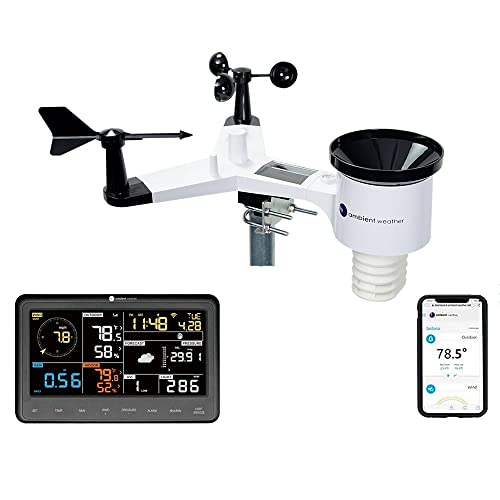
Ambient Weather WS-2902 WiFi Smart Weather Station
COMPLETE WEATHER STATION: (1) Osprey Sensor Array with Rain Cup, and (1) Brilliant, Easy-to-Read LCD Color Display
As an affiliate, we earn on qualifying purchases.
As an affiliate, we earn on qualifying purchases.
Key Questions
Can I enable critical alerts for all my smart devices?
Critical alerts are limited to specific safety devices like smoke and CO detectors. You can enable them via Settings > Notifications > Home. Other notifications can be customized through Focus modes.
How do I split sensors into multiple tiles for automation?
Long-press on the device in the Home app, select Accessory Settings, then choose Show as Separate Tiles if available. This allows more targeted control of individual sensors.
Are these tips applicable to all Apple devices?
Most tips are applicable to iOS devices running the latest software and compatible with Apple HomeKit. Some features may require specific hardware or software versions.
Will these automations work if I’m away from home?
Yes, automations configured within Apple Home can operate remotely if your setup includes an Apple TV, HomePod, or iPad acting as a home hub.
Are there security concerns with automations and device segmentation?
Proper security measures, such as strong home Wi-Fi passwords and device updates, are recommended. Automations themselves do not introduce additional security risks if configured correctly.
Source: Lifehacker
![Meta enables ADB on deprecated Portal devices [video]](https://smartthermostathub.com/wp-content/uploads/2026/06/meta-enables-adb-on-deprecated-portal-devices-video-featured-560x300.jpg)