For smart home enthusiasts, the ecobee Smart Thermostat Premium is my best overall pick for its broad voice-assistant support and included SmartSensor, while the Google Nest Learning Thermostat stands out for adaptive control and the Sensi Touch 2 for app-based scheduling and sensor support. Choosing among them comes down to more than connectivity: HVAC compatibility, the smart-home platform you already use, and how much control you want over routines all matter. Some thermostats offer richer automation, while simpler models may be easier to install and operate. A strong feature set is less useful if your wiring or heating system is incompatible. Read on for the full breakdown, buying advice, and answers to common setup questions.

Get home appliances delivered free with Prime
- Fast, free delivery on millions of items
- Prime Video, Amazon Music and more included
- Member-only deals all year
Complete the kit



Key Takeaways
- ecobee Premium leads for connected homes because its Siri and Alexa support and included SmartSensor suit buyers who want voice control and room-aware comfort in one package.
- Nest Learning Thermostat and Nest Smart Thermostat serve different needs: the Learning model emphasizes adaptive behavior and a temperature sensor, while the standard model is a simpler route into Google Home.
- Sensi models split by interface and feature depth: Sensi Lite favors a straightforward, value-focused setup; Sensi Touch 2 adds a touchscreen and sensor support for buyers who want more direct control.
- Compatibility is the biggest dividing line. The Wi-Fi thermostat specified for single-stage 1H/1C systems is a narrow fit, while buyers of any model should verify wiring and HVAC requirements before ordering.
- Touchscreens and color displays are not the same as smarter automation. Honeywell‘s color-screen options appeal to buyers who prioritize at-wall controls, while ecosystem support and sensors matter more for multi-room routines.
| Google Nest Smart Thermostat, Charcoal | 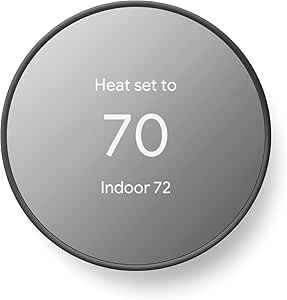 | Best for Google Home Households | Color: Charcoal | Connectivity: Wi-Fi (2.4 GHz and 5 GHz), Bluetooth Low Energy | Compatibility: Google Assistant, Matter-certified voice assistants, Google Home | VIEW ON AMAZON | See Our Full Breakdown |
| Siterwell Smart Programmable Wi-Fi Thermostat |  | Best for Touchscreen-First Control | Brand: Siterwell | Model: GS366A-MWAC | Connectivity: Wi-Fi | VIEW ON AMAZON | See Our Full Breakdown |
| Sensi Lite Smart Wi-Fi Thermostat, Alexa Compatible, Energy Star Certified (ST25W) |  | Best for DIY Installation Flexibility | Brand and model: Sensi ST25W | Connectivity: Wi-Fi (2.4 GHz) | Voice assistants: Amazon Alexa, Google Assistant | VIEW ON AMAZON | See Our Full Breakdown |
| Amazon Smart Thermostat |  | Best for Alexa and Ring Homes | Model: S6ED3R | Dimensions: 3.56 × 3.56 × 0.84 inches | Weight: 3.86 oz | VIEW ON AMAZON | See Our Full Breakdown |
| Sensi Touch 2 Wi-Fi Smart Thermostat, Model ST76 |  | Best for Room-by-Room Temperature Balancing | Brand and model: Sensi ST76 | Connectivity: Wi-Fi (2.4 GHz and 5.0 GHz) | Display: LCD touchscreen | VIEW ON AMAZON | See Our Full Breakdown |
| Google Nest Learning Thermostat (4th Gen, 2024) with Nest Temperature Sensor, Polished Gold |  | Best for Adaptive, Room-Aware Comfort | Model: 4th generation (2024) | Color: Polished Gold | Included sensor: Nest Temperature Sensor (2nd gen) | VIEW ON AMAZON | See Our Full Breakdown |
| Sensi Smart Thermostat (ST55) – Wi‑Fi, DIY, Alexa, Energy Star Certified |  | Best for Privacy-Minded DIY Setup | Model: ST55 | Connectivity: Wi-Fi | Compatible controllers: Amazon Alexa, Apple HomeKit, Google Assistant, SmartThings, Vera | VIEW ON AMAZON | See Our Full Breakdown |
| Wi-Fi Smart Thermostat for Single-Stage 1H/1C Systems |  | Best for Basic Single-Stage Scheduling | System compatibility: Conventional single-stage 1 heat/1 cool | Compatible fuel types: Gas, oil, or electric | Required wiring: 24V C wire; RH, RC, W, Y, G, and C terminals | VIEW ON AMAZON | See Our Full Breakdown |
| Honeywell Home RTH9600WF Smart Color Wi-Fi Thermostat |  | Best for a Customizable Touchscreen | Model: RTH9600WF | Connectivity: Wi-Fi | Display: Color touchscreen LCD | VIEW ON AMAZON | See Our Full Breakdown |
| ecobee Smart Thermostat Premium with Wi-Fi, Siri, Alexa, and SmartSensor |  | Best Premium Smart-Home Hub | Connectivity: Wi-Fi | Built-in voice assistants: Siri and Alexa | Included sensor: SmartSensor | VIEW ON AMAZON | See Our Full Breakdown |
| Honeywell Home Wi-Fi Smart Color Programmable Thermostat, 7-Day, Touchscreen, ENERGY STAR Certified, Gray |  | Best for Schedule Control and Customization | Model: RTH9585WF1004 | Connectivity: Wi-Fi | Display: Customizable color touchscreen | VIEW ON AMAZON | See Our Full Breakdown |
| smart thermostat for smart home enthusiast | Connectivity | Display | Model |
|---|---|---|---|
| Google Nest Smart Thermostat | Wi-Fi (2.4 GHz and 5 GHz), Bluetooth Low Energy | 2-inch LCD | — |
| Siterwell Smart Programmable W | Wi-Fi | 3.5-inch color touchscreen | GS366A-MWAC |
| Sensi Lite Smart Wi-Fi Thermos | Wi-Fi (2.4 GHz) | LCD | — |
| Amazon Smart Thermostat | — | — | S6ED3R |
| Sensi Touch 2 Wi-Fi Smart Ther | Wi-Fi (2.4 GHz and 5.0 GHz) | LCD touchscreen | — |
| Google Nest Learning Thermosta | — | Graphical LCD, IPS | 4th generation (2024) |
| Sensi Smart Thermostat | Wi-Fi | LED, 5 inches | ST55 |
| Wi-Fi Smart Thermostat for Sin | — | — | — |
| Honeywell Home RTH9600WF Smart | Wi-Fi | Color touchscreen LCD | RTH9600WF |
| ecobee Smart Thermostat Premiu | Wi-Fi | — | — |
| Honeywell Home Wi-Fi Smart Col | Wi-Fi | Customizable color touchscreen | RTH9585WF1004 |
More Details on Our Top Picks
Google Nest Smart Thermostat, Charcoal
The Google Nest Smart Thermostat is the clearest fit for a Google-centered home: it works with the Google Home app, supports compatible voice assistants, and can adjust settings when the home is empty. That makes it more hands-off than the schedule-focused Siterwell GS366A-MWAC, while its design for installation without a C-wire in most homes may suit more setups than the Amazon Smart Thermostat. The tradeoff is that this flexibility is not universal; some HVAC systems still need a C-wire or compatible power accessory. Its 2-inch LCD is also more restrained than Siterwell’s larger color touchscreen. Choose Nest for convenient app-based control and occupancy-aware adjustments, not for a display-first interface or guaranteed compatibility with every system.
Pros:- Can adjust settings when the home is empty to help reduce unnecessary heating or cooling.
- Remote control and schedules are available through the Google Home app.
- Designed to install without a C-wire in most homes.
- Works with Google Assistant and Matter-certified voice assistants.
Cons:- Some HVAC systems require a C-wire or compatible power accessory.
- Remote control and notifications depend on internet access and Wi-Fi.
- The 2-inch LCD offers less display space than the Siterwell’s 3.5-inch touchscreen.
Best for: Google Home users who want remote control, scheduled heating and cooling, and automatic adjustments when the home is empty.
Not ideal for: Households that need a large touchscreen or have an HVAC system that requires a C-wire and cannot use a compatible power accessory.
- Color:Charcoal
- Connectivity:Wi-Fi (2.4 GHz and 5 GHz), Bluetooth Low Energy
- Compatibility:Google Assistant, Matter-certified voice assistants, Google Home
- Temperature control:Heating and cooling
- Power source:Battery powered
- Display:2-inch LCD
- Mounting:Wall mount
- Certification:ENERGY STAR
Our verdict“Choose the Nest if Google Home integration and occupancy-aware control matter more to you than a large screen or guaranteed C-wire-free installation.”
Siterwell Smart Programmable Wi-Fi Thermostat
The Siterwell GS366A-MWAC puts its 3.5-inch color touchscreen at the center of the experience, giving households a more visible on-wall control point than the smaller displays on the Google Nest Smart Thermostat and Sensi Lite. App access and Alexa or Google Assistant voice control add remote options, while programmable schedules cover routine heating and cooling without requiring a more feature-heavy system. Its stated support for many standard 24VAC single- and multi-stage systems may appeal to owners who want broad residential HVAC coverage, though compatibility still depends on the specific setup. The main catch is firm: installation requires a C-wire. This is a sensible choice for a wired system and people who prefer direct touchscreen adjustments, but less suitable for homes seeking a simpler C-wire-free installation.
Pros:- Large 3.5-inch color touchscreen makes on-device adjustments easy to see.
- Supports app, touch, Alexa, and Google Assistant controls.
- Programmable schedules support regular heating and cooling routines.
- Specified compatibility includes many single- and multi-stage 24VAC systems.
Cons:- Requires a C-wire for installation.
- Compatibility depends on the home’s specific HVAC system.
- Does not list occupancy-based adjustments like the Google Nest Smart Thermostat.
Best for: Homeowners with a compatible 24VAC HVAC system and C-wire who want a large touchscreen plus app and voice control.
Not ideal for: People without a C-wire or buyers who want a thermostat that can adjust temperatures based on whether the home is empty.
- Brand:Siterwell
- Model:GS366A-MWAC
- Connectivity:Wi-Fi
- Display:3.5-inch color touchscreen
- Control methods:App, touch, voice
- HVAC compatibility:Most standard 24VAC systems; single- and multi-stage heating and cooling
- Power requirement:C-wire
- Warranty:3 years
- Certification:UL-certified
Our verdict“Pick the Siterwell if your system has a C-wire and you value an easy-to-read touchscreen over occupancy-aware automation.”
Sensi Lite Smart Wi-Fi Thermostat, Alexa Compatible, Energy Star Certified (ST25W)
The Sensi Lite ST25W is the practical pick for homeowners who want smart schedules and remote access without making a C-wire mandatory for most system types. Its included batteries and DIY installation aids—a built-in level and step-by-step instructions—make it a more approachable retrofit than the Sensi Touch 2, which requires a C-wire. Geofencing and usage reports add useful control beyond basic scheduling, though the LCD keeps the interface simpler than the Sensi Touch 2 touchscreen or Siterwell’s larger color display. Compatibility has an important exception: heat-pump and heat/cool-only systems require a C-wire. It also connects only to 2.4 GHz Wi-Fi. Choose this model for straightforward setup and flexible app control, but check your HVAC wiring before buying.
Pros:- C-wire is not required for most systems.
- Built-in level and step-by-step instructions support DIY installation.
- Offers remote control, flexible schedules, geofencing, and usage reports.
- Works with Alexa and Google Assistant.
Cons:- Requires a C-wire for heat-pump and heat/cool-only systems.
- Supports 2.4 GHz Wi-Fi only.
- LCD display is less expansive than the touchscreen on the Sensi Touch 2.
Best for: DIY-minded homeowners with a compatible system who want geofencing, usage reports, and a thermostat that avoids a C-wire on most setups.
Not ideal for: Owners of heat-pump or heat/cool-only systems without a C-wire, or households whose Wi-Fi network requires 5 GHz connectivity.
- Brand and model:Sensi ST25W
- Connectivity:Wi-Fi (2.4 GHz)
- Voice assistants:Amazon Alexa, Google Assistant
- Power source:Battery or C-wire
- Compatible systems:Air conditioner, boiler, furnace, heat pump
- Display:LCD
- Batteries:2 AAA batteries included
- Certification:ENERGY STAR
- Warranty:3 years
Our verdict“Choose the Sensi Lite for a DIY-friendly, feature-rich retrofit if your HVAC system and 2.4 GHz Wi-Fi meet its requirements.”
Amazon Smart Thermostat
The Amazon Smart Thermostat makes the most sense in a home already organized around Alexa or Ring: it works through those apps, can be controlled by compatible Echo devices, and supports scheduled and automatic temperature adjustments. That ecosystem focus sets it apart from the Google Nest Smart Thermostat, which is the more natural match for Google Home users. The Alexa model also includes features such as humidity sensing, vacation mode, emergency heat mode, and an energy dashboard, giving connected households several controls in one compact unit. The tradeoff is a strict C-wire or separately sold power adapter requirement, plus 2.4 GHz-only Wi-Fi. Voice control needs a separate Alexa-enabled device, so this is less self-contained than an app-and-touch option like the Siterwell.
Pros:- Integrates with Alexa and Ring apps and compatible Echo devices.
- Supports schedules and automatic temperature adjustments.
- Includes humidity sensing, vacation mode, emergency heat mode, and an energy dashboard.
- Guided installation is available through the Alexa app.
Cons:- Requires a C-wire or separately sold power adapter kit.
- Supports 2.4 GHz Wi-Fi only, not 5 GHz.
- Voice control requires a separate Alexa-enabled device.
Best for: Alexa or Ring households with a compatible 24V HVAC system and an Echo device for voice control.
Not ideal for: Homes without a C-wire or power adapter, households using 5 GHz-only Wi-Fi, or buyers who want voice control without a separate device.
- Model:S6ED3R
- Dimensions:3.56 × 3.56 × 0.84 inches
- Weight:3.86 oz
- HVAC compatibility:Most 24V systems; not compatible with 110–240V systems
- Power requirement:C-wire or separately sold power adapter kit
- Wi-Fi:2.4 GHz, 802.11 b/g/n; does not support 5 GHz
- Controls:Alexa app, Ring app, compatible Echo devices, three on-device touch buttons
- Features:Schedules, indoor humidity sensing, emergency heat mode, vacation mode, energy dashboard, automatic air filter ordering
- Certifications:ENERGY STAR, ECOLOGO Gold
Our verdict“Choose the Amazon Smart Thermostat if Alexa or Ring is your preferred smart-home hub and your wiring and Wi-Fi meet its requirements.”
Sensi Touch 2 Wi-Fi Smart Thermostat, Model ST76
The Sensi Touch 2 ST76 is the strongest fit here for households trying to address uneven temperatures, because it supports up to 15 optional Sensi Room Sensors. Those sensors are sold separately, but the capability gives it a room-balancing path that the Sensi Lite and Amazon Smart Thermostat do not list. It also combines touchscreen, app, and voice control with scheduling and energy reports, making it a more feature-rich Sensi option than the Lite. That added flexibility comes with a firm installation condition: the ST76 requires a C-wire. Its support for both 2.4 and 5 GHz Wi-Fi also distinguishes it from several alternatives in this group. Pick it if room-level comfort is a priority and you are comfortable adding sensors; skip it if you need a C-wire-free setup.
Pros:- Supports up to 15 optional Sensi Room Sensors for room-level temperature input.
- Offers app, touchscreen, and voice controls.
- Includes flexible scheduling, remote access, and energy usage reports.
- Supports both 2.4 GHz and 5 GHz Wi-Fi.
Cons:- Requires a C-wire for installation.
- Room sensors are sold separately.
- Less suitable than the Sensi Lite for systems where avoiding a C-wire is a priority.
Best for: Households with hot or cold rooms that have a C-wire and want the option to add room sensors for better temperature balance.
Not ideal for: Renters or homeowners without a C-wire, and buyers who do not want to purchase optional room sensors separately.
- Brand and model:Sensi ST76
- Connectivity:Wi-Fi (2.4 GHz and 5.0 GHz)
- Display:LCD touchscreen
- Voice assistants:Amazon Alexa, Google Assistant
- Compatible systems:Air conditioner, boiler, furnace, heat pump
- Power source:C-wire
- Dimensions:5.6 × 3.25 × 0.77 inches
- Room sensor support:Up to 15 Sensi Room Sensors, sold separately
- Voltage:24 V
Our verdict“Choose the Sensi Touch 2 if you have a C-wire and want the option to expand thermostat control with room sensors.”
Google Nest Learning Thermostat (4th Gen, 2024) with Nest Temperature Sensor, Polished Gold
The Nest Learning Thermostat is the strongest fit here for smart-home owners who want routines to shape temperature control, rather than building every schedule themselves. It learns preferences and includes a second-generation Nest Temperature Sensor to help address rooms that run warmer or cooler than the thermostat location. Compared with the ecobee Smart Thermostat Premium, it offers a more learning-led approach, while ecobee adds built-in air-quality monitoring and a speaker. Matter support, app control, and voice control also give this Nest a useful place in a mixed-platform home. Its main compromise is system fit: it supports most 24V setups, not every HVAC configuration, and some homes may still need a C wire. Choose it for adaptive comfort, not for the broadest possible feature set.
Pros:- Learns temperature preferences and adapts to changing routines.
- Includes a sensor to help manage hot and cold spots.
- Supports Matter, Alexa, Apple HomeKit, and Google Assistant.
- Offers app and voice control with energy-saving features for home and away.
Cons:- Compatibility is limited to most 24V heating and cooling systems.
- A C wire may be needed in some homes.
- Buyers seeking built-in air-quality monitoring or a speaker should compare it with the ecobee Smart Thermostat Premium.
Best for: Smart-home owners with compatible 24V HVAC who want automatic schedule learning and a sensor for a room with uneven temperatures.
Not ideal for: Homes with electric baseboard or other non-24V systems, or buyers who prioritize built-in air-quality monitoring and a speaker over schedule learning.
- Model:4th generation (2024)
- Color:Polished Gold
- Included sensor:Nest Temperature Sensor (2nd gen)
- Compatible systems:Most 24V gas, electric, oil, forced-air, heat pump, and radiant systems
- C wire:Not required for installation in most homes; may be needed in some
- Smart home compatibility:Amazon Alexa, Apple HomeKit, Google Assistant, Matter
- Display:Graphical LCD, IPS
- Power and voltage:Battery powered; 24 volts
Our verdict“Choose the Nest Learning Thermostat if you want a sensor-equipped, learning-focused thermostat for a compatible smart home.”
Sensi Smart Thermostat (ST55) – Wi‑Fi, DIY, Alexa, Energy Star Certified
The Sensi ST55 favors practical control over the adaptive features of the Google Nest Learning Thermostat. Its built-in level and guided app setup are aimed at homeowners who want to install a Wi-Fi thermostat themselves, while flexible schedules and usage reports help them manage heating and cooling without relying on automatic learning. Support for Alexa, Google Assistant, Apple HomeKit, SmartThings, and Vera makes it a flexible pick for homes that already use different platforms. Sensi also highlights data privacy, a meaningful distinction for buyers who prefer to keep household information out of sales profiles. The tradeoff is a more utilitarian feature set: it does not include a room sensor like Nest or ecobee, and some HVAC setups may need a C wire. It is a sensible control hub, not a room-by-room comfort system.
Pros:- Built-in level and guided app steps support DIY installation.
- Works with Alexa, Google Assistant, Apple HomeKit, SmartThings, and Vera.
- Provides flexible scheduling, usage reports, and remote monitoring.
- Emphasizes data privacy and includes a filter-change indicator.
Cons:- A C wire may be required for some HVAC systems.
- Wall-mount installation limits placement options.
- Lacks the included room sensor and adaptive learning found in the Google Nest Learning Thermostat.
Best for: DIY homeowners who want app-guided installation, scheduling, usage reports, and broad assistant compatibility without prioritizing learning features.
Not ideal for: Buyers who need room sensors, automatic routine learning, or a thermostat that can be placed somewhere other than a wall.
- Model:ST55
- Connectivity:Wi-Fi
- Compatible controllers:Amazon Alexa, Apple HomeKit, Google Assistant, SmartThings, Vera
- Voltage:24 V AC
- Display:LED, 5 inches
- Power:Corded electric; 2 AA batteries included
- Mounting:Wall mount
- Additional features:Data privacy, DIY installation guidance, filter indicator, programmable schedules
Our verdict“Pick the Sensi ST55 if easy DIY setup, privacy, and multi-platform control matter more than automatic learning or room sensors.”
Wi-Fi Smart Thermostat for Single-Stage 1H/1C Systems
This thermostat is the lineup’s straightforward choice for a home with a compatible single-stage 1H/1C system and a clear need: app control plus a seven-day schedule. That focused scope makes it less flexible than the Sensi ST55, which lists compatibility with several voice-assistant platforms, but the supplied details for this model do not name any assistant integration. Its backlit LCD can be read in a dark room, and remote control lets owners adjust temperature away from home. The limits are substantial for smart-home enthusiasts: it requires a 24V C wire and 2.4 GHz Wi-Fi, cannot run on batteries, and does not support heat pumps or multistage systems. I would choose it only after confirming the HVAC wiring and system type; it is a basic scheduler, not a broad smart-home controller.
Pros:- Offers remote temperature control through an app.
- Seven-day scheduling can reduce unnecessary HVAC operation.
- Backlit LCD is readable in dark rooms.
- Supports gas, oil, and electric single-stage systems.
Cons:- Requires a 24V C wire and does not run on batteries.
- Limited to 2.4 GHz Wi-Fi.
- Incompatible with heat pumps, multistage systems, and several other HVAC setups.
Best for: Owners of gas, oil, or electric single-stage 1H/1C systems who want remote app control and a weekly schedule.
Not ideal for: Households with heat pumps, multistage HVAC, no C wire, or a smart home that depends on voice-assistant integration.
- System compatibility:Conventional single-stage 1 heat/1 cool
- Compatible fuel types:Gas, oil, or electric
- Required wiring:24V C wire; RH, RC, W, Y, G, and C terminals
- Wi-Fi:2.4 GHz only
- Scheduling:7-day programmable
- Temperature control accuracy:Within 2°F
- Power source:24V AC; does not run on batteries
- Dimensions:0.98 × 4.72 × 3.86 inches
Our verdict“Choose this model only if your HVAC is single-stage and you need basic app control and scheduled temperature changes.”
Honeywell Home RTH9600WF Smart Color Wi-Fi Thermostat
The Honeywell Home RTH9600WF puts its customizable color touchscreen at the center of the experience, making schedules and comfort information easy to view directly on the wall. It suits buyers who prefer a visible local interface to the more automation-led Google Nest Learning Thermostat. App control, flexible scheduling, and compatibility with Alexa, Google Assistant, Cortana, and IFTTT also connect it to common smart-home routines. Its listed system support covers forced-air gas, oil, or electric, hot water and steam, and heat pumps with electric backup, giving it a different compatibility profile from the single-stage-only Wi-Fi thermostat in this group. The main installation hurdle is power: it requires a C wire or compatible adapter. It also does not support 120–240V electric baseboard heat, so the touchscreen appeal is only relevant after checking the home’s wiring and heating type.
Pros:- Customizable color touchscreen makes local controls and information easy to see.
- Supports remote app control and flexible scheduling.
- Works with Alexa, Google Assistant, Cortana, and IFTTT.
- Lists compatibility with several forced-air, hot-water, steam, and heat-pump systems.
Cons:- Requires a C wire or compatible power adapter.
- Not compatible with 120–240V electric baseboard heat.
- Unlike the Google Nest Learning Thermostat, it does not list an included room sensor or routine-learning feature.
Best for: Homeowners who want a prominent color touchscreen, flexible schedules, and app or assistant control on a compatible low-voltage HVAC system.
Not ideal for: Homes with 120–240V electric baseboard heat or no practical way to provide the required C-wire power.
- Model:RTH9600WF
- Connectivity:Wi-Fi
- Display:Color touchscreen LCD
- Compatibility:Forced-air gas, oil, or electric; hot water and steam; heat pumps with electric backup
- Smart home compatibility:Amazon Alexa, Google Assistant, Microsoft Cortana, IFTTT
- Wire requirement:C wire required; power adapter may be needed
- Power and battery:24 volts; 1 AAA battery
- Dimensions:1 × 4.75 × 3.5 inches
Our verdict“Choose the RTH9600WF if you want a configurable touchscreen and your HVAC system can meet its C-wire requirement.”
ecobee Smart Thermostat Premium with Wi-Fi, Siri, Alexa, and SmartSensor
The ecobee Smart Thermostat Premium is the broadest smart-home package in this group: it combines an included SmartSensor, radar occupancy detection, air-quality monitoring, and a built-in Siri or Alexa speaker. Those features can make it a better match than the Nest Learning Thermostat for buyers who want comfort sensing and voice interaction gathered into one device, rather than centering the experience on learned temperature preferences. Its stated compatibility with 95% of HVAC systems and included Power Extender Kit and trim kit also make it a strong option for homes where installation accessories matter. The premium feature set brings dependencies: Siri requires an Apple home hub, and some security features need an ecobee Smart Security subscription. Choose it for an integrated control point, but skip it if you want a simpler thermostat without extra monitoring or subscription-linked features.
Pros:- Included SmartSensor and radar occupancy detection support room-aware comfort adjustments.
- Built-in air-quality monitoring and filter-change reminders add household insight.
- Built-in Siri or Alexa speaker adds voice control at the thermostat.
- Includes a Power Extender Kit and trim kit, plus a three-year warranty.
Cons:- Siri requires an Apple home hub.
- Some security features require an ecobee Smart Security subscription.
- Its added monitoring and speaker features may be unnecessary for buyers who only want scheduling and remote control.
Best for: Smart-home enthusiasts who want room-aware comfort, air-quality information, and an integrated Siri or Alexa speaker in one thermostat.
Not ideal for: Buyers seeking a basic temperature controller, those without an Apple home hub who want Siri, or anyone unwilling to consider a subscription for some security features.
- Connectivity:Wi-Fi
- Built-in voice assistants:Siri and Alexa
- Included sensor:SmartSensor
- HVAC compatibility:Compatible with 95% of HVAC systems
- Energy certification:ENERGY STAR certified
- Air-quality monitoring:Built in
- Installation accessories:Power Extender Kit and trim kit included
- Warranty:3 years
Our verdict“Choose ecobee Premium if you want a sensor-rich thermostat that also serves as a voice and air-quality hub.”
Honeywell Home Wi-Fi Smart Color Programmable Thermostat, 7-Day, Touchscreen, ENERGY STAR Certified, Gray
I’d pick the Honeywell Home RTH9585WF1004 for a smart home where household routines change across the week and the thermostat should be easy to read at a glance. Its customizable color touchscreen and seven-day schedule provide more direct on-device control than the simpler presentation of the Amazon Smart Thermostat, while app access and Alexa and Google Home support connect it to a broader smart-home setup. Energy reports and equipment reminders add useful management tools beyond basic remote temperature changes.
The tradeoff is installation flexibility: this model requires a C-wire and does not work with 120–240V electric baseboard heat. Buyers seeking a thermostat that adapts its schedule automatically may prefer the Google Nest Learning Thermostat; this Honeywell is better for people who want to define their own weekly plan. Its plastic construction and more traditional interface may also feel less polished than premium alternatives.
Pros:- Customizable color touchscreen makes settings and current conditions easy to see.
- Seven-day scheduling and temperature holds suit households with changing routines.
- App, Alexa, and Google Home controls allow remote and voice adjustments.
- Energy reports and equipment reminders offer useful system-management information.
Cons:- Requires a C-wire, which can complicate installation in some homes.
- Does not support 120–240V electric baseboard heat.
- Uses a plastic body and relies on user-set schedules rather than automatic learning.
Best for: Smart-home owners with compatible central heating and cooling who want detailed weekly scheduling, a readable touchscreen, and Alexa or Google Home control.
Not ideal for: Homes with electric baseboard heating, installations without a C-wire, or buyers who want the thermostat to learn their routine automatically.
- Model:RTH9585WF1004
- Connectivity:Wi-Fi
- Display:Customizable color touchscreen
- Scheduling:7-day programmable
- Compatibility:Forced-air gas, oil, or electric; hot water and steam; compatible heat pumps with electric backup
- Power:AC power; C-wire required
- Voice assistants:Amazon Alexa and Google Home
- Mounting and color:Wall mount; gray
- Certification:ENERGY STAR
Our verdict“Choose this Honeywell if you want hands-on weekly scheduling and a customizable display, but skip it if your system lacks a C-wire or uses electric baseboard heat.”

How We Picked
I ranked these thermostats by how useful they are to someone building a connected home, not by the length of a feature list. My main criteria were smart-platform and voice-assistant fit, the practical value of sensors and automation, everyday control through the thermostat and app, and the likelihood that a buyer can match the unit to their HVAC system. I also weighed setup complexity and whether features serve a clear purpose beyond remote temperature changes.
The order reflects distinct buyer priorities. The ecobee Premium ranks first for combining multi-assistant support with an included SmartSensor; Nest Learning follows for buyers who prefer adaptive control within Google’s ecosystem. Models with simpler controls or narrower compatibility rank lower, though they may be the better choice for a focused setup. Product names alone do not confirm wiring compatibility, so I treat system fit as a requirement to verify rather than a presumed strength.
| smart thermostat for smart home enthusiast | Connectivity |
|---|---|
| Google Nest Smart Thermostat | Wi-Fi (2.4 GHz and 5 GHz), Bluetooth Low Energy |
| Siterwell Smart Programmable W | Wi-Fi |
| Sensi Lite Smart Wi-Fi Thermos | Wi-Fi (2.4 GHz) |
| Amazon Smart Thermostat | — |
| Sensi Touch 2 Wi-Fi Smart Ther | Wi-Fi (2.4 GHz and 5.0 GHz) |
| Google Nest Learning Thermosta | — |
| Sensi Smart Thermostat | Wi-Fi |
| Wi-Fi Smart Thermostat for Sin | — |
| Honeywell Home RTH9600WF Smart | Wi-Fi |
| ecobee Smart Thermostat Premiu | Wi-Fi |
| Honeywell Home Wi-Fi Smart Col | Wi-Fi |
Factors to Consider When Choosing Smart Thermostat For Smart Home Enthusiasts
Before choosing a thermostat, I would work through the decisions that shape whether it will fit your home and work well with the rest of your devices. These checks can prevent a connected thermostat from becoming an isolated gadget or an expensive mismatch.
Match the thermostat to your HVAC system
Start with the heating and cooling equipment, not the app features. Check the thermostat’s supported system types and terminals against your existing wiring, including whether you have a common wire and whether your setup is single-stage, multi-stage, or heat pump. A product described for single-stage 1H/1C systems is not a safe assumption for a more complex system. Take a photo of the current wiring and compare each terminal with the manufacturer’s compatibility guidance before purchase. If the labels are unclear, ask an HVAC professional rather than guessing based on wire color. Compatibility checks narrow the field early and can matter more than choosing between two otherwise similar smart-home features.
Choose the ecosystem you want to control
List the platforms you actively use—such as Google Home, Alexa, or Siri—and check what each thermostat supports in your region and current software version. Support for a voice assistant does not always mean every thermostat setting or automation is available through that assistant. A home built around one platform may benefit from a thermostat that fits it cleanly, while a mixed-device household may prefer broader assistant coverage. Also check whether the thermostat can take part in the routines you care about, rather than only appearing in an app. Avoid buying on a logo or compatibility badge alone; confirm the specific actions you can trigger. This makes ecosystem fit a practical test, not a vague promise of connectivity.
Decide whether room sensors solve a real problem
Room sensors can help when the thermostat’s location does not reflect comfort in bedrooms or frequently used spaces. They are less useful if one central reading already keeps the whole home comfortable or if you do not plan to manage room priorities. Check whether sensors are included, sold separately, or limited to certain thermostat models. Ask how the system uses sensor readings: some setups let you favor a room at particular times, while others may use readings as part of broader routines. A sensor cannot fix poor airflow, closed vents, or an undersized system. Pay for sensor support when uneven room temperatures are a recurring issue, not simply because extra sensors sound advanced.
Separate adaptive scheduling from schedules you control
Some buyers want a thermostat to learn patterns or adjust automatically; others prefer explicit schedules they can inspect and edit. Adaptive features may reduce routine adjustments, but they can feel unpredictable if you work changing hours or want precise control. A conventional schedule offers clarity, though it may need updates when household routines change. Before choosing, consider how often your occupancy varies and whether you are comfortable reviewing automated changes in an app. Check whether geofencing or occupancy features depend on phone permissions, location settings, or additional devices. The right automation level is the one you can understand and maintain.
Plan for installation and ongoing control
Installation effort depends on wiring, the thermostat’s mounting and setup process, and your comfort working around low-voltage equipment. Confirm whether the maker provides a wiring guide and whether your home needs an adapter or professional help. Think about who will adjust the temperature day to day: a large touchscreen may suit people who prefer wall controls, while app-first households may value remote access more. Check that other household members can use the controls without relying on your phone or account. Also review connectivity needs, including whether the thermostat requires a steady Wi-Fi connection for remote features. A manageable setup and accessible controls often matter longer than a feature you use only during installation.
Pay for the features your home can use
A premium thermostat makes sense when its added sensors, assistant support, or automation will solve a specific household problem. If you mainly need remote temperature changes and basic scheduling, a simpler model may cover the job without adding controls you will rarely touch. Compare ongoing needs as well as the device itself: sensor expansion, account requirements, and platform dependencies can shape the experience after setup. Do not treat a color display as evidence of better energy management, or assume that more integrations automatically mean easier routines. Write down the two or three functions you expect to use weekly, then judge each option against them. That keeps the choice focused on useful capability rather than feature count.
Frequently Asked Questions
How can I tell whether one of these thermostats will work with my wiring?
Compare the wiring at your current thermostat with the terminals and system types listed in the exact model’s installation documentation. Check for a common wire, heat-pump wiring, and any additional heating or cooling stages; these details can change compatibility. Do not infer a wire’s purpose from its color, since installers may use colors differently. Photograph the existing connections before removing anything, and use the manufacturer’s compatibility checker if available. If the wiring or HVAC configuration remains unclear, ask a qualified installer to identify it before you buy.
Should I choose ecobee or Nest if my home uses more than one smart-home platform?
Start by checking which assistants and routines you actually use, then confirm support for those specific functions on each thermostat. The ecobee Premium lists Siri and Alexa alongside Wi-Fi and a SmartSensor, while the Nest Learning model is a natural fit for buyers centered on Google’s ecosystem. A compatibility label may not cover every command, automation, or setting, and software support can change over time. If your household uses several platforms, prioritize the one that controls the routines you rely on most. Check current manufacturer documentation before choosing based on cross-platform support.
Is a thermostat with room sensors worth choosing if one room is always too hot or cold?
It can be a helpful fit when the thermostat’s placement gives an inaccurate picture of the room where you spend time, especially if the system can prioritize a sensor at relevant hours. First check that the model supports the sensor you need and whether it is included or an additional purchase. Sensors report conditions; they do not correct duct, insulation, or equipment problems that cause uneven temperatures. If the imbalance is severe, an HVAC assessment may offer more benefit than a thermostat change alone. Choose sensor support when room-based scheduling is part of your plan.
Can I install a smart thermostat myself, or should I hire an HVAC professional?
A straightforward, compatible low-voltage setup may suit a careful DIY installer who follows the manufacturer’s instructions and can identify the wires correctly. Complex systems, uncertain wiring, or equipment with multiple stages are reasons to seek professional help. Turn off power to the HVAC system before handling thermostat wiring, and do not proceed if the existing connections do not match the installation guide. Some homes may need a common-wire solution or other equipment-specific steps. Confirm compatibility first, then decide whether the installation task matches your skill and comfort level.
Do I need a learning thermostat, or is a programmable Wi-Fi model enough?
A learning thermostat may suit a household with fairly consistent routines that wants the device to adapt with less manual scheduling. A programmable Wi-Fi thermostat can be a better match if you prefer to set clear time blocks, make occasional app changes, and keep behavior predictable. Neither approach guarantees lower energy use on its own; results depend on schedules, comfort preferences, and the HVAC system. Consider how often your routine changes and whether automated adjustments would be welcome or frustrating. Choose learning features for reduced schedule management, not simply because they sound more advanced.
Conclusion
For most connected homes, I recommend the ecobee Smart Thermostat Premium as the best overall choice because its included SmartSensor and Siri and Alexa support address both room comfort and smart-home control. The Sensi Lite is my best value-style pick for buyers who want straightforward Wi-Fi control without prioritizing a richer interface, while the Google Nest Learning Thermostat is the best premium fit for households that want adaptive operation and use Google Home. Beginners who want a simpler entry point should compare the Google Nest Smart Thermostat and Amazon Smart Thermostat against their chosen platform and wiring. For specific needs, choose the Sensi Touch 2 if a touchscreen and sensor support matter, or a Honeywell color-screen model if at-wall visibility is your priority. Before ordering any of them, verify HVAC compatibility; the best connected thermostat is the one your system supports and your household will actually use.