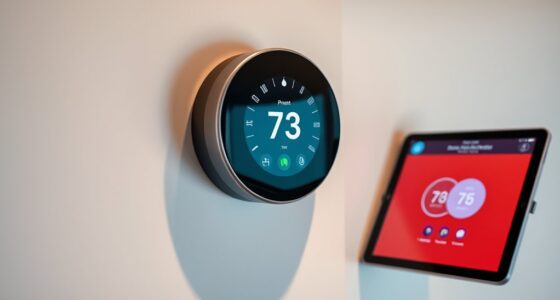

When comparing smart thermostats with voice control, the real choice is whether you want the thermostat to adapt to your routine or serve as a more capable in-room assistant. The Google Nest Learning Thermostat (4th gen) emphasizes automatic scheduling and Google Home integration. The ecobee Smart Thermostat Premium adds a built-in speaker with Alexa, supports Siri through Apple Home, and includes a room sensor to help account for temperatures beyond the hallway.

Get home appliances delivered free with Prime
- Fast, free delivery on millions of items
- Prime Video, Amazon Music and more included
- Member-only deals all year
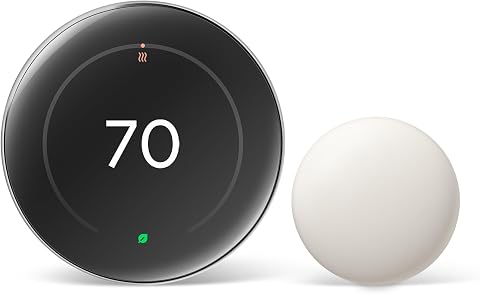
Google Nest Learning Thermostat (4th Gen) with Nest Temperature Sensor (2nd Gen), Silver
- ✔ Generation: 4th gen
- ✔ Included sensor: Nest Temperature Sensor (2nd gen)
- ✔ System compatibility: Most 24V heating and cooling systems

Google Nest Smart Thermostat, Charcoal
- ✔ Color: Charcoal
- ✔ Wi-Fi: 802.11b/g/n at 2.4 GHz and 802.11a/n at 5 GHz
- ✔ Wireless interconnect: Bluetooth Low Energy

Siterwell Smart Wi-Fi Programmable Thermostat
- ✔ System compatibility: Most standard 24VAC residential HVAC systems
- ✔ Heating and cooling: Single-stage and multi-stage
- ✔ Compatible heat sources: Gas, oil, electric, auxiliary heat, and emergency heat
Both can adjust heating and cooling by voice, but they suit different homes. Nest makes more sense for people already using Google services who want less schedule management. Ecobee is the better match if voice commands from the thermostat itself, multi-room comfort, or its additional home-monitoring features matter. Compatibility with your HVAC system and preferred smart-home platform should decide the shortlist before design or learning features do.
At a Glance
| Criteria | Google Nest Learning Thermostat (4th gen) | ecobee Smart Thermostat Premium | Winner |
|---|---|---|---|
| Voice control | Google Assistant and Google Home voice control; no built-in speaker or microphone | Built-in Alexa voice control and speaker; Siri support through Apple Home | B |
| Learning and scheduling | Learns patterns and can create an automatic schedule | Programmable schedules and smart adjustments, with less emphasis on learning your routine | A |
| Room-by-room comfort | Remote sensors are optional accessories | Includes one SmartSensor to account for another room | B |
| Smart-home compatibility | Strong fit with Google Home; supports Matter and other integrations | Broad smart-home support, including Alexa and Apple Home | B |
| HVAC compatibility | Works with many common systems; check wiring and system compatibility | Works with many common systems; check wiring and system compatibility | Tie |
| Additional features | Temperature display, app control, and energy-saving features | Air-quality monitoring, occupancy sensing, and security-related features | B |
| Value | Often the better choice when learning and Google integration are the priorities | Higher price can pay off if the included sensor and extra functions will be used | Depends |
Google Nest Learning Thermostat (4th Gen) with Nest Temperature Sensor (2nd Gen), Silver
For households choosing a thermostat specifically to combine voice control with more even comfort across rooms, the Nest Learning Thermostat (4th Gen) is the most complete option here. Its included second-generation temperature sensor gives the system information about a room that may be warmer or cooler than the thermostat’s location. That distinction matters when voice control can set a target temperature, but cannot by itself solve the problem of a bedroom that never feels like the hallway.It also has the broadest stated assistant lineup in this group: Google Assistant, Alexa, and Siri, with Matter support. That makes it a better match than the standard Nest for a mixed-assistant home. The model learns preferred temperatures and routines, which may reduce how often we need to make manual adjustments; by comparison, the standard Nest relies on custom schedules and automatic adjustments when people leave.The added capability comes with a more involved decision: confirm that the home’s heating and cooling system is compatible, and remember that some installations still need a C-wire. Buyers who want a simpler Google Home thermostat may find the standard Nest easier to justify, while those with compatible 24V equipment who value room sensing and assistant choice get the strongest all-around fit here.
Pros:
- Includes a second-generation temperature sensor to address room-to-room hot or cold spots.
- Supports Google Assistant, Alexa, and Siri, with Matter compatibility.
- Learns temperature preferences and routines.
- Remote control is available through the Google Home app.
Cons:
- Some homes may still require a C-wire.
- The specific HVAC system should be checked for compatibility before installation.
Best for: Households with compatible 24V HVAC that want an included room sensor, adaptive temperature routines, and flexibility across Google Assistant, Alexa, and Siri.
Not ideal for: Buyers who only need basic scheduling and Google Home control, or whose system compatibility and wiring have not been confirmed.
Bottom line: Choose the Learning Thermostat when room sensing and broad voice-assistant support matter more than keeping the setup simple.
“Choose the Learning Thermostat when room sensing and broad voice-assistant support matter more than keeping the setup simple.”
Google Nest Smart Thermostat, Charcoal
The standard Google Nest Thermostat is a sensible pick when voice control is part of a Google-centered home and the priority is accessible scheduling, remote adjustments, and automatic temperature changes when the household leaves. Its setup centers on the Google Home app, so it fits buyers who want one familiar place to manage routines and check HVAC monitoring alerts or maintenance reminders.Compared with the Learning model, this Nest does not include a room sensor or learn preferences and routines in the same way. That makes it a less targeted answer to uneven temperatures, but a clearer choice for someone who does not need those extras. It supports Google Assistant and Matter-certified voice assistants; voice commands still depend on having a compatible smart device in the home.Installation is designed to avoid a C-wire in most homes, which can make this model easier to consider than Siterwell, where a C-wire is required. However, some heating, cooling, zone-controlled, and heat pump systems may still call for a C-wire or compatible power accessory. We’d choose it for straightforward Google Home management, while buyers seeking a supplied room sensor or the broadest explicitly listed assistant selection should step up to the Learning model.
Pros:
- Supports custom schedules and remote control through the Google Home app.
- Automatically adjusts temperature when household members leave.
- Provides HVAC monitoring alerts and maintenance reminders.
- Designed to work without a C-wire in most homes.
Cons:
- Some HVAC configurations may require a C-wire or compatible power accessory.
- Voice control requires a compatible smart device.
Best for: Google Home users who want remote control, custom schedules, departure-based adjustments, and HVAC alerts in a simpler thermostat.
Not ideal for: Households that need room sensing, want the Learning model’s adaptive routines, or rely on voice control without a compatible smart device.
Bottom line: Pick this Nest for practical Google Home scheduling and alerts when an included room sensor is not a priority.
“Pick this Nest for practical Google Home scheduling and alerts when an included room sensor is not a priority.”
Siterwell Smart Wi-Fi Programmable Thermostat
The Siterwell Smart Wi-Fi Programmable Thermostat stands apart by putting more information and control directly on its 3.5-inch color touchscreen. We can see temperature, humidity, and operating mode at the wall, while voice commands through Alexa or Google Assistant and smartphone scheduling add remote options. That makes it a distinct choice for homes where people want visible controls as well as hands-free adjustments.Compared with the two Nest options, Siterwell states support for a wider range of standard 24VAC configurations, including single-stage and multi-stage heating and cooling and several heat sources. That list can make it appealing for buyers who need to match a specific conventional HVAC setup, but it is not a substitute for checking the system details. Its C-wire requirement is the most decisive drawback: unlike both Nest models, it is not presented as a thermostat that works without one in most homes.The PIN-code lock is another practical differentiator for households that want to restrict changes at the thermostat. But its stated voice compatibility is narrower than the Learning model’s lineup, and the product description does not list Siri or Matter. Choose Siterwell when the touchscreen, lock, and Alexa or Google Assistant support suit the household and the wiring is already compatible; consider Nest if avoiding a required C-wire is more important.
Pros:
- 3.5-inch color touchscreen shows temperature, humidity, and operating mode.
- Supports Alexa and Google Assistant voice control.
- Lists single-stage and multi-stage heating and cooling compatibility.
- Includes a PIN-code lock and a three-year warranty.
Cons:
- Requires a C-wire for power.
- HVAC compatibility should be confirmed for the specific system.
Best for: Households with compatible 24VAC HVAC and an available C-wire that want a wall touchscreen, PIN lock, and Alexa or Google Assistant control.
Not ideal for: Homes without a C-wire, systems outside the stated 24VAC compatibility, or buyers who need Siri or Matter support.
Bottom line: Choose Siterwell for its touchscreen and on-device lock if your compatible HVAC system already has the required C-wire.
“Choose Siterwell for its touchscreen and on-device lock if your compatible HVAC system already has the required C-wire.”
As an Amazon Associate we earn from qualifying purchases.
Key Differences
The clearest distinction is how voice control works. Nest responds through Google Assistant devices and the Google Home setup; the thermostat itself is not a smart speaker. Ecobee has Alexa built in, so a person in the room can issue a command directly to the thermostat. It also supports Siri through Apple Home, subject to Apple’s home hub and setup requirements. That makes ecobee more self-contained for voice use, while Nest is a natural choice when a Google speaker is already nearby.
Comfort is the next major difference. Nest learns a schedule from household behavior, which can reduce manual programming for people whose routines are fairly consistent. Ecobee instead includes a room sensor and gives households a straightforward way to account for a bedroom or other room that runs warmer or cooler than the thermostat’s location. The sensor does not independently control a separate zone; it helps inform the thermostat’s readings and comfort settings.
Ecobee’s higher purchase price is easier to justify when its included sensor, built-in Alexa, air-quality monitoring, and other home features replace equipment or solve problems the buyer already has. Nest offers stronger value for Google-oriented households that primarily want convenient temperature control and automatic scheduling. Neither product can compensate for incompatible HVAC wiring, so check the system requirements before comparing convenience features.
Detailed Comparison
Ecobee wins; the gap is moderate. Its built-in Alexa speaker and microphone let people speak to the thermostat directly, and Siri support adds an Apple Home option. Nest relies on Google Assistant through compatible devices and the Google Home experience. Choose ecobee if you want voice control in a room without adding a separate speaker; choose Nest if a Google speaker is already within reach.
Learning and scheduling (Google Nest Learning Thermostat (4th gen) wins — moderate)
Nest wins; the gap is moderate. Its learning approach can build a schedule from repeated adjustments, which suits households with patterns that repeat from week to week. Ecobee offers schedules and smart adjustments, but buyers should expect to do more deliberate setup. Nest saves effort when routines are predictable; people with changing schedules may prefer direct control over what the thermostat learns.
Ecobee wins; the gap is moderate. One room sensor is included, which gives it an immediate advantage when a bedroom or office differs from the thermostat’s location. Nest can also use remote sensors, but they are an additional purchase. A sensor helps the system account for another room; it does not create separate heating zones, so buyers with true zone-control needs should look at their HVAC setup.
Ecobee has a modest edge; the gap is minor. It accommodates Alexa and Apple Home users particularly well, while Nest is most at home in Google Home. Both support broader integrations, though the available controls can differ by platform and device. The practical winner is the thermostat that works naturally with the speakers, routines, and services already in the household.
HVAC compatibility (major difference)
Tie, pending a system check. Both are designed for a broad range of common heating and cooling systems, but compatibility depends on the specific equipment, wiring, and power requirements. Neither is a safe default based only on brand or home age. Check each manufacturer’s compatibility guidance and your wiring before purchase, especially for specialized systems or homes without a C wire.
Ecobee wins; the gap is moderate. Its Premium model combines thermostat duties with air-quality monitoring, occupancy sensing, and speaker functions. Those features can be useful if they replace a separate device or provide information the household will act on. Nest is more focused on temperature management and its Google-connected experience, which may be preferable for buyers who do not want to pay for features they will ignore.
Value for money (moderate difference)
Depends on the household; the difference is moderate. Nest usually makes better value sense when the main goals are Google voice control and a thermostat that learns routines. Ecobee costs more, but its included sensor and built-in voice functions can reduce the need for add-ons. Pay the premium only if those features solve a real comfort or convenience need; otherwise Nest is the more focused buy.
Google Nest Learning Thermostat (4th gen): Pros and Cons
Pros:
- Learns recurring routines and can automate a schedule
- Fits naturally into Google Home households
- Good value when remote room sensing and a built-in speaker are not priorities
Cons:
- Voice commands depend on a separate Google Assistant device
- Remote sensors cost extra
- Less suited to buyers who want Alexa or Apple Home as the center of their setup
Pros:
- Built-in Alexa voice control and speaker
- Includes a room sensor
- Supports Apple Home through Siri and adds air-quality and occupancy features
Cons:
- Costs more than a thermostat focused on core temperature control
- Some smart-home features require compatible hubs, services, or setup
- A room sensor cannot provide independent zone control
Who Should Choose What
Choose Google Nest Learning Thermostat (4th gen) if:
- You already use Google Home or Google Assistant and want thermostat control to fit that setup.
- Your household follows recurring routines and you prefer a thermostat that can learn a schedule.
- You want voice-enabled temperature control but do not need a speaker built into the thermostat.
Choose ecobee Smart Thermostat Premium if:
- You want to issue voice commands directly to the thermostat using Alexa.
- A bedroom or office often feels different from the thermostat’s location and you will use the included sensor.
- You use Apple Home or value air-quality and occupancy features enough to justify the higher price.
Skip both if: Skip both if your HVAC system is incompatible, if you need true independent zone control from a thermostat and sensor alone, or if your household does not want connected devices and app-based setup.
Value for Money
Nest is the stronger value for buyers who want a smart thermostat mainly for Google Assistant access, app control, and schedule automation. Its learning features matter most when household routines repeat; if everyone has a different timetable, that advantage may have less practical value.
Ecobee’s higher price can be worthwhile when its built-in Alexa, included room sensor, and additional monitoring features each serve a purpose. That package may reduce the need to buy a separate speaker or sensor. If you would use only basic temperature changes, the premium is hard to justify. Compare the installed cost as well as the device price, since wiring changes or professional installation can affect either choice.
Final Verdict
For most Google Home households looking for voice-enabled temperature control and a thermostat that can learn recurring routines, choose the Google Nest Learning Thermostat (4th gen). It is the more focused buy when you already have a Google Assistant speaker and do not need a sensor included.
Choose the ecobee Smart Thermostat Premium if direct voice commands from the thermostat, Apple Home support, or a sensor for a problem room will see regular use. Its higher cost is justified for those buyers because it bundles practical features that Nest either lacks or sells separately. The deciding factor is whether you need ecobee’s in-room voice and multi-room sensing; if not, Nest is the clearer recommendation. Check HVAC compatibility before ordering either model.
Frequently Asked Questions
Which thermostat has voice control built in?
Ecobee Smart Thermostat Premium has a built-in Alexa speaker and microphone. Nest can respond to Google Assistant voice commands through compatible speakers or other devices, but the thermostat itself is not a smart speaker.
Is the ecobee sensor a separate thermostat for another room?
No. The included SmartSensor lets the system account for another room’s temperature and occupancy, but it does not create an independent heating or cooling zone. Separate zone control depends on the home’s HVAC equipment and controls.
Is Nest better than ecobee for a Google Home household?
Usually, yes. Nest fits Google Home and Google Assistant naturally and can learn recurring schedules. Ecobee remains a better fit if the household also needs its built-in Alexa speaker, Apple Home support, or included room sensor.
Is ecobee worth paying more for?
It can be if you will use direct Alexa commands, the included sensor, or its extra monitoring features. If you mainly want app control and automatic scheduling in a Google setup, Nest is typically the better value.
Columbus Day / Indigenous Peoples' Day Picks
long weekend sales
As an affiliate, we earn on qualifying purchases.