
If your KitchenAid Artisan Series 5 Quart Tilt Head Stand Mixer isn’t tilting back as it should, it can make adding ingredients and cleaning more difficult. Fortunately, most tilt mechanism issues are fixable with some simple troubleshooting. This guide will walk you through the steps to diagnose and repair the tilt-head problem safely and accurately, ensuring your mixer operates smoothly again.
Before starting any repair, ensure you disconnect the mixer from the power outlet to prevent accidental injury. With patience and the right tools, you’ll be able to restore your mixer to its proper functioning, saving time and money on professional repairs.
Key Takeaways
| Common Cause | A stuck or damaged tilt mechanism is often due to debris, misalignment, or worn parts. |
| Safety First | Always unplug the mixer before attempting repairs or inspections. |
| Step-by-Step Fix | Follow clear instructions to disassemble, diagnose, and fix the tilt head. |
| Preventative Tips | Regular cleaning and inspection can help avoid future tilting issues. |

KitchenAid Artisan, 5-Qt Tilt Head Stand Mixer, KSM150PS, Milkshake
Built to take it all on with the durable and built-to-last metal construction, and 59 touchpoints around the...
As an affiliate, we earn on qualifying purchases.
Gather Tools and Prepare Your Workspace
- Unplug the mixer from the electrical outlet.
- Set up a clean, flat workspace with good lighting.
- Gather necessary tools: a Phillips-head screwdriver, a flat-head screwdriver, and a soft cloth.
Having all tools ready will streamline the repair process and reduce the risk of losing small parts.
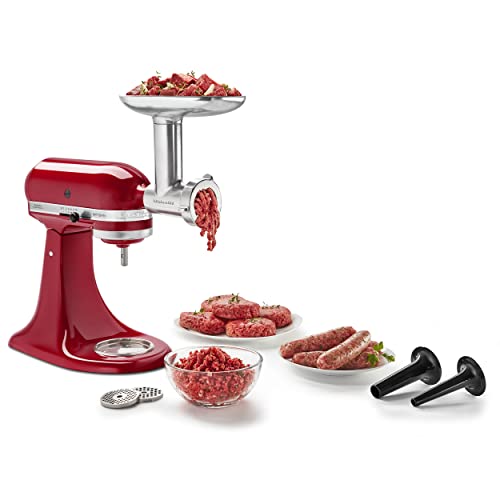
KitchenAid KSMMGA Food Grinder Attachment for All KitchenAid Stand Mixers
Connect to any household KitchenAid Stand Mixer power hub and use the power of the motor to run...
As an affiliate, we earn on qualifying purchases.
Remove the Mixer Head for Inspection
- Using the Phillips-head screwdriver, remove the screws securing the back or top cover of the mixer head.
- Carefully lift the cover to access the tilt mechanism, paying attention to any wiring or clips.
- Place the cover aside on a soft surface to avoid scratches.
This step exposes the tilt pin, springs, and other components that could be causing the issue.
Inspect and Clear Obstructions
- Check for any debris, dried batter, or dust around the tilt pin and spring areas.
- Gently clean these parts with a soft cloth or brush.
- Look for signs of wear, such as broken or bent springs or a worn tilt pin.
If you notice debris or buildup, cleaning often restores proper movement. Replace any damaged parts as needed.
Replace or Realign Worn or Broken Parts
- If a spring is broken or deformed, replace it with an identical part.
- For bent or worn tilt pins, consider ordering a replacement from KitchenAid or authorized parts suppliers.
- Reassemble the tilt mechanism carefully, ensuring all parts fit snugly and correctly aligned.
Proper reassembly is critical for a smooth tilt-back operation. Consult your model’s specific repair guide if available.
Test the Mixer and Reassemble
- Before fully closing the cover, plug in the mixer and gently test the tilt mechanism.
- Lift and lower the head to see if it moves freely without sticking.
- If it works smoothly, reattach the cover and tighten screws securely.
Ensure all parts are in place and the mixer is functioning correctly before resuming normal use.
The Products in This Guide

KitchenAid Artisan Series 5 Quart Tilt Head Stand Mixer
- ✔ Weight: 26 lbs
- ✔ Dimensions: 14 x 8 x 14 inches
- ✔ Color Options: Over 20

KitchenAid Stand Mixer Attachment
- ✔ Weight: 3.5 lbs
- ✔ Dimensions: 6 x 8 x 4 inches
- ✔ Included Accessories: Multiple grinding plates
KitchenAid Artisan Series 5 Quart Tilt Head Stand Mixer
The KitchenAid Artisan Series 5 Quart Tilt Head Stand Mixer is built to last with durable metal construction and 59 touchpoints for thorough mixing. Its tilt-head feature makes adding ingredients easy, but occasional issues with tilting can occur. Regular maintenance and careful inspection can prevent and fix tilt mechanism problems effectively.
Pros:
- Sturdy metal construction for durability
- Easy tilt-head access for ingredient addition
- Multiple speed settings for versatility
- Large 5-quart capacity
Cons:
- Tilt mechanism can get stuck over time
- Requires disassembly for repairs
- Spring or pin wear may need replacement
Best for: Home bakers and cooking enthusiasts needing a reliable mixer
Not ideal for: Users seeking a lightweight, portable mixer
Bottom line: A well-maintained KitchenAid tilt-head mixer provides years of reliable service.
KitchenAid Stand Mixer Attachment
The KitchenAid Metal Food Grinder attachment connects easily to your stand mixer and helps you create fresh ground meats, sausages, and more. It’s a practical addition if you want to expand your kitchen capabilities and is built with durable metal for long-lasting use.
Pros:
- Easy to attach and use
- Includes multiple grinding plates
- Sturdy metal construction
- Large food tray
Cons:
- Accessory sold separately
- Requires cleaning after use
- Adds extra weight to the mixer
Best for: Home cooks looking to grind meats or prepare fresh ingredients
Not ideal for: Those needing a compact, all-in-one appliance
Bottom line: A versatile attachment that boosts your mixer’s capabilities for fresh, homemade foods.
Frequently Asked Questions
Why won’t my KitchenAid tilt head stay up or tilt back?
This issue is often caused by debris buildup, worn or broken parts, or misalignment in the tilt mechanism. Regular inspection and cleaning can prevent or fix the problem.
How do I know if my tilt pin or spring needs replacing?
If the tilt head is difficult to move, feels loose, or sticks, inspect the pin and spring for wear or damage. Replacing these parts can restore smooth operation.
Is it safe to disassemble my mixer myself?
Yes, as long as you unplug the mixer first, follow proper disassembly procedures, and handle parts carefully. Consult your model’s repair guide if available.
Can I prevent my tilt head from sticking again?
Regular cleaning of the tilt area, avoiding debris accumulation, and checking for worn parts can help maintain smooth movement.
Where can I find replacement parts for my KitchenAid mixer?
Official KitchenAid parts distributors and authorized service providers are recommended sources for genuine replacement parts.
Keep Your KitchenAid Mixer Running Smoothly
Maintaining your KitchenAid Artisan Series 5 Quart Tilt Head Stand Mixer involves regular cleaning and prompt attention to mechanical issues. If your mixer won’t tilt back, following these troubleshooting steps can save you time and expense. With careful inspection, replacement of worn parts, and proper reassembly, your mixer can be restored to peak performance, ensuring many more delicious baking sessions ahead.
Affiliate disclosure: As an Amazon Associate we earn from qualifying purchases. Prices and availability are accurate as of the time of publishing.