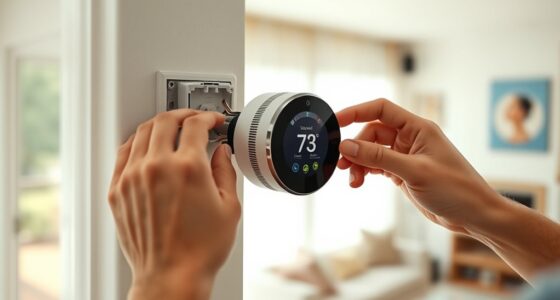
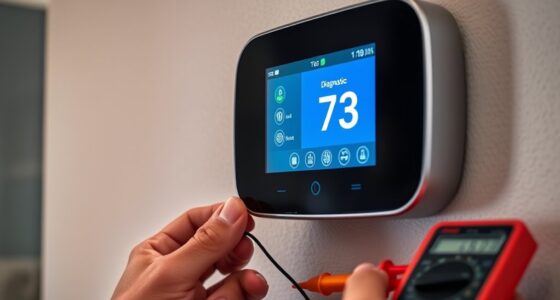
To calibrate your smart thermostat’s temperature sensors, start by placing a trusted, calibrated thermometer next to the sensor and allow both to stabilize. Compare their readings and, if your model offers calibration options through its app or interface, follow the manufacturer’s instructions to adjust the correction factor so the thermostat matches the thermometer. If no calibration feature exists, you may need to manually adjust settings or consider sensor replacement. Continue reading to learn more tips on maintaining accurate temperature control.

Get home appliances delivered free with Prime
- Fast, free delivery on millions of items
- Prime Video, Amazon Music and more included
- Member-only deals all year
Key Takeaways
- Use a trusted, calibrated thermometer alongside the thermostat sensor in the same location to compare readings.
- Access the thermostat’s calibration or adjustment settings via the device interface or app.
- Adjust the sensor’s correction factor to match the reference thermometer’s temperature, following manufacturer instructions.
- Ensure sensor placement is optimal—away from heat sources, drafts, and direct sunlight for accurate readings.
- Regularly verify sensor accuracy with a reference thermometer and recalibrate as needed to prevent drift.

Have you ever noticed that your smart thermostat isn’t quite keeping your home as comfortable as it should? You might find that the temperature it reports doesn’t match how warm or cool your space actually feels. This discrepancy often comes down to sensor accuracy. Over time, temperature sensors can drift from their original calibration, leading to less reliable readings. To fix this, you need to understand calibration techniques that can help restore your thermostat’s accuracy and guarantee your home stays comfortable.
First, recognize that accurate sensor readings are essential for your thermostat to perform correctly. If the sensor isn’t calibrated properly, it might think the room is warmer or cooler than it truly is, causing the system to turn on or off at the wrong times. To address this, you can start by checking the sensor’s accuracy. One straightforward method is to compare the thermostat’s reading with a trusted, calibrated thermometer placed nearby. Wait a few minutes to let both devices stabilize at the same spot. If the readings differ considerably, it indicates your sensor may need calibration.
Calibration techniques vary depending on your thermostat model. Some smart thermostats have built-in options to recalibrate the sensor directly through their interface or app. If yours offers this feature, follow the manufacturer’s instructions to adjust the sensor’s reading until it matches the reference thermometer. This process usually involves setting a correction factor that aligns the thermostat’s displayed temperature with the actual ambient temperature. For models without this feature, manual calibration might be necessary, which can involve adjusting the sensor’s position or replacing it if it’s faulty.
In cases where manual calibration isn’t possible, you might consider resetting the sensor’s calibration settings to factory defaults and then repeating the comparison process. This can sometimes clear any accumulated errors. Additionally, ensuring the sensor is free from obstructions, dust, or debris helps maintain its accuracy. Proper placement is also critical; sensors should be away from direct sunlight, drafts, or heat sources that can skew readings.
Regularly verifying sensor accuracy and applying calibration techniques helps keep your smart thermostat functioning at its best. Over time, sensors can drift again, so periodic checks are advisable. Using reliable reference thermometers and following calibration procedures ensures you’re getting precise temperature readings. Ultimately, maintaining sensor accuracy means your thermostat can make smarter decisions, leading to better comfort, energy efficiency, and lower utility bills. Take the time to calibrate your smart thermostat correctly, and you’ll enjoy a more consistent, comfortable home environment.
Frequently Asked Questions
Can Calibration Fix Temperature Sensor Hardware Issues?
Calibration can’t address hardware issues like sensor damage or malfunction. If your sensor is faulty, you’ll need sensor replacement after hardware troubleshooting confirms the problem. Calibration helps fine-tune the readings, but it won’t resolve hardware problems. So, if you’re experiencing inaccurate temperature readings despite calibration efforts, consider inspecting the sensor for damage and replacing it if necessary to ensure your thermostat works correctly.
How Often Should I Calibrate My Smart Thermostat?
Think of your smart thermostat’s sensor accuracy as a finely tuned instrument that needs regular tuning. You should calibrate your thermostat about once or twice a year, or whenever you notice temperature discrepancies. Regular calibration helps maintain superior comfort and energy efficiency. Keep an eye on how the readings match your actual room temperature, and adjust calibration frequency if you see ongoing mismatches to keep your system running smoothly.
Does Calibration Affect Energy Efficiency or Savings?
Calibration can influence your energy efficiency and cost savings. When your thermostat’s temperature readings are accurate, it prevents unnecessary heating or cooling, reducing energy consumption. This means your system runs only when needed, saving you money on energy bills. Proper calibration ensures ideal performance, keeps your home comfortable, and maximizes your savings. So, yes, calibration directly influences your thermostat’s efficiency and your overall energy costs.
Can I Calibrate Remotely via the App?
Yes, you can perform remote adjustment and app-based calibration of your smart thermostat. With your device connected to Wi-Fi, simply open the app, locate the calibration settings, and make the necessary adjustments. This convenience means you don’t need to physically access the thermostat, saving time and effort. Keep in mind, some models might have limited calibration options through the app, so check your thermostat’s capabilities first.
What Should I Do if Calibration Doesn’T Improve Accuracy?
If calibration doesn’t improve accuracy, you should consider sensor replacement or schedule a professional inspection. Sometimes, the sensor may be faulty or damaged, causing inaccurate readings. Replacing the sensor can resolve this issue, but if you’re unsure or uncomfortable doing it yourself, a professional can assess and fix the problem efficiently. This guarantees your smart thermostat provides precise temperature control for your comfort.
Conclusion
Remember, a well-calibrated thermostat ensures your home stays comfortable and energy-efficient. Take the time to regularly check and adjust your device, because “a stitch in time saves nine.” By calibrating your smart thermostat now, you prevent bigger issues later and save money on energy bills. Don’t wait until temperature discrepancies become noticeable—stay proactive and keep your home perfectly cozy all year round.
Halloween Picks
halloween
As an affiliate, we earn on qualifying purchases.