TL;DR
This article outlines 10 practical hacks every Apple Home user should know, including enabling critical alerts, customizing scenes, and creating weather-based automations. These tips improve safety, automation, and convenience.
Apple Home users can now significantly improve their smart home experience by leveraging new tips and tricks, including enabling critical alerts and customizing automations, according to recent guidance from Apple and tech sources. These hacks enhance safety, convenience, and automation control, making Apple Home more responsive and tailored to individual needs.
One confirmed feature is the ability to enable Critical Alerts in the Settings > Notifications > Home menu, which allows emergency notifications—such as smoke, carbon monoxide, or leak alerts—to break through Silent and Do Not Disturb modes. This ensures users receive immediate alerts during emergencies, even when devices are muted.
Another proven tip involves customizing the Control Center by pinning frequently used scenes or accessories. Users can long-press the Home control in the Control Center to add or remove scenes, enabling quick access to automation controls without opening the Home app.
Additionally, users can split device sensors into multiple tiles for more targeted automation, such as controlling individual sensors within a device like a thermostat or motion detector. This allows for more precise automation based on specific sensor data.
Apple’s built-in countdown timers can be used to turn off devices after a set period, streamlining automation for lights and other smart devices triggered by sensors. Setting timers within the Home app helps prevent forgotten devices running unnecessarily.
Using the Shortcuts app, users can create weather-based automations—for example, adjusting blinds or thermostats depending on outdoor conditions—adding an extra layer of automation tailored to real-time weather data.
Another confirmed trick involves programming smart bulbs to act as silent intercoms by flashing in specific patterns, useful for signaling or alerting family members without noise.
Finally, motion sensors can trigger audio transitions between speakers, such as moving music from one room to another when entering or leaving a space, enhancing the smart audio experience.
Why These Hacks Elevate Your Apple Home Experience
Implementing these tips can greatly enhance the safety, automation, and convenience of your smart home. Enabling critical alerts ensures you are immediately notified of emergencies, potentially saving lives or property. Customizing control center access and automations makes daily routines more efficient, while weather-based shortcuts add personalized comfort. Overall, these hacks help users maximize the value of their Apple Home ecosystem, making it more responsive and tailored to their needs.
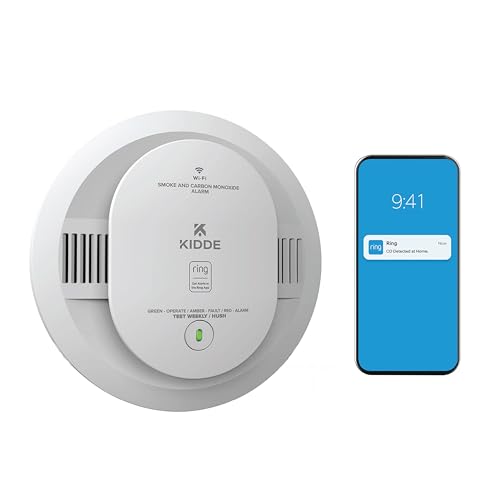
Kidde Smart Smoke & CO Detector with Ring, AA Battery, RGCUDR-RW
- Dual Detection: Detects smoke and CO
- App Notifications: Real-time alerts via Ring app
- Fast Response: Over 25% quicker smoke detection
As an affiliate, we earn on qualifying purchases.
As an affiliate, we earn on qualifying purchases.
Apple Home Automation Features and Recent Updates
Apple’s HomeKit platform has steadily expanded its capabilities, allowing users to automate and control a wide range of smart devices. Recent updates have emphasized safety features like critical alerts and enhanced automation options, including sensor management and shortcuts. These developments are part of Apple’s ongoing effort to improve user safety and streamline smart home control, with many features accessible through iOS and the Home app.
“Enabling Critical Alerts ensures emergency notifications are delivered immediately, even during silent or Do Not Disturb modes.”
— Apple Support

Wireless Zigbee Smart Button, 4-Way Remote Switch and Scene Controller
- Wireless Zigbee Control: Reliable remote control for smart devices
- 4-Button Customization: Supports single, double, and long press actions
- Scene and Device Activation: Trigger scenes, adjust blinds, and more
As an affiliate, we earn on qualifying purchases.
As an affiliate, we earn on qualifying purchases.
Remaining Questions About Apple Home Hacks
While these tips are confirmed, some advanced automation features—such as splitting sensors into multiple tiles or creating complex weather-based shortcuts—may vary depending on device compatibility and iOS version. Apple has not yet provided comprehensive guidance on all automation intricacies, leaving some customization options potentially unclear for users.

AIR ALFA 4900FT WiFi Smart Weather Stations Wireless Indoor Outdoor, LoRa Based Wireless Weather Station with 7-in-1 Solar Sensor, Thermo-Hygro Sensor, Bird Spike, CSV Export & Calibration Black
- Long-Range LoRa Signal: Up to 4900 ft in open areas
- 7-in-1 Weather Monitoring: Indoor/outdoor temperature, humidity, rainfall, wind, UV, light
- Bird-Resistant Sensor Design: Includes bird spikes to prevent interference
As an affiliate, we earn on qualifying purchases.
As an affiliate, we earn on qualifying purchases.
Next Steps for Apple Home Users and Updates
Apple is likely to continue expanding HomeKit features, possibly including more granular automation controls and enhanced safety alerts. Users should stay updated with the latest iOS releases and Apple support resources to access new features and improve their smart home setup. Additionally, third-party accessories may further broaden automation possibilities.

Amazon Basics Smart A19 LED Light Bulb, Color Changing, 9W (60W Equivalent), 800LM, Works with Alexa Only, WiFi 2.4 GHz, No Hub Required, Mood Lighting, Energy Efficient, 1-Pack
- Voice and App Control: Manage with Alexa or app
- Easy Setup: No hub required, quick installation
- Color Customization: 16 preset colors and adjustable brightness
As an affiliate, we earn on qualifying purchases.
As an affiliate, we earn on qualifying purchases.
Key Questions
How do I enable Critical Alerts in Apple Home?
Go to Settings > Notifications > Home, then toggle on Critical Alerts. You may also need to configure permissions within individual device apps.
Can I customize which scenes appear in the Control Center?
Yes. Long-press the Home control in Control Center, turn off Use Recommended, and add your preferred scenes or accessories manually.
What is the benefit of splitting sensors into separate tiles?
It allows for more precise automation, such as controlling devices based on specific sensor data within a single device, improving automation accuracy.
Are weather-based automations reliable?
They work based on real-time weather data, but depend on accurate location settings and internet connectivity. Compatibility may vary by device.
What should I do if a feature isn’t working as expected?
Ensure your iOS is up to date, verify device compatibility, and consult Apple’s support resources for troubleshooting.
Source: Lifehacker