Smart home energy monitors clamp onto your electrical panel and show exactly where every kilowatt-hour goes, and the gap between a good one and a mediocre one comes down to circuit-level granularity, local control options, and app reliability. The Emporia Vue 3 stands out as the best overall pick for most homes thanks to its polished app, real-time data, and affordable circuit-monitoring expansion. If you want to avoid the cloud entirely, the Refoss with Open API and Home Assistant support is the strongest local-control option, while the 16-sensor monitor with 50A circuit sensors is the pick for granular whole-home breakdowns. The main tradeoffs you’ll face are between sensor count and price, cloud convenience versus privacy, and DIY installation versus professional electrician help. Keep reading for the full breakdown of all 13 monitors and which one fits your home and budget.

Get home appliances delivered free with Prime
- Fast, free delivery on millions of items
- Prime Video, Amazon Music and more included
- Member-only deals all year
Complete the kit


Key Takeaways
- The Emporia Vue 3 dominates the mid-range because its app and data history are the most reliable in the lineup, even though three near-identical listings appear with only bundle differences — buyers should compare what’s included before ordering.
- Circuit-level monitoring is the single biggest differentiator: 2-clamp whole-home monitors (like the Eyedro 200A and Leviton LWHEM-2R) tell you total usage, but only 8- or 16-sensor models reveal which appliance is actually driving your bill.
- Refoss is the clear choice for Home Assistant users, offering local control and an open API, while Emporia‘s ecosystem leans cloud-first — your privacy preferences should drive this decision before price does.
- The SIEMENS Inhab sits in a premium tier with build quality and brand support the budget WiFi monitors can’t match, but its higher cost only pays off if you want a professionally-oriented system.
- Several generic WiFi monitors with dual 80A or 120A clamps undercut brand-name rivals by $30–60; they’re fine for basic total-consumption tracking, but app quality and firmware updates are inconsistent compared with Emporia, Refoss, and Eyedro.
| WiFi Energy Monitor with 2 x 120A Clamps | 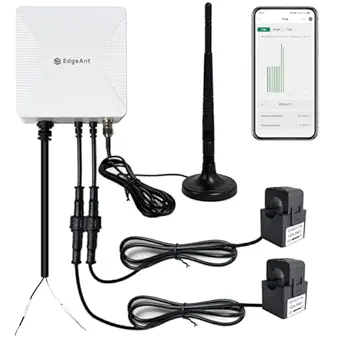 | Best Value Pick | Current Sensors: 2 x 120A clamp sensors | Connectivity: WiFi 2.4 GHz | Measurement Accuracy: ±2% | VIEW LATEST PRICE | See Our Full Breakdown |
| Refoss Smart Home Energy Monitor EM16P |  | Best for Power Users and Solar Homes | Model: EM16P | Control: Local Web UI, Open API, MQTT | Compatibility: Home Assistant, OpenClaw AI | VIEW LATEST PRICE | See Our Full Breakdown |
| Smart Home Energy Monitor with 16 50A Circuit Sensors |  | Best for Rentals and Shared Households | Sensors: 16 x 50A sensors | Supported Voltages: Single-phase up to 240VAC, split-phase 120/240VAC, three-phase up to 415Y/240VAC | Connectivity: WiFi 2.4GHz, MQTT, LAN | VIEW LATEST PRICE | See Our Full Breakdown |
| Smart Home Energy Monitor with 8 50A Circuit Level Sensors |  | Best Compact Option | Sensors: 8 x 50A circuit sensors | Supported Voltages: Up to 415Y/240VAC | Connectivity: WiFi 2.4GHz | VIEW LATEST PRICE | See Our Full Breakdown |
| Eyedro Smart Home Energy Monitor 200A WiFi/Ethernet |  | Best for Plug-and-Play Solar Monitoring | Current Rating: 200A | Sensors Included: Two 200A sensors | Connectivity: WiFi 2.4 GHz and Ethernet | VIEW LATEST PRICE | See Our Full Breakdown |
| SIEMENS Inhab Smart Home Energy Monitor with Circuit Sensors |  | Best Brand-Backed Pick | Circuit Level Sensors: 16–50A | Main Sensors: 2–200A | Compatibility: US and Canada | VIEW LATEST PRICE | See Our Full Breakdown |
| WiFi Home Energy Monitor with 3 80A CT Clamps |  | Best for Remote Control | Channels: 3 CT clamps | Max Current per Clamp: 80A | Supported AC Voltage: 100–240V | VIEW LATEST PRICE | See Our Full Breakdown |
| Refoss Smart Home Energy Monitor with 16 60A Circuit Sensors |  | Best for Smart Home Integrators | Number of Sensors: 16 | Sensor Capacity: 60A per sensor | Supported Systems: Single-phase, Split-phase, 3-phase 4-wire Wye | VIEW LATEST PRICE | See Our Full Breakdown |
| Smart Home Energy Monitor 2×80A, Dual-Channel WiFi Electricity Usage Tracker with App Control |  | Best Easy-Install Starter Pick | Channels: 2 | Current per Channel: 80A | Connectivity: WiFi (2.4GHz required) | VIEW LATEST PRICE | See Our Full Breakdown |
| Emporia Vue 3 Home Energy Monitor – Real-Time Electricity Usage and Power Consumption Meter |  | Best Overall | Certification: UL Listed | Sensors Included: Sixteen 50A branch sensors | Supported Systems: Single phase, single-split phase, 2-wire, 3-wire, 3-phase, 4-wire Wye | VIEW LATEST PRICE | See Our Full Breakdown |
| Emporia Vue 3 Home Energy Monitor – Real-Time Electricity Usage and Power Consumption Meter |  | Best Overall | Certification: UL Listed | Supported Systems: Single phase, split phase, 2-wire, 3-wire, 3-phase, 4-wire Wye | Connectivity: 2.4 GHz Wi-Fi | VIEW LATEST PRICE | See Our Full Breakdown |
| Emporia Vue 3 Home Energy Monitor |  | Best for Fast, Real-Time Data | Certification: UL Listed | Supported Systems: Single phase, split phase, 2-wire, 3-wire, 3-phase, 4-wire Wye | Sensor Type: Clamp-on CT sensors | VIEW LATEST PRICE | See Our Full Breakdown |
| Leviton LWHEM-2R Whole Home Energy Monitor with One Pair of CTs |  | Best for Smart Breaker Control | Model: LWHEM-2R | Connectivity: Wi-Fi | Included: Monitor with 1 pair of CTs | VIEW LATEST PRICE | See Our Full Breakdown |
| smart home energy monitor | Connectivity |
|---|---|
| WiFi Energy Monitor with 2 x 1 | WiFi 2.4 GHz |
| Refoss Smart Home Energy Monit | — |
| Smart Home Energy Monitor with | WiFi 2.4GHz, MQTT, LAN |
| Smart Home Energy Monitor with | WiFi 2.4GHz |
| Eyedro Smart Home Energy Monit | WiFi 2.4 GHz and Ethernet |
| SIEMENS Inhab Smart Home Energ | — |
| WiFi Home Energy Monitor with | — |
| Refoss Smart Home Energy Monit | Wi-Fi, Open API, MQTT, WebSocket |
| Smart Home Energy Monitor 2×80 | WiFi (2.4GHz required) |
| Emporia Vue 3 Home Energy Moni | 2.4 GHz WiFi |
| Emporia Vue 3 Home Energy Moni | 2.4 GHz Wi-Fi |
| Emporia Vue 3 Home Energy Moni | 2.4 GHz Wi-Fi |
| Leviton LWHEM-2R Whole Home En | Wi-Fi |
More Details on Our Top Picks
WiFi Energy Monitor with 2 x 120A Clamps
This option stands out for covering whole-home basics at a budget price. The two 120A clamps monitor the mains rather than individual circuits, which is why it costs so much less than the 16-sensor monitor from the same category. Compared with the Refoss EM16P, you lose circuit-level detail and local control, but if you simply want to see total consumption and catch a failing water heater early, this covers it. Bidirectional measurement means solar households still get usable data, though accuracy of ±2% trails the Refoss’s ±1%. The tradeoff is straightforward: appliance-level detective work requires guessing, because you can’t isolate which breaker is drawing power.
Pros:- Real-time whole-home tracking at an accessible price
- Bidirectional measurement works for solar and net metering
- Clamp installation fits most residential panel types
- Flexible hourly, daily, monthly, and yearly data export
Cons:- Installation should be done by a qualified electrician
- 2.4 GHz Wi-Fi only, and no compatibility with Delta electrical systems
- No circuit-level breakdown to pinpoint specific appliances
Best for: Budget-conscious homeowners who want whole-home consumption data without paying for per-circuit sensors
Not ideal for: Buyers who want to identify exactly which appliance is wasting power — two main clamps can’t isolate individual circuits
- Current Sensors:2 x 120A clamp sensors
- Connectivity:WiFi 2.4 GHz
- Measurement Accuracy:±2%
- Supported Systems:Single-phase, split-phase, 2-wire, 2-phase, 3-wire Wye
- Bidirectional Measurement:Yes
- Data Export:Hourly, daily, monthly, yearly
Our verdict“A sensible low-cost entry point for whole-home energy awareness, provided you don’t need per-appliance detail.”
Refoss Smart Home Energy Monitor EM16P
The EM16P is the most capable monitor in this lineup, and it earns that position through local control, Open API, and MQTT support — no cloud dependency whatsoever. Compared with the 16-sensor 50A monitor, it matches the circuit-level granularity but adds ±1% accuracy, five years of local storage, and a two-year warranty, making it the stronger choice for solar households running Home Assistant automations. The catch is accessibility: getting the API and automation features running demands genuine technical comfort. Casual users who just want an app with pretty graphs will find this model overkill, and the 16-branch sensor ceiling may frustrate owners of very large panels. This pick makes the most sense for people who treat energy data as raw material for automation.
Pros:- Fully local control with no cloud reliance, protecting data privacy
- Tight Home Assistant and OpenClaw AI integration for automation
- ±1% accuracy with 2 main and 16 branch circuit sensors
- Solar optimization and peak management with up to 5 years of stored data
Cons:- API and automation setup requires technical expertise
- Capped at 2 main and 16 branch sensors, limiting very large panels
- Complex installation for users without electrical knowledge
Best for: Smart home enthusiasts and solar owners who run Home Assistant and want local, private, automation-ready energy data
Not ideal for: Non-technical buyers — the API, MQTT, and automation setup assume skills most casual users don’t have
- Model:EM16P
- Control:Local Web UI, Open API, MQTT
- Compatibility:Home Assistant, OpenClaw AI
- Accuracy:±1%
- Current Range:200A (main), 1-60A (branch)
- Data Storage:Up to 5 years
- Installation:Clamp-on, 2 main + 16 branch sensors
- Certification:ETL, UL 61010
- Warranty:2 years
Our verdict“The deepest data and best privacy in this batch, but only for buyers willing to do the technical legwork.”
Smart Home Energy Monitor with 16 50A Circuit Sensors
This model’s strength is circuit-specific billing — with 16 individual sensors, a landlord or roommate group can attribute costs to specific circuits instead of splitting a bill by guesswork. Compared with the 8-sensor monitor, it doubles your coverage, which matters in shared apartments where the HVAC, laundry, and kitchen circuits all belong to different people. It runs on a local network without cloud dependency, similar to the Refoss EM16P but with a friendlier price. The tradeoffs: MQTT and Home Assistant setup still demands some tinkering, its ecosystem support ends at Home Assistant, and long-term storage is thinner — 90 days of hourly data versus the Refoss’s five years. For tenant billing, though, permanent daily and monthly records do the job.
Pros:- 16 circuit sensors enable appliance-level and tenant-level cost tracking
- Local network operation with no cloud dependency
- Customizable billing features suited to rental properties
- Broad voltage support including three-phase up to 415Y/240VAC
Cons:- MQTT and Home Assistant configuration requires technical effort
- Only 90 days of hourly data before it aggregates
- Smart home compatibility effectively limited to Home Assistant
Best for: Landlords, property managers, and roommates who need per-circuit cost tracking and fair bill allocation
Not ideal for: Buyers outside the Home Assistant ecosystem who want native Alexa or Google Home integration out of the box
- Sensors:16 x 50A sensors
- Supported Voltages:Single-phase up to 240VAC, split-phase 120/240VAC, three-phase up to 415Y/240VAC
- Connectivity:WiFi 2.4GHz, MQTT, LAN
- Cloud Dependency:None — local network operation
- Data Storage:90 days hourly; permanent daily/monthly/yearly
- Warranty:1 year
Our verdict“The clear choice for circuit-level billing in shared or rental properties, as long as Home Assistant is on your radar.”
Smart Home Energy Monitor with 8 50A Circuit Level Sensors
At 3.1 x 1.2 x 4.2 inches, this is the most panel-friendly monitor here — a real advantage in crowded or apartment-sized breaker boxes where the 16-sensor models physically struggle. Eight 50A sensors are enough to cover the major circuits (HVAC, water heater, kitchen, laundry) in a typical home, which is why this option makes sense as a right-sized middle ground between the two-clamp budget tracker and the fully loaded 16-sensor unit. It shares the LAN and MQTT, no-cloud privacy approach of the Refoss EM16P, and supports solar and net metering. The compromises: no wired Ethernet option like the Eyedro, 2.4 GHz Wi-Fi only, and app configuration takes patience before notifications work reliably.
Pros:- Compact housing fits tight breaker panels easily
- 8 circuit sensors cover the major appliances in most homes
- Privacy-focused LAN and MQTT operation with no cloud required
- Supports single-phase, three-phase, and solar/net metering setups
Cons:- Only 8 sensors, leaving mid-to-large panels partially monitored
- No Ethernet option, limited to 2.4 GHz Wi-Fi
- App setup and notification configuration can be finicky
Best for: Homeowners with smaller or crowded panels who want key-circuit monitoring without bulk
Not ideal for: Households wanting full panel coverage — eight sensors leave larger homes with uncovered circuits
- Sensors:8 x 50A circuit sensors
- Supported Voltages:Up to 415Y/240VAC
- Connectivity:WiFi 2.4GHz
- Local Control:LAN and MQTT, no cloud required
- App Compatibility:Android, Apple
- Dimensions:3.1 x 1.2 x 4.2 inches, 2.8 pounds
- Warranty:1 year
Our verdict“A right-sized pick for smaller homes that want circuit detail where it counts, without paying for sensors they can’t fit.”
Eyedro Smart Home Energy Monitor 200A WiFi/Ethernet
The Eyedro wins on simplicity and connection flexibility: it’s the only monitor in this batch offering Ethernet alongside Wi-Fi, which solves the 2.4 GHz reliability complaints that affect every other pick here. Its free MyEyedro cloud requires no subscription, a contrast with the DIY-flavored Refoss and 16-sensor models that assume you’ll build your own dashboards. Two 200A sensors handle whole-home consumption and production, and solar and net metering support is native. The honest tradeoff: no circuit-level detail at all, and full net metering actually requires a second unit — an added cost that narrows its value gap versus the circuit-level competition. Buyers who want granular per-appliance data should look at the 8- or 16-sensor monitors instead.
Pros:- Ethernet plus Wi-Fi connectivity for dependable setup
- Native solar, grid, and net metering support
- Free MyEyedro cloud access with no subscription fees
- 200A sensors handle whole-home consumption and production
Cons:- Full net metering requires purchasing a second device
- No circuit-level monitoring for appliance breakdowns
- Cloud-dependent design limits appeal for privacy-focused users
Best for: Solar homeowners who want reliable, subscription-free whole-home monitoring with minimal setup effort
Not ideal for: Tinkerers wanting circuit-level data and local API control — Eyedro is cloud-centric and whole-home only
- Current Rating:200A
- Sensors Included:Two 200A sensors
- Connectivity:WiFi 2.4 GHz and Ethernet
- Metering Support:Solar, grid, net metering
- Cloud Access:MyEyedro cloud, no subscription required
- Standards:North American safety standards
- In the Box:Two 200A sensors, Ethernet cable, power adapter
Our verdict“The easiest path to solar-aware whole-home data for non-technical owners, at the cost of per-circuit insight.”
SIEMENS Inhab Smart Home Energy Monitor with Circuit Sensors
The SIEMENS Inhab stands out for buyers who want the backing of a major electrical manufacturer rather than a generic importer brand. With UL Listing and CE marking, it clears the safety bar that installers and insurers actually look for — something several budget monitors in this roundup can’t claim. Its sensor range is unusually broad, from 16A branch circuits up to 200A mains, so it covers whole-home and circuit-level tracking in one package. Compared with the Emporia Vue 3, which offers similar sensor counts, the Inhab leans harder into advanced energy management functions and personalized alerts rather than raw data export. The tradeoff: it’s locked to US and Canada, and panel installation realistically means paying an electrician, which adds to the total cost of ownership.
Pros:- UL Listed and CE marked for verified safety compliance
- Wide sensor range covers both mains and branch circuits
- Personalized alerts and advanced energy management features
- Works with existing panels, no panel replacement needed
Cons:- Only available for US and Canada electrical systems
- Panel installation typically requires professional electrician costs
Best for: Homeowners who prioritize certified safety standards and want a mainstream brand their electrician will recognize and stand behind
Not ideal for: DIY tinkerers and Home Assistant enthusiasts — the closed ecosystem lacks the local API and MQTT support that the Refoss monitor offers
- Circuit Level Sensors:16–50A
- Main Sensors:2–200A
- Compatibility:US and Canada
- Standards:CE marked, UL Listed
- Installation:Electrical panel, existing panels supported
- App:Mobile app with real-time tracking and alerts
Our verdict“Choose the Inhab if certified safety and a trusted industrial brand matter more to you than open-source flexibility.”
WiFi Home Energy Monitor with 3 80A CT Clamps
This three-channel monitor earns its spot for something most competitors here don’t do at all: remote ON/OFF relay control up to 15A. Where the Refoss 16-sensor monitor gives you far more granular data, this unit lets you act on that data — switching off a water heater or pool pump from your phone. The temperature alert feature adds a safety layer for high-heat environments like garages or mechanical rooms. Its scope is deliberately narrow: three 80A clamps mean you’re monitoring a handful of big loads, not a whole panel. Small businesses tracking specific equipment, or homeowners targeting two or three energy hogs, will find the fit right. Anyone wanting whole-home visibility should look at the Emporia Vue 3 instead, which includes sixteen sensors out of the box.
Pros:- Remote relay control lets you switch loads off, not just observe them
- Real-time and historical data through Smart Life/Tuya app
- Temperature alerts flag overheating equipment
- Handles three 80A circuits simultaneously
Cons:- Panel wiring installation may require a qualified electrician
- External temperature sensor setup may require additional parts
- Only three channels — poor fit for whole-home monitoring
Best for: Small business owners and homeowners who want to monitor and remotely switch off a few high-draw appliances like heaters, pumps, or compressors
Not ideal for: Whole-home energy auditors — three circuits can’t paint a complete picture of household consumption
- Channels:3 CT clamps
- Max Current per Clamp:80A
- Supported AC Voltage:100–240V
- Relay Control:Up to 15A
- App Compatibility:Smart Life, Tuya
- Temperature Alert:Yes, triggers above 50°C
Our verdict“If switching loads remotely matters as much as measuring them, this is the affordable way to get both in one device.”
Refoss Smart Home Energy Monitor with 16 60A Circuit Sensors
For anyone running Home Assistant or building custom automations, this Refoss unit is the most technically capable option in this batch. Native support for Open API, MQTT, WebSocket, and a local Web UI means your energy data stays on your network — no cloud account, no third-party server deciding your history’s fate. That’s a sharper privacy stance than the SIEMENS Inhab, whose app-centric approach funnels data through vendor infrastructure. The five years of local data storage outlasts the Emporia Vue 3’s retention scheme by a wide margin, useful for spotting seasonal patterns. Support for single-phase, split-phase, and 3-phase 4-wire Wye systems covers nearly every residential scenario. The honest downside: users consistently report the installation and integration process is complex, and you’ll want genuine comfort with electrical work and networking before committing.
Pros:- Full local control with Web UI, Open API, MQTT, and WebSocket — no cloud dependency
- Five years of stored data for long-term analysis
- Supports single-phase, split-phase, and 3-phase 4-wire Wye systems
- Smart fault alerts and solar optimization features
Cons:- Requires real technical knowledge for setup and integration
- Multiple user reports of complex installation
- No turnkey guided experience for non-technical buyers
Best for: Tech-savvy smart home hobbyists who want local-only data, MQTT/API access, and multi-year storage for automation
Not ideal for: Casual users who just want an app with a monthly bill estimate — the setup complexity will feel punishing for that job
- Number of Sensors:16
- Sensor Capacity:60A per sensor
- Supported Systems:Single-phase, Split-phase, 3-phase 4-wire Wye
- Data Storage:5 years
- Connectivity:Wi-Fi, Open API, MQTT, WebSocket
- Warranty:2 years
- Dimensions:4.5 x 3.5 x 1.1 inches
Our verdict“This is the enthusiast’s pick — powerful and private, but only if you’re willing to do the configuration work yourself.”
Smart Home Energy Monitor 2×80A, Dual-Channel WiFi Electricity Usage Tracker with App Control
This dual-channel tracker wins on installation simplicity. Its clamp-style sensors attach externally without wiring modifications, which puts it a step ahead of panel-mounted options like the WiFi monitor with 3 CT clamps that demands work inside the breaker box. For a first dip into energy monitoring — checking whether the EV charger or the dryer is the real bill inflator — it does the job at minimal cost and risk. The bi-directional energy tracking is a surprise at this price, making it viable for solar households watching export versus consumption, a trick the SIEMENS Inhab doesn’t advertise as explicitly. Tradeoffs are real, though: two channels cap your visibility, the 2.4GHz-only Wi-Fi requirement trips up modern mesh networks, and there’s no path to Home Assistant or other platforms outside the Tuya/Smart Life ecosystem.
Pros:- Clamp-style external sensors install without wiring modifications
- Bi-directional tracking supports solar export monitoring
- Works with widely used Tuya and Smart Life apps
- Shows real-time voltage, current, power, and historical energy data
Cons:- Requires a 2.4GHz Wi-Fi network for setup
- Limited to two channels on residential systems
- Locked to Tuya/Smart Life — poor compatibility with other platforms
Best for: First-time energy monitors and renters-cum-owners who want plug-and-clamp setup to track two major appliances without an electrician
Not ideal for: Smart home power users — the Tuya-only ecosystem and two-channel ceiling will frustrate anyone planning deeper integration
- Channels:2
- Current per Channel:80A
- Connectivity:WiFi (2.4GHz required)
- App Compatibility:Tuya, Smart Life
- Installation:Clamp-style external sensors, no wiring mods
- Monitoring Features:Real-time data, historical records, bi-directional energy tracking
Our verdict“The lowest-friction way to start understanding your energy use, as long as two circuits are enough for your questions.”
Emporia Vue 3 Home Energy Monitor – Real-Time Electricity Usage and Power Consumption Meter
The Emporia Vue 3 earns the top spot by balancing what most buyers actually need: UL certification, sixteen included 50A branch sensors, native solar and net-metering support, and a polished app that doesn’t require a networking degree. Compared with the Refoss 16-sensor monitor, the Vue 3 trades local API control for approachability — most people will take guided setup over MQTT configuration any day. Its system coverage is the widest here, spanning single-phase through 3-phase 4-wire Wye configurations. The automation features tie directly into bill reduction, letting you shift load away from expensive peak windows. The compromises are worth knowing: real-time second-level data only streams while the app is open, minute-level history lasts just seven days, 3-phase setups need an extra sensor, and it depends entirely on Wi-Fi and Emporia’s cloud. If you want local-first data, the Refoss is the better specialist; for everyone else, this is the most complete package.
Pros:- UL Listed for safety with solar and net-metering support
- Sixteen 50A branch sensors included for granular circuit tracking
- Automation features actively help cut electric bills
- Broad compatibility across single-phase, split-phase, and Wye systems
Cons:- 1-second data only available while the app is actively open
- 3-phase systems require an additional sensor purchase
- Fully dependent on WiFi and Emporia’s cloud for real-time data
Best for: Homeowners — including solar users — who want whole-home, circuit-level insight with a mature app and minimal fuss
Not ideal for: Cloud-averse privacy-minded users and offline-first automation builders — the Refoss monitor’s local control suits them far better
- Certification:UL Listed
- Sensors Included:Sixteen 50A branch sensors
- Supported Systems:Single phase, single-split phase, 2-wire, 3-wire, 3-phase, 4-wire Wye
- Sensor Type:Clamp-on sensors
- Connectivity:2.4 GHz WiFi
- Data Retention:Minute data 7 days; hourly data indefinite
- Warranty:1 year
Our verdict“The best all-around choice for most homes — certified, capable, and user-friendly, provided cloud reliance doesn’t bother you.”
Emporia Vue 3 Home Energy Monitor – Real-Time Electricity Usage and Power Consumption Meter
This option stands out for its scalability: the base unit covers your whole home, and up to 16 branch sensors can be added later to isolate individual circuits. That flexibility is what separates it from single-channel trackers like the WiFi Home Energy Monitor 2×80A, which tells you total consumption but can’t tell you whether the HVAC or the water heater is the culprit behind a high bill. Solar and net-metering support comes standard, and the UL listing matters here since this device lives inside your panel. The tradeoff is real, though: sensors are sold separately, so circuit-level insight costs extra, and anyone with an unusual 3-phase setup may want an electrician’s help rather than a DIY install.
Pros:- UL-listed for safe installation inside the electrical panel
- Expandable to 16 branch sensors for circuit-by-circuit tracking
- Native solar and net-metering support in the app
- Works across nearly every residential and light-commercial electrical configuration
Cons:- Branch sensors sold separately, so full monitoring costs more than the sticker price
- Live data requires a 2.4 GHz Wi-Fi connection with no wired backup
- Complex 3-phase installations may need professional help
Best for: Homeowners who want whole-home data now and the option to expand into circuit-level monitoring over time, especially solar owners
Not ideal for: Buyers who want appliance-level detail out of the box — the branch sensors are an extra purchase, which inflates the real cost
- Certification:UL Listed
- Supported Systems:Single phase, split phase, 2-wire, 3-wire, 3-phase, 4-wire Wye
- Connectivity:2.4 GHz Wi-Fi
- Sensor Capacity:Up to 16 branch sensors (sold separately)
- Data Retention:7 days minute data; indefinite hour data
- Solar Support:Yes, with net metering
- App Control:Mobile app with automation
Our verdict“If one monitor has to serve a whole house today and grow with you tomorrow, this is the one to buy — just budget for the add-on sensors.”
Emporia Vue 3 Home Energy Monitor
Functionally a sibling of the Emporia Vue 3 listed above, this version’s claim to attention is 1-second data resolution — a level of granularity most monitors in this roundup, including the Eyedro 200A, don’t offer. For anyone diagnosing short power spikes or fine-tuning automation, that speed matters; for casual bill-watching, it’s overkill, and you should know the fine-grained data is only retained for 3 hours before it’s averaged into minute-level history. Compared with the other Vue 3 listing, this one’s spec sheet is more explicit about clamp-on sensors and includes a 1-year warranty, which makes it a safer pick if you’re comparison shopping between the two listings. The Wi-Fi-only requirement remains the weak point.
Pros:- 1-second real-time data resolution for precise spike detection
- UL-certified and works with nearly every wiring configuration
- Clamp-on sensors simplify installation compared to hardwired alternatives
- Backed by a 1-year warranty
Cons:- 1-second data is retained for only 3 hours before averaging
- 3-phase systems with neutral require an additional sensor
- No wired connectivity option — Wi-Fi is mandatory
Best for: Data-hungry users and tinkerers who want second-by-second readings to diagnose spikes or tune automations
Not ideal for: Renters or anyone without reliable 2.4 GHz Wi-Fi near the panel — the monitor is dead in the water without it
- Certification:UL Listed
- Supported Systems:Single phase, split phase, 2-wire, 3-wire, 3-phase, 4-wire Wye
- Sensor Type:Clamp-on CT sensors
- Connectivity:2.4 GHz Wi-Fi
- Data Resolution:1 second (active)
- Data Retention:3 hours (1-sec), 7 days (minute), indefinite (hour)
- Warranty:1 year
Our verdict“Choose this version of the Vue 3 when reaction speed matters more than long-term historical detail.”
Leviton LWHEM-2R Whole Home Energy Monitor with One Pair of CTs
Every other monitor in this roundup, including both Emporia Vue 3 variants, is a passive observer — they show you where power goes but can’t do anything about it. The LWHEM-2R is different: paired with Leviton 2nd Gen Smart Circuit Breakers, it can remotely schedule, automate, and shut off individual circuits from the My Leviton app, and it even coordinates with backup power through a transfer switch. That makes it less an energy monitor and more a control hub that happens to measure. The catch is ecosystem lock-in: without Leviton’s own smart breakers installed, you’ve paid a premium for monitoring alone, and its compatibility with third-party platforms like Home Assistant is far murkier than the open-API Refoss options.
Pros:- Actively controls circuits via Leviton smart breakers, not just monitors them
- Integrates with backup power and automatic transfer switches
- Remote scheduling and automation per circuit through the My Leviton app
- Simple starter package with monitor and one pair of CTs included
Cons:- Full functionality requires buying Leviton’s own smart circuit breakers
- Weak or undocumented compatibility with non-Leviton smart home platforms
- Professional installation is likely, adding to total cost
Best for: Homeowners already in (or building) a Leviton smart-breaker ecosystem who want to control circuits, not just watch them
Not ideal for: Home Assistant users and multi-brand smart homes — the closed ecosystem and unclear third-party support make open-API monitors a better fit
- Model:LWHEM-2R
- Connectivity:Wi-Fi
- Included:Monitor with 1 pair of CTs
- Compatibility:Leviton 2nd Gen Smart Circuit Breakers, Automatic Transfer Switch
- App:My Leviton
- Control Features:Remote monitoring, scheduling, circuit automation
- Type:Whole-home energy monitor
Our verdict“This makes sense only if you want command over your circuits and are committed to Leviton hardware — otherwise a cheaper monitor does the observing just as well.”

How We Picked
I evaluated these 13 monitors against the criteria that actually change the ownership experience: measurement accuracy and sensor capacity, app and software quality, local control versus cloud dependency, installation complexity, and long-term value. Sensor count mattered heavily in the ranking because it determines whether you see one total number or a per-circuit breakdown of your home — the difference between knowing your bill and understanding it. I also weighed ecosystem fit: monitors with Home Assistant compatibility, open APIs, and no-cloud operation scored higher for tinkerers, while polished mobile apps and reliable cloud history scored higher for everyday users.
The ranking logic reflects these tradeoffs rather than raw specs alone. The Emporia Vue 3 variants take the top spots for balancing accuracy, app quality, and price. Refoss models rank high for local-control buyers, multi-sensor monitors rank by how much circuit-level insight they deliver per dollar, and premium options like the SIEMENS Inhab rank lower on value but high on build quality and support. Generic no-name WiFi monitors were ranked primarily on reported reliability and app stability, where they consistently trail established brands.
Factors to Consider When Choosing Smart Home Energy Monitors
Beyond the specific models above, choosing a smart home energy monitor involves structural decisions about your home, your electrical panel, and how you plan to use the data. These are the factors I’d weigh before spending anything.Whole-Home vs. Circuit-Level Monitoring
The most common mistake buyers make is paying for 16 circuit sensors when two main clamps would answer their question. Whole-home monitoring (two CT clamps on your mains) tells you total consumption and works well if your goal is simply tracking monthly usage or validating a solar setup. Circuit-level monitoring adds a sensor per breaker, which is the only way to identify that an old fridge or a failing well pump is silently adding $20 a month. A practical middle path: start with a monitor that supports expansion, install main clamps first, then add circuit sensors to suspicious breakers later. Also check whether your panel has physical space — 16 sensors means 16 wire runs into a crowded breaker box, and some older panels make this far messier than the product photos suggest.
Cloud, Local Control, and Data Privacy
Every monitor in this category either streams data to a manufacturer’s cloud or keeps it on your network, and this choice shapes the entire experience. Cloud-based systems like Emporia’s offer slick apps, remote access, and history without any setup effort, but if the company changes its subscription model or shuts down servers, your hardware can become a dumb meter. Local-first options like the Refoss models with open APIs keep data in your house and integrate cleanly with Home Assistant, at the cost of a steeper setup process and no out-of-the-box mobile experience unless you build one. My advice: if you already run Home Assistant or care about data leaving your home, pay the small premium for local control now rather than replacing a cloud monitor later. If you just want to check usage from your phone, cloud dependency is a reasonable trade.
Electrical Panel Compatibility and Amperage Ratings
A monitor is only as good as its fit with your panel, and mismatched amperage ratings are a silent failure point. Check your main breaker rating (commonly 100A, 150A, or 200A) and confirm the included CT clamps are rated at or above it — clamping a 200A service with 120A sensors means distorted readings at high load, not just a spec-sheet technicality. Solar owners face an extra wrinkle: you’ll want a monitor that supports bidirectional measurement or includes a third clamp for the solar feed, like the 3-clamp 80A WiFi model in this lineup. Split-phase North American homes need two clamps on the mains, while some international buyers need single-phase or three-phase support that budget US-market monitors don’t offer. Verify this before purchase; returns after panel installation are a hassle.
Installation: DIY or Electrician
Nearly every monitor here requires opening your electrical panel, which is legal for homeowners to do in many jurisdictions but carries real risk if you’re unfamiliar with breaker panels. The sensors themselves clamp around insulated wires without cutting anything, but the panel’s main lugs remain live even with the main breaker off — there is no safe way to fully de-energize a panel from inside it. Budget monitors often ship with short sensor leads and vague instructions, which pushes marginal DIYers toward mistakes; brand-name kits like Leviton’s and SIEMENS’ include better documentation and support. If you have any hesitation, factor $100–200 for an electrician into the total cost — it’s often cheaper than regret, and many electricians will install customer-provided monitors during an already-scheduled visit. Rental properties and condos add another layer, since panel access may require landlord or building approval.
App Quality and Long-Term Support
The hardware is half the product; the software determines whether you’ll still be using the monitor in six months. Established brands like Emporia, Eyedro, and Leviton maintain their apps with regular updates, exportable data, and useful features like bill forecasting and alerts for appliances left on. Generic monitors frequently ship with rebranded apps that haven’t been updated in years, and buyer reviews often reveal broken cloud integrations or apps that stop working after phone OS updates. Check whether the app supports data export (CSV or API access) — without it, you’re locked into whatever charts the manufacturer decides to show. Also look at how the company handles history: some free tiers cap data retention, which undermines the whole point of long-term tracking. A $50 savings on hardware isn’t worth an abandoned app.
What You Plan to Do With the Data
Be honest about your goal before choosing, because it changes the right answer. If you’re chasing a high bill, circuit-level monitoring pays for itself by finding the culprit — this is where 8- and 16-sensor models earn their price. If you’re sizing a solar array or battery backup, accurate whole-home totals with second-level resolution matter more than per-circuit detail. If you’re automating your home (turning off a water heater when rates spike), API access and Home Assistant compatibility outrank app polish. And if you’re simply curious about your consumption, a basic two-clamp monitor under $80 answers that question — buying a 16-channel premium system for curiosity alone usually results in a dashboard nobody opens after month two. Match the tool to the actual decision you’re trying to make.
Frequently Asked Questions
Do I need an electrician to install a smart home energy monitor?
Most monitors are designed for DIY installation because the CT sensors clamp around the outside of insulated wires without any cutting or splicing. However, you must remove your panel cover to reach the wires, and the incoming service lugs stay energized even with the main breaker off, so the work is never completely safe for someone unfamiliar with panels. Homeowners who are comfortable resetting breakers and understand panel layout typically manage fine in 30–60 minutes. If your panel is crowded, you have a tandem-breaker configuration, or you feel any hesitation, hiring an electrician for $100–200 is money well spent. In some jurisdictions, code also requires a licensed electrician for anything inside the panel, so check local rules first.
What’s the real difference between a 2-clamp monitor and one with 8 or 16 circuit sensors?
Two clamps on your mains measure total household consumption — useful for tracking your bill, verifying solar production, or spotting unusual usage spikes, but blind to which appliance caused them. Circuit sensors attach to individual breakers and attribute consumption to specific loads, which is how you discover that a failing refrigerator compressor or always-on dehumidifier is costing real money each month. The practical implication: 2-clamp data tells you how much, circuit data tells you why. If your motivation is a mysteriously high bill, start with circuit sensors — total-only monitoring often just confirms the bill without explaining it. If you only want general awareness or solar tracking, two clamps are sufficient and considerably cheaper.
Can these monitors work without internet or a cloud subscription?
It depends entirely on the model, and this is one of the biggest dividing lines in the category. Cloud-dependent monitors like the Emporia Vue need internet access for their apps, history, and even some real-time views; if your Wi-Fi drops or the company’s servers have issues, you lose visibility. Locally controlled options — most notably the Refoss models with open APIs — push data directly to a Home Assistant instance or local server, so everything keeps working without internet, and no usage data leaves your house. None of the monitors in this roundup require a paid subscription for core monitoring, but free tiers sometimes limit historical data retention. If offline reliability or privacy matters, filter for ‘local control’ or ‘no cloud’ before anything else on the spec sheet.
How accurate are budget WiFi energy monitors compared to my utility meter?
Reputable CT-based monitors, including budget ones, typically land within 1–3% of your utility meter when properly installed, which is accurate enough for decision-making even if not billing-grade. Accuracy problems usually come from installation rather than hardware: a clamp that’s slightly open, a sensor rated below your actual load, or clamps installed backwards on solar feeds will skew readings noticeably. Brand-name monitors tend to maintain that accuracy over time because their firmware corrects for power factor and phase issues, while some generic models drift or misreport variable loads like modern inverter appliances. If your numbers seem off, compare a full day against your utility’s hourly data before assuming the device is defective — and reseat every clamp first.
Why do three Emporia Vue 3 listings appear in this roundup, and which should I buy?
The three Emporia Vue 3 entries represent different retail listings and bundle configurations of the same core hardware — typically varying in included accessories, sensor bundles, or packaging, sometimes at different prices from different sellers. The base unit is identical: real-time whole-home monitoring with the option to add circuit sensors. My suggestion is to buy the configuration that matches your plan: the base two-clamp version if you want total consumption, or a bundle with 8 or 16 circuit sensors if you want per-appliance detail, since buying sensors separately usually costs more than a bundled kit. Compare what each listing actually includes rather than the price alone, because a cheaper listing that omits sensors can end up costing more once you expand. This is also why the Vue 3 ranks so well overall — the ecosystem lets you start small and grow without replacing hardware.
Conclusion
After comparing all 13 monitors, the right pick comes down to what you’re trying to learn about your home’s electricity use. For best overall, the Emporia Vue 3 earns it with the best balance of accurate data, a genuinely good app, and an expandable sensor ecosystem that grows with your needs. The Refoss 16-sensor monitor with open API takes best value for serious monitoring, delivering circuit-level detail and local Home Assistant control at a price that undercuts premium brands — while the generic 2×80A dual-channel WiFi monitor is the budget pick for basic total-usage tracking. For best premium, the SIEMENS Inhab offers brand backing and build quality suited to buyers who want a professionally-oriented system rather than a gadget. Beginners should start with the Eyedro 200A monitor, which pairs simple installation with straightforward software and no ecosystem lock-in. For specific needs: solar owners should look at the 3-clamp 80A model, Home Assistant enthusiasts should go with either Refoss option for local control, and anyone diagnosing a high bill should pick the 8- or 16-circuit sensor monitors over any two-clamp design. Whichever you choose, match the sensor count to your actual question — that single decision matters more than brand or price.