For most buyers, I’d start with the eufy Security Smart Lock C220: its fingerprint access pairs with keypad entry, giving households more than one way to get inside. The Philips Wi-Fi Smart Deadbolt with Fingerprint stands out for buyers who want connected access, while the TEEHO TE001 is a simpler choice for keypad-first entry. The main tradeoff is between straightforward PIN access and added features such as fingerprints, app control, and Wi-Fi, which can bring more setup and maintenance. Door fit matters just as much: a knob or handle set is not a direct substitute for a deadbolt on every door. Read on for the full comparison and a guide to choosing the right lock for your entry.

Get home appliances delivered free with Prime
- Fast, free delivery on millions of items
- Prime Video, Amazon Music and more included
- Member-only deals all year
Complete the kit

Key Takeaways
- Fingerprint access is the clearest differentiator in this lineup: options such as the eufy C220, Wyze Lock Bolt v2, and Philips fingerprint deadbolt add a fast alternative to entering a PIN.
- Keypad-only models keep the job simple. The TEEHO TE001 and Kwikset SmartCode 955 focus on code entry rather than app-connected features, which may suit buyers who want less setup.
- Lock format should come before feature count. Deadbolts, knobs, and handle sets serve different door setups, so a feature-rich lock is still a poor choice if it does not match the existing hardware.
- Wi-Fi and app control are not universal benefits. Philips Wi-Fi models and the KUCACCI offer connected features, while simpler keypad locks avoid dependence on a connected setup.
- Some listings share a model but differ in finish or configuration. The TE001 appears in matte black and satin nickel, so buyers should check the exact variant rather than assume every listing has identical hardware.
| Philips WiFi Keypad Door Lock with Handle – Satin Nickel |  | Best for Direct Wi-Fi Access | Model: DDL242X-1HW | Connectivity: 2.4 GHz Wi-Fi; no hub required | Fingerprint unlock speed: 0.3 seconds | VIEW LATEST PRICE | See Our Full Breakdown |
| Evanshow Fingerprint Biometric Door Knob with Keypad, Black |  | Best for Multiple Local Entry Options | Model: 190NOA | Entry methods: Fingerprint, password, IC card, 2 mechanical keys | Fingerprint capacity: Up to 100 fingerprints | VIEW LATEST PRICE | See Our Full Breakdown |
| KUCACCI Keypad Smart Door Lock with Handle |  | Best for Weather-Exposed Keypad Entry | Lock type: Keypad lock with handle | User capacity: Up to 20 keypad users | Code length: 4–8 digits | VIEW LATEST PRICE | See Our Full Breakdown |
| Philips 4200 Series WiFi Smart Deadbolt with Handle |  | Best for a Connected Deadbolt Upgrade | Model: 4200 Series (DDL242X-1HW-L) | Connectivity: 2.4 GHz Wi-Fi; no hub required | Unlock methods: Fingerprint, passcode, app, voice assistant | VIEW LATEST PRICE | See Our Full Breakdown |
| Ulecoce U68 Fingerprint Keypad Deadbolt with Knob Set, Matte Black | 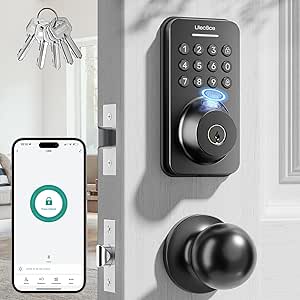 | Best for High-Capacity Access Sharing | Model: U68 | Unlock methods: Fingerprint, keypad, app, one-touch, physical key | Fingerprint and passcode capacity: Up to 512 sets | VIEW LATEST PRICE | See Our Full Breakdown |
| Veise VE017 Fingerprint Smart Door Lock with App Control, Matte Black |  | Best for Flexible Access | Unlock methods: Fingerprint, app, authorized access, fob card, PIN, shared code, mechanical key, and voice assistant with G1 Gateway | Fingerprint recognition: Under 0.2 seconds; claimed 99.99% accuracy | Power: Four AA/LR6 alkaline batteries, not included; stated battery life about 12 months and varies with use | VIEW LATEST PRICE | See Our Full Breakdown |
| TEEHO TE001 Keyless Entry Deadbolt with Keypad, Matte Black |  | Best Value Keypad Deadbolt | Model: TE001 | Access codes: Up to 20 codes plus one one-time guest code | Auto-lock: Adjustable from 10 to 99 seconds; one-touch locking | VIEW LATEST PRICE | See Our Full Breakdown |
| Kwikset SmartCode 955 Pembroke Light Commercial 10-Button Keypad Electronic Lever, Satin Nickel |  | Best for High-Traffic Entries | Lock type: Light-commercial electronic lever with 10-button keypad | User codes: Up to 30 codes plus one-time code option | Lock modes: Auto-Lock, Passage, and disabled turnpiece | VIEW LATEST PRICE | See Our Full Breakdown |
| Yamiry Keypad Smart Door Knob Lock with Handle | 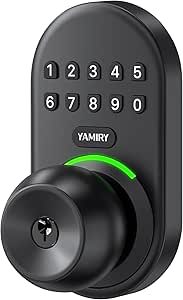 | Best Keypad Knob for Simple DIY Installation | Model: YR04 | Lock type: Keypad knob with handle | Material and color: Aluminum alloy; matte black | VIEW LATEST PRICE | See Our Full Breakdown |
| Wyze Lock Bolt v2 Fingerprint Smart Deadbolt |  | Best for High-Capacity Biometric Access | Model: WLCKB2 | Lock type: Biometric smart deadbolt with keypad | Connectivity: Wi-Fi | VIEW LATEST PRICE | See Our Full Breakdown |
| TEEHO TE001 Keyless Entry Deadbolt with Keypad, Satin Nickel |  | Best for Simple, Code-Based Access | Brand and model: TEEHO TE001 | Finish: Satin nickel | Access codes: 20 user codes plus one one-time guest code | VIEW LATEST PRICE | See Our Full Breakdown |
| Smart Door Handle Lock with Keypad, Yamiry Fingerprint Knob for Front Door |  | Best for Flexible Entry Methods | Brand and model: Yamiry YR01 | Lock type: Smart door handle lock | Unlock methods: Fingerprint, Bluetooth app, passcodes, key fobs, mechanical keys, Alexa voice control via separate Wi-Fi gateway | VIEW LATEST PRICE | See Our Full Breakdown |
| eufy Security Smart Lock C220 – Fingerprint Keyless Entry Door Lock |  | Best for Built-In Remote Access | Brand and model: eufy Security C220 (T8506) | Lock type: Deadbolt | Unlock methods: Fingerprint, app, keypad, physical key, Apple Watch, Alexa or Google Assistant voice commands | VIEW LATEST PRICE | See Our Full Breakdown |
| Philips Wi-Fi Smart Deadbolt Lock with Fingerprint and Keyless Entry |  | Best for High Code Capacity | Brand and model: Philips DDL242X-1HW | Unlock methods: App, passcode, fingerprint, physical key, Alexa, Google Assistant | Wi-Fi: Built-in 2.4 GHz; no hub required | VIEW LATEST PRICE | See Our Full Breakdown |
| Yamiry YR05 Smart Door Knob Lock with Keypad and Fingerprint |  | Best for Bluetooth-First Households | Brand and model: Yamiry YR05 | Material and finish: Aluminum; matte black | Connectivity: Bluetooth; remote control requires a separately sold Wi-Fi gateway | VIEW LATEST PRICE | See Our Full Breakdown |
| smart locks with keypad | Unlock methods |
|---|---|
| Philips WiFi Keypad Door Lock | — |
| Evanshow Fingerprint Biometric | — |
| KUCACCI Keypad Smart Door Lock | — |
| Philips 4200 Series WiFi Smart | Fingerprint, passcode, app, voice assistant |
| Ulecoce U68 Fingerprint Keypad | Fingerprint, keypad, app, one-touch, physical key |
| Veise VE017 Fingerprint Smart | Fingerprint, app, authorized access, fob card, PIN, shared code, mechanical key, and voice assistant with G1 Gateway |
| TEEHO TE001 Keyless Entry Dead | — |
| Kwikset SmartCode 955 Pembroke | — |
| Yamiry Keypad Smart Door Knob | — |
| Wyze Lock Bolt v2 Fingerprint | Fingerprint, keypad code, app, and physical key |
| TEEHO TE001 Keyless Entry Dead | — |
| Smart Door Handle Lock with Ke | Fingerprint, Bluetooth app, passcodes, key fobs, mechanical keys, Alexa voice control via separate Wi-Fi gateway |
| eufy Security Smart Lock C220 | Fingerprint, app, keypad, physical key, Apple Watch, Alexa or Google Assistant voice commands |
| Philips Wi-Fi Smart Deadbolt L | App, passcode, fingerprint, physical key, Alexa, Google Assistant |
| Yamiry YR05 Smart Door Knob Lo | App, password, key fob, fingerprint, physical key |
More Details on Our Top Picks
Philips WiFi Keypad Door Lock with Handle – Satin Nickel
The Philips WiFi Keypad Door Lock suits buyers who want keypad entry alongside remote access, without adding a separate hub. Its app control and access monitoring give it an advantage over the KUCACCI Keypad Smart Door Lock, which lists no app connectivity. Fingerprint entry takes a stated 0.3 seconds, while PIN options accommodate different visitors, from household members to short-term guests. The included handle set makes this a more complete front-door update than a deadbolt-only setup. The tradeoff is that it relies on 2.4 GHz Wi-Fi and eight AA batteries, which are not included. I’d choose it for connected convenience, but skip it if you want a simpler keypad lock that operates without a Wi-Fi connection.
Pros:- Direct 2.4 GHz Wi-Fi supports remote app control without a separate hub
- Fingerprint access is specified at 0.3 seconds
- PIN options can accommodate household members and visitors
- Includes two matching door levers for a coordinated replacement
Cons:- Works only with 2.4 GHz Wi-Fi
- Requires eight AA batteries, which are not included
- More dependent on network setup than keypad-only options such as the KUCACCI
Best for: Homeowners who want keypad and fingerprint entry plus remote app monitoring without installing a separate hub.
Not ideal for: Buyers with only 5 GHz Wi-Fi, or anyone who wants to avoid the upkeep of eight AA batteries.
- Model:DDL242X-1HW
- Connectivity:2.4 GHz Wi-Fi; no hub required
- Fingerprint unlock speed:0.3 seconds
- Auto-lock timer:0–180 seconds
- Supported door thickness:38–50 mm (1-3/8–1-3/4 inches)
- Battery type:8 AA alkaline batteries, not included
- Included components:2 door levers, latch assembly, mounting screws and hardware, smart lock unit, user manual
Our verdict“Choose this Philips if you want a keypad lock with fast fingerprint entry and hub-free remote access, and are comfortable maintaining its battery supply and 2.4 GHz connection.”
Evanshow Fingerprint Biometric Door Knob with Keypad, Black
The Evanshow biometric knob puts entry flexibility ahead of app features: it accepts a fingerprint, password, IC card, or mechanical key. That gives households several ways to get inside, while its capacity for 100 fingerprints and 50 passwords can suit a shared home or small workplace. Unlike the Wi-Fi-connected Philips 4200 Series, this Evanshow’s listed access methods do not depend on an app or network, so it makes more sense for buyers who want local, keypad-centered entry. Its tradeoff is a setup step: an administrator fingerprint must be registered before use. The USB port is for emergency power from an external power bank, not for charging the internal batteries. Check wooden-door thickness and compatibility before buying.
Pros:- Combines fingerprint, password, IC card, and mechanical-key access
- Stores up to 100 fingerprints and 50 passwords
- Reversible hand orientation supports left- or right-handed installation
- USB port can provide emergency power from an external power bank
Cons:- Administrator fingerprint registration is required before use
- USB power is for emergencies and cannot charge the internal batteries
- Specified for wooden doors within a particular thickness range
Best for: Households or small shared spaces that need several local entry methods and capacity for many fingerprints and passwords.
Not ideal for: Buyers seeking remote access, app monitoring, or a clearly listed Wi-Fi connection; the provided features focus on local entry.
- Model:190NOA
- Entry methods:Fingerprint, password, IC card, 2 mechanical keys
- Fingerprint capacity:Up to 100 fingerprints
- Password capacity:Up to 50 passwords
- Fingerprint recognition:About 0.5 seconds
- Door thickness:1.18–1.97 inches
- Hand orientation:Reversible
- Emergency power:USB port for an external power bank
Our verdict“Pick the Evanshow for varied, local entry methods and generous user capacity, but choose a connected model such as the Philips 4200 Series if app access matters.”
KUCACCI Keypad Smart Door Lock with Handle
The KUCACCI Keypad Smart Door Lock is the straightforward choice here for buyers who prioritize keypad access and weather resistance over app control. Its IP66 rating and backlit keypad suit an exposed entry where buttons need to be easy to see, while one-time codes and space for up to 20 users provide practical access sharing. Compared with the Philips WiFi Keypad Door Lock, KUCACCI does not list remote app monitoring or fingerprint access; that simpler setup also means fewer connected features to configure. Auto-lock can be set from 5 to 99 seconds, and physical keys offer a backup. The tradeoffs are four AA batteries, sold separately, and the absence of listed app connectivity. This is a keypad-first pick, not a remote-management lock.
Pros:- IP66 weather resistance suits exposed entry points
- Backlit keypad aids use in low-light conditions
- Supports up to 20 keypad users and one-time codes
- Adjustable auto-lock and physical-key backup offer alternative ways to secure or access the door
Cons:- No app connectivity is listed
- Requires four AA batteries, which are not included
- Does not list fingerprint entry, unlike the Philips and Evanshow models
Best for: Buyers who need a weather-resistant keypad lock for an exposed standard door and want guest codes without app dependence.
Not ideal for: People who want remote monitoring, app unlocking, or fingerprint entry; those features are not listed for this model.
- Lock type:Keypad lock with handle
- User capacity:Up to 20 keypad users
- Code length:4–8 digits
- Auto-lock interval:5–99 seconds
- Weather resistance:IP66
- Power:4 AA batteries, not included
- Door compatibility:Standard left- or right-hand doors
- Backup keys:2 physical keys
- Warranty:1 year
Our verdict“Choose KUCACCI if a weather-resistant keypad and guest codes matter more than app control or biometrics.”
Philips 4200 Series WiFi Smart Deadbolt with Handle
The Philips 4200 Series WiFi Smart Deadbolt combines a keypad-oriented entry setup with fingerprint, app, and voice-assistant access, making it a strong fit for buyers upgrading a standard front door. It connects directly to 2.4 GHz Wi-Fi, so unlike the Ulecoce U68, it does not require a separately sold gateway for the listed remote app features. Its real-time status and access history offer more oversight than the keypad-focused KUCACCI, and the matching handle helps create a coordinated replacement. The main catches are practical: the router should be within 33 feet for a stable connection, batteries are not included, and auto-lock is off by default. I’d favor it over a simpler keypad model when app monitoring matters, but not for a network-free setup.
Pros:- Direct 2.4 GHz Wi-Fi supports app control without a hub
- Fingerprint, passcode, app, and voice assistant provide several entry routes
- App offers real-time status checks and access history
- Matching handle set supports a coordinated door upgrade
Cons:- Stable connection calls for the router to be within 33 feet
- Batteries are not included
- Auto-lock is disabled by default and must be enabled manually
Best for: Homeowners replacing a standard deadbolt and handle who want keypad, fingerprint, app, and voice-assistant access over direct Wi-Fi.
Not ideal for: Buyers whose router is too far from the door, who prefer not to rely on Wi-Fi, or who want auto-lock enabled out of the box.
- Model:4200 Series (DDL242X-1HW-L)
- Connectivity:2.4 GHz Wi-Fi; no hub required
- Unlock methods:Fingerprint, passcode, app, voice assistant
- Fingerprint recognition:0.3 seconds
- Battery life:Up to 6 months
- Door thickness compatibility:1-3/8–1-3/4 inches (38–50 mm)
- Voice assistant support:Alexa and Google Assistant
- Auto-lock:Adjustable from 0–180 seconds; off by default
Our verdict“Choose this Philips for a connected deadbolt-and-handle upgrade with multiple entry methods, provided the door is within reliable Wi-Fi range.”
Ulecoce U68 Fingerprint Keypad Deadbolt with Knob Set, Matte Black
The Ulecoce U68 stands out for its stated capacity of up to 512 fingerprint and passcode sets, giving it a clear advantage over the Philips models for buyers managing many users. Its app supports temporary, scheduled, recurring, and permanent codes, while fingerprint, keypad, one-touch, and physical-key entry cover different routines. The tradeoff is that its connectivity is less complete out of the box: app unlocking is listed within a 5-meter range, and remote or voice control requires a separately sold gateway. By contrast, the Philips 4200 Series connects directly to Wi-Fi for remote app features. Ulecoce is the better fit for extensive local access sharing and a longer listed warranty, but not for buyers who expect direct, wide-range remote control.
Pros:- Supports up to 512 fingerprint and passcode sets
- App can manage temporary, scheduled, recurring, and permanent codes
- Offers fingerprint, keypad, app, one-touch, and physical-key entry
- Includes five backup keys and a 3-year warranty
Cons:- Remote and voice control require a separately sold gateway
- App unlocking is listed for a 5-meter range
- Smart assistant compatibility adds a separate hardware requirement
Best for: Hosts or property managers who need to assign many types of temporary, recurring, or permanent access codes and fingerprints.
Not ideal for: Buyers who want remote control over Wi-Fi without extra hardware, or who need app unlocking beyond the listed 5-meter range.
- Model:U68
- Unlock methods:Fingerprint, keypad, app, one-touch, physical key
- Fingerprint and passcode capacity:Up to 512 sets
- Fingerprint recognition time:As little as 0.3 seconds
- Auto-lock delay:5–60 seconds
- App control range:5 meters
- Smart assistant compatibility:Alexa and Google Assistant with separately sold Ulecoce gateway
- Installation:Designed for standard left- and right-hand doors
- Warranty:3 years
Our verdict“Choose the Ulecoce U68 for high-capacity access sharing and varied code schedules, but favor the Philips 4200 Series for direct Wi-Fi remote control.”
Veise VE017 Fingerprint Smart Door Lock with App Control, Matte Black
The Veise VE017 suits households that want more than a keypad: residents can use fingerprints, PINs, fob cards, the app, or a mechanical key. That range gives family members and regular visitors a choice of entry method, while remote user management and entry logs help the owner keep track of access. Unlike the simpler TEEHO TE001, this model stores access data locally with AES-128 encryption and offers fingerprint entry. Its tradeoff is that remote access and Alexa or Google voice control require the separately sold G1 Gateway, so the lock’s smart features are not all available on their own. It also needs four AA batteries, which are not included. For buyers who value several keypad alternatives and access controls, that added flexibility may be worth the extra setup.
Pros:- Offers fingerprint, PIN, app, fob card, shared-code, and mechanical-key entry
- Supports remote user permissions and entry activity logs through the app
- Stores access data locally with AES-128 encryption
- Includes an emergency USB-C power port and supports a 0–180-second auto-lock timer
Cons:- G1 Gateway is sold separately for remote access and Alexa or Google voice control
- Four AA batteries are required and are not included
- Fingerprint and app features add setup and management beyond a basic keypad deadbolt
Best for: Households with multiple residents or recurring visitors who want fingerprint, PIN, card, and app access options plus entry records.
Not ideal for: Buyers who want remote access or voice control without purchasing a separate gateway, or who prefer a keypad-only lock with fewer setup dependencies.
- Unlock methods:Fingerprint, app, authorized access, fob card, PIN, shared code, mechanical key, and voice assistant with G1 Gateway
- Fingerprint recognition:Under 0.2 seconds; claimed 99.99% accuracy
- Power:Four AA/LR6 alkaline batteries, not included; stated battery life about 12 months and varies with use
- Data security:AES-128 encryption; access data stored locally on the lock
- Auto-lock:Adjustable from 0 to 180 seconds
- Emergency power:USB-C port
- Weather resistance:IP55
- Installation:DIY installation with a screwdriver; approximately 15 minutes; automatically detects door handing
Our verdict“Choose the VE017 if you want a keypad lock with fingerprint and card alternatives, and are comfortable adding a gateway for remote and voice features.”
TEEHO TE001 Keyless Entry Deadbolt with Keypad, Matte Black
The TEEHO TE001 keeps the job focused: it is a keypad deadbolt for households that need separate family codes and a simple way to grant one-time guest access. Its 20 user codes and single-use guest code cover everyday sharing without the fingerprint, app, and gateway setup found on the Veise VE017. One-touch locking and an adjustable 10–99-second auto-lock setting help reduce the chance of leaving the door unsecured, while IP54 weather resistance supports exposed entry points. This simpler approach also means fewer smart controls: the provided details do not list app management or remote access. Fit is another constraint, since it requires a 2-1/8-inch door hole and will not fit 38 mm holes. Buyers who want straightforward code access may prefer it; those seeking biometric entry should look elsewhere.
Pros:- Stores up to 20 family access codes and supports a one-time guest code
- Offers one-touch locking and an adjustable 10–99-second auto-lock
- IP54 weather resistance and a low-battery alert support outdoor entry use
- Includes two backup keys and a two-year warranty
Cons:- Requires a 2-1/8-inch door hole and is not compatible with 38 mm holes
- Four AA batteries are required and are not included
- No app control or remote access is listed
Best for: Families who want individual keypad codes and a one-time guest code without app-based access management.
Not ideal for: Owners of doors with 38 mm holes or buyers who want fingerprint unlocking, remote code management, or app control.
- Model:TE001
- Access codes:Up to 20 codes plus one one-time guest code
- Auto-lock:Adjustable from 10 to 99 seconds; one-touch locking
- Power:Four AA batteries, not included; battery life up to 365 days
- Weather resistance:IP54
- Door hole compatibility:2-1/8 in (54 mm); not compatible with 38 mm holes
- Included components:Two backup keys, latch, strike plate, keypad deadbolt, and instructions
- Warranty:2 years
Our verdict“Pick the TE001 for uncomplicated family and guest PIN access, but skip it if your door does not match its hole size or you need app features.”
Kwikset SmartCode 955 Pembroke Light Commercial 10-Button Keypad Electronic Lever, Satin Nickel
The Kwikset SmartCode 955 takes a different route from keypad deadbolts such as the TEEHO TE001: it is a light-commercial lever built around frequent use, with a stated durability test of 500,000 lock cycles. That makes it a stronger fit for a busy entry where a lever is preferable to a deadbolt, such as a shared office or high-traffic household. The keypad supports up to 30 user codes and a one-time code, while its three modes—Auto-Lock, Passage, and disabled turnpiece—let the owner tailor how the door operates. A backlit keypad helps in dim conditions, and the included 9V battery is stated to last up to three years. The tradeoff is that this is a substantial, single-battery electronic lever rather than a biometric or app-focused lock; no alternative power option is listed.
Pros:- Tested for 500,000 lock cycles for frequent-use applications
- Supports up to 30 user codes and a one-time code
- Offers Auto-Lock, Passage, and disabled-turnpiece modes
- Backlit keypad and included 9V battery with stated battery life up to three years
Cons:- Uses a 9V battery and no alternative power option is listed
- Provides keypad access rather than the fingerprint and app options available on the Veise VE017
- Its lever form may not suit buyers looking specifically for a deadbolt replacement
Best for: Owners of busy shared entrances who want a durable keypad lever, multiple codes, and a passage mode.
Not ideal for: Buyers who specifically need a deadbolt, fingerprint access, app control, or a backup power method beyond the 9V battery.
- Lock type:Light-commercial electronic lever with 10-button keypad
- User codes:Up to 30 codes plus one-time code option
- Lock modes:Auto-Lock, Passage, and disabled turnpiece
- Battery:One 9V battery included; stated battery life up to 3 years
- Durability test:500,000 lock cycles
- Material:Metal; zinc handle
- Finish:Satin nickel, brushed finish
- Dimensions and weight:9.9 × 8.6 inches; 4.8 pounds
Our verdict“Choose the SmartCode 955 for a high-traffic door where a durable, mode-flexible keypad lever matters more than biometric or app access.”
Yamiry Keypad Smart Door Knob Lock with Handle
The Yamiry YR04 is a keypad knob for buyers who want code access without moving to a deadbolt or adding an app-managed system. It offers 20 user codes, one-time guest codes, two backup keys, and a backlit keypad, giving it more access flexibility than a basic keyed knob. Installation is described as taking less than 15 minutes with a screwdriver, which makes it a practical pick for a straightforward DIY replacement. Compared with the deadbolt-style TEEHO TE001, the YR04 uses a knob format; that distinction matters when matching the lock to an existing door setup. Its “smart” label should not be read as app connectivity: no app or smart-home integration is listed. It also relies on physical backup keys, which may be a drawback for buyers trying to minimize key-based access.
Pros:- Supports 20 user codes and one-time guest codes
- Backlit keypad and low-battery indicator aid everyday use
- IP54 weather resistance and aluminum alloy construction
- Installation is described as taking under 15 minutes with basic tools
Cons:- No app control or smart-home integration is listed
- Includes physical backup keys, which may not suit buyers aiming to avoid key-based entry
- One-year product coverage is shorter than the TEEHO TE001’s stated two-year warranty
Best for: DIY-minded buyers replacing a compatible door knob who want keypad codes and guest access without app management.
Not ideal for: Buyers seeking remote access, smart-home integration, fingerprint entry, or a deadbolt-style lock.
- Model:YR04
- Lock type:Keypad knob with handle
- Material and color:Aluminum alloy; matte black
- User codes:20, plus one-time guest codes
- Backup keys:2
- Auto-lock:Adjustable from 5 to 99 seconds
- Weather resistance:IP54
- Dimensions and weight:5.62 × 2.7 × 3 inches; 1.18 kg
- Warranty:1-year product coverage
Our verdict“Choose the YR04 if you want a quick-install keypad knob with guest codes, but not if app control or a deadbolt is part of your plan.”
Wyze Lock Bolt v2 Fingerprint Smart Deadbolt
The Wyze Lock Bolt v2 pairs a keypad with fingerprint, app, and physical-key entry, then gives households room for up to 50 codes or fingerprints. That capacity makes it a better match for a larger household or a door shared by many authorized users than the TEEHO TE001, which is limited to 20 family codes and a one-time guest code. Auto-lock and tamper alarms add useful security prompts, while USB-C emergency power offers a backup when the batteries run down. The tradeoff is battery demand: it uses eight AA batteries and states a life of up to eight months, shorter than the Veise VE017’s stated roughly 12 months. Wyze lists Wi-Fi connectivity, but remote control and live-feed unlocking depend on Wi-Fi and compatible Wyze devices, so buyers should check that their setup supports those functions.
Pros:- Stores up to 50 codes or fingerprints
- Offers fingerprint, keypad, app, and physical-key entry
- Includes auto-lock, tamper alarms, and USB-C emergency power
- Wi-Fi connectivity is listed, with eight AA batteries included
Cons:- Stated battery life is up to eight months, shorter than the Veise VE017’s stated roughly 12 months
- Remote control and live-feed unlocking require Wi-Fi and compatible Wyze devices
- Uses eight AA batteries for regular operation
Best for: Larger households or shared entryways that need a high number of fingerprint and PIN credentials alongside app access.
Not ideal for: Buyers who want longer stated battery life, use few access credentials, or need remote functions without Wi-Fi and compatible Wyze devices.
- Model:WLCKB2
- Lock type:Biometric smart deadbolt with keypad
- Connectivity:Wi-Fi
- Unlock methods:Fingerprint, keypad code, app, and physical key
- Capacity:Up to 50 codes or fingerprints
- Power:Eight AA batteries included; stated battery life up to 8 months
- Emergency power:USB-C
- Weather resistance and certification:IP53; BHMA2 durability certification
- Additional features:Auto-lock and tamper alarms
Our verdict“Pick the Wyze Lock Bolt v2 if your priority is accommodating many fingerprint and PIN users, and your home setup supports its Wi-Fi-dependent remote features.”
TEEHO TE001 Keyless Entry Deadbolt with Keypad, Satin Nickel
The TEEHO TE001 is the straightforward keypad pick in this group: it stores 20 user codes and adds a one-time guest code that deletes itself after use, handy for a visitor who should not keep access. Unlike the app-connected Yamiry YR05, this lock keeps access management on the keypad rather than relying on Bluetooth or an optional gateway. Its adjustable auto-lock can be set from 10 to 99 seconds, or left off, and one-touch locking gives household members a quick way to secure the door when leaving.
The tradeoff is a narrower fit and feature set: it needs a 2-1/8-inch door hole, and it does not offer the fingerprint or remote controls found on the eufy C220. Four AA batteries are also not included, though the lock has a low-battery alert and a claimed life of up to 365 days. I’d choose it for practical keypad access, not smart-home control.
Pros:- Stores up to 20 user codes and includes a one-time guest code that deletes itself after use.
- Auto-lock delay is adjustable from 10 to 99 seconds, with one-touch locking available.
- IP54 weather resistance, low-battery alert, and claimed battery life of up to 365 days.
- Includes two backup keys and supports left- or right-handed doors after setup.
Cons:- Requires a 2-1/8-inch (54 mm) door hole and is not compatible with 38 mm holes.
- Four AA batteries are required but are not included.
- Lacks app-based remote access and biometric unlocking.
Best for: Households and hosts who want separate keypad codes, including a disposable guest code, without managing an app or Wi-Fi connection.
Not ideal for: Buyers with a 38 mm bore or anyone who wants fingerprint entry, remote access, or smart-home voice control.
- Brand and model:TEEHO TE001
- Finish:Satin nickel
- Access codes:20 user codes plus one one-time guest code
- Auto-lock delay:10–99 seconds; off by default
- Power:4 AA batteries, not included
- Claimed battery life:Up to 365 days
- Weather resistance:IP54
- Door hole compatibility:2-1/8 in (54 mm); not compatible with 38 mm holes
- Included components:2 backup keys, latch, strike plate, installation and programming instructions
Our verdict“Choose the TE001 if you want flexible keypad codes and basic automatic locking, and your door has the required bore size.”
Smart Door Handle Lock with Keypad, Yamiry Fingerprint Knob for Front Door
Yamiry’s YR01 suits households that want more than a keypad but prefer a handle-style lock: it combines passcodes, fingerprint access, Bluetooth app control, key fobs, mechanical keys, and Alexa control when paired with a separately sold Wi-Fi gateway. Its reversible handle fits left- or right-handed doors, and the advertised drill-free installation is a useful contrast with deadbolts such as the TEEHO TE001, which require a specified bore size. The app can manage temporary or permanent access and show unlock activity, making this a better fit for landlords or households coordinating several users.
That flexibility brings extra setup and connectivity dependencies. Alexa voice control and remote access require the gateway, while the eufy C220 has built-in Wi-Fi for remote management without a separate bridge. Yamiry also does not specify battery life or replacement details, so ongoing power planning is less clear. I’d favor the YR01 for entry-method variety, not for a simple, clearly documented keypad-only setup.
Pros:- Offers six access methods, including fingerprint, passcode, key fob, mechanical key, and app control.
- App supports temporary and permanent access management and unlock activity monitoring.
- Reversible handle works on left- and right-handed doors.
- Designed for quick, drill-free installation on most standard American wooden front doors.
Cons:- Alexa voice control and remote access require a separately sold Wi-Fi gateway.
- Battery life and battery replacement details are not specified.
- Setup may be confusing for people unfamiliar with smart-lock apps and connected features.
Best for: Landlords and busy households who want fingerprint, fob, key, and code access plus app-based access management.
Not ideal for: Buyers seeking remote control without extra hardware, or those who want clearly stated battery life and a simple setup.
- Brand and model:Yamiry YR01
- Lock type:Smart door handle lock
- Unlock methods:Fingerprint, Bluetooth app, passcodes, key fobs, mechanical keys, Alexa voice control via separate Wi-Fi gateway
- App access:Permanent and temporary access management, one-time codes, and unlock activity monitoring
- Handle orientation:Reversible for left- or right-handed doors
- Installation:Designed for quick, drill-free installation on most standard American wooden front doors
- Included components:Exterior assembly, interior assembly, 2 key fobs, 2 mechanical keys, screw set, adjustable latch
Our verdict“Pick the YR01 if your household will use its varied entry methods and app tools, and you are comfortable with extra setup and gateway requirements.”
eufy Security Smart Lock C220 – Fingerprint Keyless Entry Door Lock
The eufy C220 is the strongest fit here for buyers who want a keypad plus connected access without a separate hub. Its built-in Wi-Fi supports remote management, while fingerprint, app, keypad, physical key, Apple Watch, and voice options let household members choose how to enter. That makes it more versatile than the TEEHO TE001, which focuses on local keypad codes, and less dependent on add-on hardware than the Yamiry YR05, whose remote control needs a separate gateway.
The tradeoff is battery upkeep: the C220 uses eight AA batteries and claims up to eight months of use, shorter than the TE001’s stated maximum. It includes the batteries, which eases initial setup, but replacements will still be part of ownership. Its BHMA Grade 3 certification, IP53 rating, and stated operating range from -22°F to 158°F add useful durability information; the fingerprint sensor may take multiple attempts at first. Choose it for connected convenience, not minimal battery changes.
Pros:- Built-in Wi-Fi enables remote management without a separate bridge.
- Six entry methods include keypad, fingerprint, app, physical key, Apple Watch, and voice commands.
- Includes eight AA batteries and installation hardware for setup.
- BHMA Grade 3 certified, IP53 waterproof, and rated for a wide operating temperature range.
Cons:- Uses eight AA batteries, with claimed battery life of up to eight months.
- Fingerprint sensor may need multiple attempts initially.
- Offers more app and connected features than buyers seeking a simple standalone keypad deadbolt may need.
Best for: Homeowners who want keypad and fingerprint entry with remote access and voice-assistant options, without buying a separate Wi-Fi bridge.
Not ideal for: Buyers prioritizing long intervals between battery changes or a basic keypad lock without app-connected features.
- Brand and model:eufy Security C220 (T8506)
- Lock type:Deadbolt
- Unlock methods:Fingerprint, app, keypad, physical key, Apple Watch, Alexa or Google Assistant voice commands
- Wi-Fi:Built-in; no bridge required
- Power:8 AA batteries; included
- Claimed battery life:Up to 8 months
- Operating temperature:-22°F to 158°F (-30°C to 70°C)
- Compatibility:Standard deadbolts; bore up to 54 mm
Our verdict“Choose the C220 if you want a keypad lock with built-in remote access and multiple entry options, and accept periodic AA battery replacement.”
Philips Wi-Fi Smart Deadbolt Lock with Fingerprint and Keyless Entry
For a home that regularly needs distinct entry codes, the Philips Wi-Fi Smart Deadbolt stands out with capacity for up to 100 passcodes, far beyond the TEEHO TE001’s 20 user codes. Built-in 2.4 GHz Wi-Fi adds remote access and activity alerts without a hub, while fingerprint entry, a physical key, and Alexa or Google Assistant control give residents alternatives to the keypad. The adjustable auto-lock spans 10 to 180 seconds, and Away Mode adds a separate setting for periods when the household is out.
This is a better match for code-heavy access than for buyers seeking the clearest door-status setup: a door sensor is not included, so the lock alone does not provide that component. It also works only with 2.4 GHz Wi-Fi, and AA alkaline batteries must be supplied separately. Compared with the eufy C220, its standout advantage is code capacity; eufy includes batteries and supports Apple Watch, while Philips offers more passcodes. Check door thickness before buying.
Pros:- Supports up to 100 passcodes, giving frequent visitors or users separate access codes.
- Built-in 2.4 GHz Wi-Fi provides remote access and activity alerts without an extra hub.
- Combines keypad entry with fingerprint, physical key, and Alexa or Google Assistant control.
- Adjustable 10–180-second auto-lock and Away Mode provide different locking options.
Cons:- AA alkaline batteries are not included.
- Supports 2.4 GHz Wi-Fi only.
- Door sensor is not included.
Best for: Homeowners, hosts, or property managers who need many individual passcodes and want remote access without a separate hub.
Not ideal for: Buyers whose network relies on 5 GHz Wi-Fi, who need an included door sensor, or whose door falls outside the stated thickness range.
- Brand and model:Philips DDL242X-1HW
- Unlock methods:App, passcode, fingerprint, physical key, Alexa, Google Assistant
- Wi-Fi:Built-in 2.4 GHz; no hub required
- Maximum passcodes:100
- Auto-lock delay:10–180 seconds
- Door thickness compatibility:1⅜–2 inches (38–50 mm)
- Power:AA alkaline (LR6) batteries, not included
- Door sensor:Not included
Our verdict“Choose the Philips if code capacity and hub-free remote access matter more to you than an included door sensor or dual-band Wi-Fi.”
Yamiry YR05 Smart Door Knob Lock with Keypad and Fingerprint
The Yamiry YR05 is a handle-style option for buyers who want a keypad, fingerprint reader, and app control without making Wi-Fi part of the basic setup. It connects over Bluetooth and stores up to 50 passwords and fingerprints, giving a household room to assign multiple credentials. Five entry methods—app, password, key fob, fingerprint, and physical key—make it more flexible at the door than the keypad-only TEEHO TE001. It also supports auto-lock and app-lock, and installation is designed for most American standard doors with a screwdriver.
The main distinction from the YR01 is its simpler stated access capacity and connectivity: YR05 lists Bluetooth, while YR01 describes app management and remote activity tools. Remote control requires a separately sold Wi-Fi gateway, so Bluetooth alone will not support control from away from home. The listing also leaves battery type and life unspecified, making power planning uncertain. I’d shortlist it for local access options, not for remote-first use.
Pros:- Five unlocking methods include password, fingerprint, app, key fob, and physical key.
- Stores up to 50 passwords and fingerprints.
- Supports auto-lock, app-lock, and locking by long-pressing the check button.
- Includes two physical keys, two key fobs, latch, and installation hardware.
Cons:- Remote control requires a separately sold Wi-Fi gateway.
- Battery type and battery life are not specified.
- Its Bluetooth connection limits the stated remote functionality without additional hardware.
Best for: Households with multiple users who want fingerprint and code entry with Bluetooth app control at the door.
Not ideal for: People who need remote control without buying a gateway, or buyers who want documented battery type and battery-life details.
- Brand and model:Yamiry YR05
- Material and finish:Aluminum; matte black
- Connectivity:Bluetooth; remote control requires a separately sold Wi-Fi gateway
- Unlock methods:App, password, key fob, fingerprint, physical key
- Credential storage:Up to 50 passwords and fingerprints
- Locking methods:Auto-lock, app-lock, or long press of the check button
- Compatibility:Most American standard doors
- Dimensions and weight:5.62 × 2.69 × 3 in; 1.18 kg
- Included components:Front plate, back plate, hardware assembly, user guide, latch, 2 physical keys, 2 key fobs
Our verdict“Pick the YR05 for local Bluetooth and biometric access with room for many credentials, but look elsewhere if remote control or battery details are priorities.”

How We Picked
I compared these 15 keypad smart locks around the decisions that affect day-to-day use: how people enter, whether the lock is a deadbolt, knob, or handle, and whether app connectivity adds useful flexibility. I gave more weight to clear keypad access and a practical fit for common household needs than to feature count alone. Fingerprint readers, app control, and Wi-Fi counted as advantages when they offered another workable access route, but they also raised questions about setup, power, and dependence on electronics.
The ranking favors locks with a clear role and a useful balance of access methods, hardware format, and complexity. The eufy C220 leads as a flexible fingerprint-and-keypad deadbolt; the TEEHO TE001 earns a value-oriented place by keeping the focus on PIN entry; and the Philips Wi-Fi models suit buyers who want connected features. Knob and handle options rank lower for general use because they address different hardware needs, not because they are automatically inferior. Before buying any model, I’d verify door measurements, included hardware, app requirements, and the exact finish or variant.
Factors to Consider When Choosing Smart Locks With Keypad
Choosing among smart locks with keypad starts with the door and household routine, not the longest feature list. I’d work through these five points before deciding whether fingerprint access, remote control, or a basic PIN pad is worth adding.
Match the Lock Format to Your Door
Start by identifying whether you need a deadbolt, a knob, or a full handle set. These formats are not interchangeable: a deadbolt replaces or updates the deadbolt hardware, while a keypad knob may serve a different role in the door’s locking setup. Check your door’s thickness, backset, borehole, handing, and existing hardware against the product’s installation requirements. A common mistake is choosing by appearance or app features before confirming physical compatibility. If the door has a separate deadbolt and knob, decide whether you are replacing one or both. This check can rule out an otherwise appealing model before you spend time comparing its access features.
Decide Whether a PIN Is Enough
A keypad is useful for households that need shared access without handing out physical keys, but the right code setup depends on who will use it. A household with a small, stable group may only need a basic PIN, while a rental or busy family may benefit from the ability to manage multiple codes. Ask how codes are added, changed, or removed, and whether that can be done at the lock or requires an app. Do not assume every keypad model supports temporary or scheduled codes; verify those functions in the model’s documentation. A simpler PIN-only lock can be easier to manage when multiple access methods would go unused. If guests or service workers need access, plan how you will revoke their code afterward.
Treat Fingerprint Entry as an Extra, Not a Replacement
Fingerprint access can make entry quicker when your hands are occupied, but it adds another reader and another setup step. Consider who will use it and whether all household members can reliably use a fingerprint reader. Keep the keypad as a fallback, especially for visitors or anyone who cannot or does not want to enroll a fingerprint. Check the stated capacity and enrollment process rather than assuming every household member can be added. Buyers sometimes pay for biometric access without considering how often they will actually use it. A fingerprint model makes the most sense when quick, key-free entry matters enough to justify managing an additional credential.
Choose Connectivity for a Specific Job
App control and Wi-Fi can help when you need to manage access away from home or check lock status remotely, but not every buyer needs those functions. Confirm whether remote control requires a hub, a home network connection, or a particular app configuration. A lock with local keypad operation may still work for everyday entry even if you do not want remote access, but check how the product handles setup and account requirements. Connected features can add convenience while also increasing reliance on network availability, software, and account security. Do not treat the word “smart” as proof that a lock supports every remote function. Pay for connectivity when it solves a real access-management need, not simply because it appears on the feature list.
Plan for Power, Backup Access, and Maintenance
Electronic locks need power, so check the battery type, how the lock signals low power, and what backup entry methods it provides. A physical key can be useful if the battery runs down or electronics fail, but some buyers may prefer a model designed around keypad or fingerprint access. Read the instructions for emergency power and battery replacement before installation rather than waiting for a warning at the door. Consider whether you can reach the battery compartment easily and keep the required batteries available. More features may mean more settings to maintain, though the actual workload varies by model. A lock is a poor fit if its backup plan is unclear or awkward for your household.
Compare the Whole Installation, Not Just the Lock Body
Check whether the package includes a matching handle or knob, all required mounting parts, and clear instructions for your door type. Some products are presented as a lock with a handle, while others focus on a deadbolt or replacement knob; the included parts affect both appearance and installation effort. If you are replacing several pieces of door hardware, compare the full setup rather than assuming one lock covers everything. Also confirm whether installation requires drilling or changes to existing holes. A lower-complexity keypad model may be a better choice than a connected lock if you want a quick hardware update. When in doubt, compare the manufacturer’s fit guide with your door measurements before ordering.
Frequently Asked Questions
Should I choose a keypad deadbolt or a keypad knob?
Choose based on the part of the door you intend to replace and the security setup you want to keep. A deadbolt model is designed for the deadbolt position, while a keypad knob replaces the knob hardware and may not provide the same arrangement as a separate deadbolt. Check whether your door already has both pieces and whether you plan to retain one. Also compare installation dimensions and the manufacturer’s stated use, rather than assuming a knob lock can substitute for every deadbolt. If you are unsure, identify your current hardware before shopping.
Do I need Wi-Fi for a smart lock with a keypad?
No: a keypad can provide code-based entry without remote connectivity, depending on the model. Wi-Fi or app features matter most if you want to manage access or check status while away from home. Before choosing a connected lock, confirm whether it needs a hub, a particular network setup, or an account to use the functions you want. If you only need household members to enter with a PIN, a simpler model may involve less setup. Consider remote access a specific feature to buy, not a requirement for keypad entry.
Is fingerprint access worth choosing over keypad-only entry?
Fingerprint access is useful when quick entry matters and the people using the door are willing and able to enroll their prints. A keypad remains valuable for guests, backup access, or anyone who does not want to use a biometric reader. The added reader can bring more setup, so check enrollment limits and how the lock behaves when a fingerprint is not recognized. A PIN-focused option such as the TEEHO TE001 may be a better match for buyers who want fewer access methods. Pick fingerprint entry when it solves a regular inconvenience, rather than treating it as an automatic upgrade.
Can I install a keypad smart lock on any front door?
No; compatibility depends on the door’s measurements, existing cutouts, and the lock format. Compare door thickness, backset, borehole, and handing with the installation guide for the exact model. A replacement deadbolt, knob, and handle set can require different hardware, even when all have keypads. Check whether the product includes the parts needed for your setup and whether installation calls for drilling. If the measurements do not match, a model with more features will not solve the fit problem.
What backup plan should I check before buying a keypad lock?
Find out how the lock works when its batteries are low or its electronics are unavailable. Look for clear instructions on low-battery alerts, battery replacement, and any emergency power or physical-key option the model provides. Do not assume that every smart lock includes a key cylinder or uses the same backup method. Keep the instructions accessible and confirm that the backup method suits the door and the people who use it. A straightforward fallback can matter more than an extra app feature when you need access in a hurry.
Conclusion
For the best overall balance, I’d choose the eufy Security Smart Lock C220 for households that want keypad and fingerprint access in a deadbolt format. The best value-oriented pick is the TEEHO TE001 for buyers who mainly need PIN entry and prefer a simpler feature set; the Kwikset SmartCode 955 is another keypad-focused choice for those seeking a lever-style option. For a best premium, connected direction, consider the Philips Wi-Fi fingerprint deadbolt if its remote features fit your routine, and verify the exact requirements before buying. Beginners who want fewer access methods should start with a keypad-first model such as the TE001, while fingerprint seekers can compare the eufy C220, Wyze Lock Bolt v2, and Philips options. For a knob or handle replacement, focus on the Yamiry, Evanshow, KUCACCI, or other matching-format models only after confirming door fit. The right choice is the one that matches your hardware and gives your household access methods it will actually use.