
A good smart home gift should make a recipient’s daily routine easier without demanding a complicated setup or a house full of connected devices. I rank the Echo Show 5 first for its touchscreen, calls, and compatible smart home controls; the Echo Dot (5th Gen) is my stronger pick for someone who wants a simpler voice-first speaker; and the Kasa Smart Plug Mini EP10 offers the most direct way to add scheduled control to an ordinary lamp or other suitable device. The main tradeoff is how much hardware and ecosystem the gift assumes: a screen is more versatile but takes more space, a speaker is easy to place but has no display, and a plug or nightlight works best for a narrower purpose. I also include the Echo Spot for bedside routines and the Echo Glow for an Alexa-connected child’s room.

Get home appliances delivered free with Prime
- Fast, free delivery on millions of items
- Prime Video, Amazon Music and more included
- Member-only deals all year
Complete the kit


Key Takeaways
Choose the Echo Show 5 when the recipient will use a small screen for calls, quick information, media, and compatible smart home controls.
Choose the Echo Dot for a flexible voice-first gift that handles music, timers, alarms, and compatible devices without a display.
Choose the Kasa EP10 when the recipient already has a suitable lamp or appliance and wants schedules or remote switching; it requires 2.4 GHz Wi-Fi.
The Echo Spot is more bedside-focused than the Show 5, with an alarm-clock interface and no camera, but its smaller display is less suited to video calls or visual media.
Echo Glow is the most specialized pick: it adds color and lighting cues to an Alexa setup, but it is not a standalone smart speaker and does not work with other voice assistants.
| Amazon Echo Show 5 Smart Display with Alexa, Charcoal |  | Best Overall | Display: 5.5-inch touchscreen | Camera: 2 MP with built-in shutter | Speaker: 1.75-inch full-range speaker | VIEW LATEST PRICE | See Our Full Breakdown |
| Amazon Echo Dot (5th Gen) Smart Speaker, Deep Sea Blue |  | Best Voice-First Value | Generation: 5th Gen | Speaker driver: 1.6-inch full-range, mono | Audio bandwidth: 62 Hz–19 kHz (volume 6) | VIEW LATEST PRICE | See Our Full Breakdown |
| Amazon Echo Spot Smart Alarm Clock with Alexa, Glacier White | 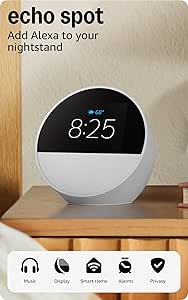 | Best for Bedside Routines | Display: 2.83-inch touchscreen, 240 × 320 px | Camera: None | Speaker: 1.73-inch full-range built-in speaker | VIEW LATEST PRICE | See Our Full Breakdown |
| Kasa Smart Wi-Fi Plug Mini EP10, 15A, 1-Pack |  | Best Practical Gift for Existing Devices | Model: EP10 | Maximum current: 15 A | Maximum wattage: 1800 W | VIEW LATEST PRICE | See Our Full Breakdown |
| Amazon Echo Glow Smart Nightlight for Kids |  | Best for a Child’s Alexa-Connected Room | Dimensions: 100 × 100 × 81 mm (3.9 × 3.9 × 3.2 in) | Weight: 245 g (8.6 oz) | Wi-Fi: 2.4 GHz, 802.11 b/g/n; does not support 5 GHz | VIEW LATEST PRICE | See Our Full Breakdown |
| smart home gift gadget | Dimensions | Weight | Wi-Fi |
|---|---|---|---|
| Amazon Echo Show 5 Smart Displ | 5.8 x 3.6 x 3.2 inches (147 x 91 x 82 mm) | 16.1 oz (456 g) | Dual-band 802.11a/b/g/n/ac |
| Amazon Echo Dot | 3.9 x 3.9 x 3.5 in (100 x 100 x 89 mm) | 10.7 oz (304 g) | Dual-band 802.11a/b/g/n/ac, 2.4 and 5 GHz |
| Amazon Echo Spot Smart Alarm C | 4.5 × 4.1 × 4.4 in (113 × 103 × 111 mm) | 14.3 oz (405 g) | Dual-band 802.11a/b/g/n/ac, 2.4 and 5 GHz |
| Kasa Smart Wi-Fi Plug Mini EP1 | — | — | — |
| Amazon Echo Glow Smart Nightli | 100 × 100 × 81 mm (3.9 × 3.9 × 3.2 in) | 245 g (8.6 oz) | 2.4 GHz, 802.11 b/g/n; does not support 5 GHz |
More Details on Our Top Picks
Amazon Echo Show 5 Smart Display with Alexa, Charcoal
I put the Echo Show 5 first because it is the most adaptable gift in this group. Its 5.5-inch touchscreen adds a visible, glanceable layer to Alexa: the recipient can check information, stream media, make video calls, and control compatible smart home devices from one compact unit. That range makes it easier to choose for someone whose exact routine I may not know. Compared with the Echo Dot, it offers a display and camera-based calls instead of concentrating on voice and audio alone.
The screen also makes the Show 5 a more natural fit for shared spaces where someone might want visual information without reaching for a phone. Its camera shutter and camera/microphone-off controls give the recipient options to limit camera use, a useful feature to mention when gifting a device that includes a camera. The product also uses recycled materials in its fabric and aluminum components, with recyclable packaging—details that may matter to a recipient who pays attention to materials.
That versatility comes with tradeoffs. The Show 5 is larger and more visually present than either the Dot or Spot, and its 2 MP camera and small speaker should be understood as built-in convenience features, not a substitute for dedicated video or audio equipment. It also depends on a compatible Wi-Fi setup and has stated Bluetooth limitations, including no support for PIN-required Bluetooth speakers. I would choose this over the Spot when the recipient will use calls or broader screen functions; I would choose the Spot for a simpler bedside clock with no camera.
Pros:- 5.5-inch touchscreen supports at-a-glance information, streaming, and video calls.
- Controls compatible smart home devices alongside its media and information features.
- Camera shutter and camera/microphone-off controls offer practical privacy choices.
- Uses recycled materials in specified components and recyclable packaging.
Cons:- The screen and camera are unnecessary extras for someone who only wants voice control and audio.
- Does not support ad-hoc or peer-to-peer Wi-Fi networks.
- Does not support PIN-required Bluetooth speakers; Mac OS X hands-free Bluetooth voice control is unsupported.
Best for: Someone who wants one compact Alexa device for a bedside table or counter, with a screen for information and media, video calls, and compatible smart home control.
Not ideal for: A recipient who wants an audio-only device, avoids screens or cameras, or needs support for ad-hoc Wi-Fi or a PIN-required Bluetooth speaker.
- Display:5.5-inch touchscreen
- Camera:2 MP with built-in shutter
- Speaker:1.75-inch full-range speaker
- Dimensions:5.8 x 3.6 x 3.2 inches (147 x 91 x 82 mm)
- Weight:16.1 oz (456 g)
- Wi-Fi:Dual-band 802.11a/b/g/n/ac
- Bluetooth:A2DP and AVRCP support
- Materials:Fabric made with 100% post-consumer recycled polyester yarn; aluminum made with 100% recycled aluminum
Our verdict“I recommend the Echo Show 5 as the most versatile gift here, provided the recipient wants a screen and is comfortable with a camera-equipped Alexa device.”
Amazon Echo Dot (5th Gen) Smart Speaker, Deep Sea Blue
The Echo Dot (5th Gen) is my pick for a recipient who wants smart home control without another screen. It plays music, podcasts, and audiobooks over Wi-Fi or Bluetooth, while Alexa handles voice assistance, alarms, timers, routines, and compatible device control. Its small speaker-first format is easy to place in a bedroom, kitchen, or office where a display would be more distraction than benefit.
Compared with the Echo Show 5, the Dot gives up visual information and video calls but keeps the interaction simple: ask for audio, set a timer, or trigger a routine. Its 1.6-inch full-range mono speaker suits everyday listening and voice responses; it is not the pick for someone who expects room-filling stereo sound. Motion and temperature sensors add potential to compatible routines, which gives it a bit more smart-home utility than a basic voice speaker.
The Dot is also distinct from the Echo Spot. The Spot presents time and bedside information on a small screen, while the Dot is better when the gift recipient values a display-free device for multiple rooms. The Dot supports Matter and Bluetooth Low Energy Mesh alongside Wi-Fi and Bluetooth, but compatibility still depends on the device and setup, not just the protocol list. Some skills and services may need subscriptions or other fees, and its eero coverage feature only applies with a compatible eero network. I would skip it for someone who wants a screen, or for a household that does not want Alexa listening for voice requests; the microphone-off button gives a control, but does not change the product’s voice-assistant design.
Pros:- Supports music, podcasts, and audiobooks over Wi-Fi or Bluetooth.
- Alexa handles hands-free timers, alarms, and compatible smart home routines.
- Motion and temperature sensors can support compatible routines.
- Includes a microphone-off button and multiple privacy controls.
Cons:- No display or camera, so it cannot provide the visual functions of the Echo Show 5 or Spot.
- eero Built-in requires a compatible eero router, linked accounts, and the eero app.
- Some skills and services may involve subscriptions or other fees; PIN-required Bluetooth speakers are unsupported.
Best for: A voice-assistant newcomer or existing Alexa household seeking a compact speaker for music, alarms, timers, routines, and compatible smart home controls.
Not ideal for: Someone who wants video calls or visual information, expects high-performance music playback, or does not want a voice-assistant device.
- Generation:5th Gen
- Speaker driver:1.6-inch full-range, mono
- Audio bandwidth:62 Hz–19 kHz (volume 6)
- Dimensions:3.9 x 3.9 x 3.5 in (100 x 100 x 89 mm)
- Weight:10.7 oz (304 g)
- Wi-Fi:Dual-band 802.11a/b/g/n/ac, 2.4 and 5 GHz
- Smart home compatibility:Wi-Fi, Bluetooth Low Energy Mesh, Matter
- eero Built-in coverage:Up to 1,000 sq. ft. with a compatible eero network
Our verdict“I would choose the Echo Dot for a flexible, display-free Alexa gift where voice control and everyday audio matter more than visual features.”
Amazon Echo Spot Smart Alarm Clock with Alexa, Glacier White
The Echo Spot gives a bedside table a more focused smart home gift than the Show 5. Its 2.83-inch customizable touchscreen can show the time, weather, and song titles, while Alexa manages alarms, music, podcasts, audiobooks, routines, and compatible device control. The absence of a camera is a meaningful distinction from the Show 5 for a recipient who would rather not keep a camera beside the bed.
As a clock, the Spot makes its purpose immediately clear. I would choose it over the Echo Dot when a recipient wants visual time and alarm information; I would choose the Dot when a screen is not wanted or when flexible voice-first use across more rooms matters more. Compared with the Show 5, the Spot is more bedside-specific and gives up the Show’s larger screen and video-call camera. Its built-in 1.73-inch speaker supports spoken content and listening, but its smaller display is not the right substitute for a general-purpose smart display.
The Spot’s microphone-off button and app controls provide ways to manage voice input, and the product uses 36% recycled materials. Its eero Built-in feature may be useful to an existing eero household, but it needs a compatible router and account linking, so I would not present it as a standalone network extender. It also does not support ad-hoc Wi-Fi networks, and Mac OS X hands-free voice control is unsupported. This is a considerate pick for a bedside routine; it is less suitable when the recipient expects a larger visual interface or an all-purpose screen.
Pros:- Customizable display can show the time, weather, and song titles.
- Built-in speaker supports voice-controlled music, podcasts, and audiobooks.
- Runs routines and controls compatible smart home devices.
- Includes a microphone-off button and uses 36% recycled materials.
Cons:- The 2.83-inch display is more limited for visual content than the Echo Show 5.
- eero extension needs a compatible eero router and linked account.
- Does not support ad-hoc Wi-Fi networks; Mac OS X hands-free voice control is unsupported.
Best for: Someone who wants an Alexa alarm clock with a customizable display, bedside audio, routines, and no built-in camera.
Not ideal for: A recipient who wants video calls, a large screen for media, or a display-free speaker for use in several rooms.
- Display:2.83-inch touchscreen, 240 × 320 px
- Camera:None
- Speaker:1.73-inch full-range built-in speaker
- Dimensions:4.5 × 4.1 × 4.4 in (113 × 103 × 111 mm)
- Weight:14.3 oz (405 g)
- Wi-Fi:Dual-band 802.11a/b/g/n/ac, 2.4 and 5 GHz
- Bluetooth:A2DP audio streaming and AVRCP voice control
- eero Built-in:Up to 1,000 sq. ft. additional coverage; requires a compatible eero router
Our verdict“I recommend the Echo Spot for a bedside-focused Alexa gift when a visible clock and camera-free design matter more than a larger screen.”
Kasa Smart Wi-Fi Plug Mini EP10, 15A, 1-Pack
The Kasa Smart Wi-Fi Plug Mini EP10 is the most direct gift in the roundup: it adds remote switching and schedules to a suitable device the recipient already owns. A lamp, for example, can be set to turn on or off on a schedule or controlled through the Kasa app, Alexa, or Google Assistant. Unlike the Echo gadgets, it is not a speaker or assistant; its value is in making an ordinary plug-in device easier to control.
For a smart home newcomer, that narrow purpose can be an advantage. I would choose the EP10 over the Echo Dot when the recipient already has a voice assistant and mainly wants automation for one device. I would choose the Dot instead when the recipient needs a device that supplies its own voice interface, audio, and routines. Because the plug supports both Amazon Alexa and Google Assistant without a hub, it is also the most flexible choice here for a household that has not settled on Alexa alone.
Its compact form is designed to leave the second outlet available on a standard wall socket, while scheduling, timers, and Away Mode make common use cases easy to understand. The 15 A, 1800 W maximum load is a firm limit, not a general invitation to connect any appliance; the buyer should check the attached device’s electrical requirements and use the plug only with a suitable load. It needs 2.4 GHz Wi-Fi, so someone with a network that does not provide that band may face a setup problem. It is a useful, practical present, but less impressive as a standalone gift for someone without a device they want to automate.
Pros:- Adds remote control, schedules, timers, and Away Mode to a suitable plug-in device.
- Works with Alexa and Google Assistant without a hub.
- Compact design leaves the second outlet available on a standard wall socket.
- UL-certified flame-retardant materials.
Cons:- Requires a 2.4 GHz Wi-Fi connection.
- The 15 A, 1800 W maximum load limits which devices are appropriate.
- A single plug offers a narrower gift experience than the Echo speakers and displays.
Best for: A household with a suitable plug-in lamp or device that wants schedules, timers, and remote control through Alexa, Google Assistant, or the Kasa app.
Not ideal for: Someone seeking an independent smart speaker or display, or a household without compatible 2.4 GHz Wi-Fi or a suitable device to connect.
- Model:EP10
- Maximum current:15 A
- Maximum wattage:1800 W
- Operating voltage:120 V AC
- Connectivity:2.4 GHz Wi-Fi
- Voice assistants:Amazon Alexa, Google Assistant
- App control:Kasa Smart, Tapo
- Certifications:UL, RoHS, FCC, IC
Our verdict“I recommend the EP10 for someone who already knows which suitable lamp or appliance they want to automate, especially in a mixed-assistant home.”
Amazon Echo Glow Smart Nightlight for Kids
The Echo Glow is the most specialized gift here and the one I would choose when the recipient is a child or family looking for a colorful room light tied to Alexa routines. It can change color and brightness through a compatible Alexa device, and its color-changing timers and lighting cues can support reminders, gaming, or winding-down routines. At 100 lumens, it is a nightlight-style accent rather than a replacement for a room’s main lighting.
Compared with the Kasa EP10, Glow changes the atmosphere instead of controlling a separate plug-in device. Compared with the Echo Dot or Echo Show 5, it provides neither a speaker nor a voice interface of its own. That distinction matters when choosing a gift: a compatible Alexa device or the Alexa app is needed for control, and Glow does not work with Google Assistant or other smart hubs. Its 2.4 GHz-only connection is another limitation to check against the recipient’s network.
One practical benefit is that Glow has no microphone or speaker, so it does not act as an independent listening device. Still, it relies on the Alexa ecosystem for voice control, which makes it a poor fit for a household that avoids Alexa or wants a standalone nightlight with simple on-device controls. I would place it below the Echo speakers, display, and Kasa plug because its useful role is narrower, not because its purpose is unclear. When the recipient already has Alexa and wants playful lighting cues for a child’s room, that focused use can make it a more personal gift than a general smart speaker.
Pros:- Alexa can control color and brightness through a compatible device.
- Color-changing timers and lighting cues support routines and reminders.
- No built-in microphone or speaker.
- Designed for use as a nightlight, with warm white and RGB LEDs.
Cons:- Requires a compatible Alexa device or the Alexa app for control.
- Works only on 2.4 GHz Wi-Fi and does not support other voice assistants or smart hubs.
- Its 100-lumen output is not a substitute for a room’s main light.
Best for: A family with an Alexa-enabled device seeking a color-changing nightlight and lighting cues for a child’s room or routine.
Not ideal for: A household without Alexa, a recipient who needs a standalone lamp or room light, or anyone using only Google Assistant or another smart home platform.
- Dimensions:100 × 100 × 81 mm (3.9 × 3.9 × 3.2 in)
- Weight:245 g (8.6 oz)
- Wi-Fi:2.4 GHz, 802.11 b/g/n; does not support 5 GHz
- Light output:100 lumens
- Light type:2600K warm white and RGB color LEDs
- Compatibility:Alexa-enabled devices and Alexa app
- Voice assistants:Alexa only; no microphones or speakers
- Age range:Ages 3 and up
Our verdict“I recommend Echo Glow only when the recipient already uses Alexa and would enjoy a dedicated, colorful nightlight rather than a general smart home hub.”
How We Picked
I ranked these gadgets by how well they work as gifts for everyday smart home use, not by how many features each one can list. I looked at the role each device can play in a home, how much setup or compatible equipment the recipient needs, and whether the main benefit is clear enough to make the gift easy to understand. A product earns a higher position when it can serve more than one common need without becoming difficult to place or configure.
Versatility and recipient fit shape the order. The Echo Show 5 covers visual information, calls, entertainment, and compatible device control, so it is the broadest all-around gift here. The Echo Dot is less visually capable but easier to place and gives voice-first households a straightforward route to music, alarms, routines, and control. The Echo Spot earns a separate role rather than competing directly with the Show 5: its alarm-clock design and lack of a camera make it a more focused bedside option.
I also weighed compatibility and limitations, since a gift can disappoint if it assumes a network, assistant, or device the recipient does not have. The Kasa plug works with Alexa and Google Assistant and needs no hub, but it relies on 2.4 GHz Wi-Fi and only controls an attached device within its electrical limits. Echo Glow needs an Alexa-enabled device or the Alexa app and is limited to Alexa. The Echo Dot and Spot can extend a compatible eero network, but that function requires the right eero setup; I do not treat it as a general Wi-Fi upgrade.
Finally, I considered privacy controls, physical footprint, and practical tradeoffs rather than assuming a screen or connected feature is always an advantage. The Show 5 has a camera shutter and controls to turn off its camera and microphone; the Spot has no camera; the Dot includes a microphone-off button. Echo Glow has no microphone or speaker, but it depends on another Alexa device for voice control. These distinctions matter when choosing a present for a household with specific expectations about privacy, space, or smart home compatibility.
Factors to Consider When Choosing Smart Home Gift Gadgets
I would choose a smart home gift by starting with the recipient’s routines and devices, rather than assuming that the most feature-rich gadget will be the best present. The biggest distinctions in this group are screen versus speaker, standalone assistant versus accessory, and broad use versus a specific task. These questions help narrow the choice before comparing individual specifications.
Start with the Recipient’s Existing Smart Home
First, check whether the recipient already uses Alexa, Google Assistant, or another smart home system. The Kasa EP10 supports Alexa and Google Assistant, which gives it an advantage in a mixed-assistant household, though it still needs 2.4 GHz Wi-Fi. The Echo Show 5, Echo Dot, Echo Spot, and Echo Glow are more closely tied to Alexa. That can be a sensible match for someone who already has Alexa devices, but it is a less flexible surprise for a household invested elsewhere.
The accessory picks call for an additional check. Echo Glow needs a compatible Alexa device or the Alexa app to control its light, so it is not a complete smart home system on its own. The Kasa plug needs a suitable device to connect to it. By contrast, the Dot, Spot, and Show 5 each bring an Alexa voice interface along with their main hardware. If I cannot confirm what the recipient owns, the Echo Show 5 or Echo Dot is a more self-contained choice than Glow or the plug, provided Alexa is welcome in the home.
Decide Whether a Screen Helps or Gets in the Way
A screen is useful when the recipient wants time, weather, visual information, or video calls. The Echo Show 5 is the most versatile display in this lineup, with a larger touchscreen and camera-based calls. The Echo Spot is better understood as an alarm clock with a small display: it presents bedside information and has no camera, but does not match the Show 5’s broader visual role.
If the person mainly wants music, timers, alarms, and voice control, I would compare the Echo Dot rather than paying attention to a screen they may rarely use. A screen also takes up visible space and may be unwelcome in a room where the recipient prefers fewer connected displays. The Show 5’s privacy shutter is a helpful control, while the Spot’s lack of a camera may make it the simpler bedside gift for someone who prefers not to have one near their bed.
Match the Device to the Gift’s Main Job
For a broad introduction to Alexa and smart home controls, I would choose between the Echo Show 5 and Echo Dot. The Show 5 is the better fit when visual features matter; the Dot is the more compact, display-free option for voice and audio. If the primary job is waking up and seeing the time, the Echo Spot has a clearer bedside identity. These devices overlap in voice assistance, but their physical interfaces make them feel different in daily use.
For an existing lamp or other suitable plug-in device, the Kasa EP10 gives the recipient a direct automation benefit without adding another speaker. For a child’s room, Echo Glow offers a more playful lighting role, but only when Alexa compatibility is already in place. I would avoid giving an accessory without knowing the intended use: a smart plug that has no suitable device to control, or a Glow that cannot connect to the recipient’s setup, may sit unused despite being straightforward hardware.
Check Wi-Fi and Electrical Requirements
Network details can decide whether a connected gift is easy to set up. The Echo Show 5, Echo Dot, and Echo Spot list dual-band Wi-Fi support, while the Kasa EP10 and Echo Glow require 2.4 GHz Wi-Fi. A recipient may need to check router settings or network availability before setup. The Show 5 and Spot also do not support ad-hoc Wi-Fi networks, so they are not the right choices for a network environment built around that connection type.
For the Kasa plug, the recipient should check the attached device’s electrical requirements against its 15 A and 1800 W maximum. A compact plug is not suitable for every appliance just because the plug fits a socket. The Echo devices also list Bluetooth limitations, such as lack of support for PIN-required Bluetooth speakers on the Show 5 and Dot. I would treat compatibility as part of gift selection, not an afterthought, especially when the recipient has an unusual speaker or network arrangement.
Consider Privacy, Space, and Setup
Smart home gifts occupy personal spaces, so controls and placement matter. The Show 5 has a camera shutter and controls to turn off its camera and microphone. The Echo Spot has no camera, and the Dot includes a microphone-off button. Echo Glow has neither a microphone nor a speaker but still relies on the Alexa app or another Alexa device for control. These are different privacy and interaction profiles, not interchangeable descriptions of a single kind of device.
Also consider how much room the recipient has and whether they will want to set up an app or account. The Dot and Spot are compact smart speakers; the Show 5 takes more space because it includes a display. The plug is physically small but requires app and network setup, while Glow must be paired with an Alexa environment. Some eero features on the Echo Dot and Spot require a compatible eero router and linked accounts. I would not count that network extension as a benefit unless I knew the recipient had the matching system.
Frequently Asked Questions
Which smart home gift is the easiest fit when I do not know the recipient’s routines?
I would start with the Echo Show 5 if the recipient is comfortable with Alexa and a screen, because it combines visual information, media, calls, and compatible smart home control. If a camera or display may be unwelcome, the Echo Dot is a simpler voice-first alternative. Neither is universal: checking whether the household uses Alexa is still the most useful step before choosing.
Should I choose the Echo Show 5 or the Echo Spot?
Choose the Echo Show 5 for a more versatile touchscreen, video calls, and a broader mix of visual functions. Choose the Echo Spot when the gift is specifically for a bedside table and the recipient wants a customizable clock display without a camera. The Spot’s smaller screen is less suited to general visual media, while the Show 5 occupies more space and includes a camera with a built-in shutter.
Is the Echo Dot a good gift for someone who already has smart home devices?
It can be, especially if the recipient wants a voice interface for music, alarms, timers, routines, and compatible device control. The Dot supports several smart home connection types, but the actual devices and setup still need to be compatible. It is less suitable for someone who expects a display, video calling, or a speaker intended for more demanding music listening.
What should I check before giving someone the Kasa EP10?
Check that the recipient has 2.4 GHz Wi-Fi, a suitable plug-in device to automate, and electrical requirements within the plug’s 15 A and 1800 W maximum. The EP10 works with Alexa and Google Assistant and does not need a hub, making it a useful choice for many existing setups. It is not a speaker or standalone assistant, so its usefulness depends on the device connected to it.
Does Echo Glow work without an Alexa device?
Echo Glow needs a compatible Alexa device or the Alexa app for control, and it does not support other voice assistants or smart hubs. Its own hardware includes no microphone or speaker, so it cannot respond to voice requests by itself. I would give it to a household that already uses Alexa and wants a color-changing nightlight, rather than as a general smart lighting starter for an unknown setup.
Conclusion
For the broadest range of gift uses, I would choose the Echo Show 5, as long as the recipient wants a touchscreen and is comfortable with Alexa and a camera-equipped device. For someone who prefers straightforward voice control and everyday audio, the Echo Dot is the better match. If the gift is meant for a bedside routine and the recipient prefers no camera, I would pick the Echo Spot.
When I know the recipient already has a suitable lamp or other device to automate, the Kasa Smart Wi-Fi Plug Mini EP10 is the most practical choice, with support for both Alexa and Google Assistant. For a child’s Alexa-connected room, the Echo Glow offers a more personal lighting-focused gift, though its narrow role and Alexa-only control make it a poor pick for households outside that ecosystem. The right choice is the one that fits the person’s existing setup and daily habits—not simply the one with the longest feature list.