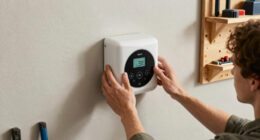
Smart home automation hubs are the command centers that tie your lights, locks, sensors, and thermostats into one coherent system, and the right one depends heavily on which wireless protocols your devices speak and how much control you want. For most buyers, the Amazon Echo Hub (newest model) is the best overall pick thanks to its intuitive 8-inch touchscreen, Alexa+ integration, and effortless setup. If you prefer a protocol-first approach, the Hubitat Elevation C-8 Pro offers local automation power for enthusiasts, while the Aqara Hub M3 stands out as a versatile Matter controller with built-in IR for controlling older appliances. The main tradeoff in this category is convenience versus control: cloud-based panels like the Echo Hub are easy to use but depend on your internet connection, whereas local hubs like Hubitat keep everything running offline but demand more technical effort. Continue reading for the full breakdown of all nine hubs.

Get home appliances delivered free with Prime
- Fast, free delivery on millions of items
- Prime Video, Amazon Music and more included
- Member-only deals all year
Complete the kit


Key Takeaways
- Protocol support was the single biggest differentiator: hubs combining Zigbee, Z-Wave, and Matter (amazon.com/dp/B0CR4G1G8M?tag=smartthermostathub-20&ascsubtag=dc-1080230″ target=”_blank” rel=”nofollow sponsored noopener”>Hubitat C-8 Pro, Aeotec, SmartThings) outlast single-protocol hubs as your device collection grows.
- The touchscreen panels (Echo Hub, both models) and the radio hubs (Aeotec, Hubitat, Aqara) solve different problems — one replaces your wall thermostat spot as a control surface, the other silently coordinates devices behind the scenes.
- The Tuya multi-mode gateway only pays off if your devices are already Tuya-based; it locked out everything else in the comparison.
- Matter controller support varied widely, with the Aqara M3 and Aeotec Smart Home Hub 2 offering the most future-proof adoption, while the SmartThings 3rd-gen hub lags behind newer Matter-native hardware.
- The refurbished Echo Hub and the newest Echo Hub are functionally close, making the refurbished unit the smarter value play if cosmetic condition is acceptable.
| Amazon Echo Hub 8” Smart Home Control Panel with Alexa (Refurbished) |  | Best for Hands-On Household Control | Display: 8 inches | Connectivity: Wi-Fi, Bluetooth, Zigbee, Matter, Sidewalk, Thread | Compatibility: Thousands of Alexa-compatible devices | VIEW LATEST PRICE | See Our Full Breakdown |
| Aqara Smart Hub M100 for Home Automation, Matter Controller, Wi-Fi |  | Best Compact Aqara Starter Hub | Protocols: Aqara Zigbee, Thread, Wi-Fi 6 | Device support: Up to 20 Zigbee and 20 Thread devices | Wi-Fi: 2.4 GHz Wi-Fi 6 | VIEW LATEST PRICE | See Our Full Breakdown |
| Aeotec Smart Home Hub, Z-Wave, Zigbee, Matter Gateway, Compatible with Alexa and Google Assistant |  | Best for North American Z-Wave Homes | Protocols: Z-Wave, Zigbee, Matter | Connectivity: Wi-Fi, Ethernet | Voice assistant compatibility: Amazon Alexa, Google Assistant | VIEW LATEST PRICE | See Our Full Breakdown |
| Aqara Smart Home Hub M3 with Matter Controller and IR |  | Best for Advanced Aqara and Matter Setups | Protocols: Zigbee, Thread, Wi-Fi, Bluetooth | Device support: Up to 127 Zigbee and 127 Thread devices | Connectivity: PoE, USB-C, 2.4/5 GHz Wi-Fi | VIEW LATEST PRICE | See Our Full Breakdown |
| Aeotec Smart Home Hub 2 – V4, Zigbee & Matter Gateway, Compatible with Alexa & Google Assistant |  | Best for Streamlined Matter and Zigbee Setups | Standards: Matter, Zigbee | Connectivity: Wi-Fi, Ethernet | Compatibility: SmartThings, Amazon Alexa, Google Assistant | VIEW LATEST PRICE | See Our Full Breakdown |
| SmartThings Hub 3rd Generation – Home Automation Hub |  | Best Ecosystem Pick | Manufacturer: Samsung | Protocols: Zigbee, Z-Wave | Voice Assistant Compatibility: Alexa, Google Home | VIEW LATEST PRICE | See Our Full Breakdown |
| Smart Multi-Mode Gateway: ZigBee 3.0 & Bluetooth & Mesh Hub |  | Best Budget Starter Hub | Protocols: ZigBee 3.0, Bluetooth mesh, Wi-Fi | App: Tuya Smart Life | Voice Control: Alexa, Google Home | VIEW LATEST PRICE | See Our Full Breakdown |
| Hubitat Elevation C-8 Pro Smart Home Hub |  | Best for Power Users | Protocols: Matter 1.5, Z-Wave 800 Series (Long Range), Zigbee 3.0, Bluetooth | Voice Assistant Compatibility: Alexa, Google Home, Apple HomeKit | Processing: Local (no subscription required) | VIEW LATEST PRICE | See Our Full Breakdown |
| Amazon Echo Hub (newest model), 8″ Smart Home Control Panel with Alexa+ |  | Best Wall-Mounted Control Panel | Display: 8 inches | Protocols: Zigbee, Matter, Thread, Sidewalk, Wi-Fi, Bluetooth | Platform: Alexa+, Ring integration | VIEW LATEST PRICE | See Our Full Breakdown |
| smart home automation hub | Protocols |
|---|---|
| Amazon Echo Hub 8” Smart Home | — |
| Aqara Smart Hub M100 for Home | Aqara Zigbee, Thread, Wi-Fi 6 |
| Aeotec Smart Home Hub | Z-Wave, Zigbee, Matter |
| Aqara Smart Home Hub M3 with M | Zigbee, Thread, Wi-Fi, Bluetooth |
| Aeotec Smart Home Hub 2 | — |
| SmartThings Hub 3rd Generation | Zigbee, Z-Wave |
| Smart Multi-Mode Gateway: ZigB | ZigBee 3.0, Bluetooth mesh, Wi-Fi |
| Hubitat Elevation C-8 Pro Smar | Matter 1.5, Z-Wave 800 Series (Long Range), Zigbee 3.0, Bluetooth |
| Amazon Echo Hub | Zigbee, Matter, Thread, Sidewalk, Wi-Fi, Bluetooth |
More Details on Our Top Picks
Amazon Echo Hub 8” Smart Home Control Panel with Alexa (Refurbished)
The Echo Hub is the clearest pick here for households that want a visible control point for lights, cameras, and locks, with both touch controls and Alexa voice commands. Its 8-inch screen and customizable dashboards make everyday control more direct than the screenless Aqara M100, which is better suited to discreet, app-managed automations. Broad Alexa device compatibility also makes this a practical fit for homes with a mix of brands. The tradeoff is that this refurbished panel depends on separately purchased mounting accessories for a wall installation, and some functions require other compatible devices. Buyers should also factor in its refurbished condition. Choose it when a shared, at-a-glance interface matters more than keeping the hub compact and out of sight.
Pros:- Touchscreen dashboards put common device controls in one visible place
- Voice control and broad Alexa device compatibility suit mixed-device households
- Supports Zigbee, Matter, and Thread alongside Wi-Fi and Bluetooth
- Uses 27% recycled materials and includes multiple privacy and security features
Cons:- Wall-mount accessories are not included, and the tabletop stand is sold separately
- Refurbished condition may mean generic packaging
- Some features depend on additional compatible devices
Best for: Alexa households that want a shared wall or tabletop touchscreen for controlling devices across several rooms
Not ideal for: Buyers seeking a small, screenless hub or a ready-to-mount new device without separate accessories
- Display:8 inches
- Connectivity:Wi-Fi, Bluetooth, Zigbee, Matter, Sidewalk, Thread
- Compatibility:Thousands of Alexa-compatible devices
- Installation:Wall mount or tabletop stand; stand sold separately
- Recycled materials:27%
- Condition:Refurbished
Our verdict“Choose the Echo Hub if your household will benefit from a shared Alexa touchscreen more than from a compact, hidden automation hub.”
Aqara Smart Hub M100 for Home Automation, Matter Controller, Wi-Fi
The M100 suits buyers building around Aqara Zigbee devices who want a small hub that can also connect Thread devices and support local automation. Compared with the larger-capacity Aqara M3, it supports up to 20 Zigbee and 20 Thread devices, so it makes more sense for a modest setup than a sprawling one. Local execution can keep supported routines running without an internet connection, while Wi-Fi 6 and WPA3 add modern network support. Its main limitation is the Zigbee boundary: third-party Zigbee devices are not supported. The USB-A power connection is flexible, but the required power adapter is not included, and some automations rely on cloud connectivity. Pick it for a focused Aqara-led system, not as a universal Zigbee bridge.
Pros:- Supports Aqara Zigbee devices and Thread devices in one compact hub
- Local execution can keep supported automations running without internet
- Wi-Fi 6 and WPA3 provide current wireless networking and security support
- Adjustable shaft rotates through a 210-degree range
Cons:- Zigbee support is limited to Aqara devices
- 5V, 0.5A power adapter is not included
- Some automations require cloud connectivity
Best for: Aqara users starting a small home setup who want local routines and Thread support in a compact hub
Not ideal for: Buyers with third-party Zigbee devices or plans to connect substantially more than 20 devices per protocol
- Protocols:Aqara Zigbee, Thread, Wi-Fi 6
- Device support:Up to 20 Zigbee and 20 Thread devices
- Wi-Fi:2.4 GHz Wi-Fi 6
- Security:WPA3
- Power:USB-A; 5V, 0.5A power adapter not included
- Automation:Local execution; some automations use cloud support
- Adjustable shaft:210 degrees
Our verdict“Choose the M100 for a small Aqara-centered system with local routines, and skip it if third-party Zigbee support is a requirement.”
Aeotec Smart Home Hub, Z-Wave, Zigbee, Matter Gateway, Compatible with Alexa and Google Assistant
This Aeotec hub stands out for buyers who want Z-Wave alongside Zigbee and Matter in a single SmartThings-managed system. That makes it a stronger match for a mixed-protocol setup than the newer Aeotec Smart Home Hub 2 – V4, which does not support Z-Wave. Wi-Fi and Ethernet give buyers a choice of connection, and the stated local automation support can reduce dependence on an internet connection for supported routines. The boundaries are equally clear: it is designed primarily for North America, and setup and management require the SmartThings app. Buyers who do not need Z-Wave or who want a touchscreen should compare it with the Echo Hub. This is a gateway for protocol coverage, not a central display for the household.
Pros:- Combines Z-Wave, Zigbee, and Matter support
- Offers Wi-Fi and Ethernet connection options
- Supports local automations for supported routines
- Works with Alexa and Google Assistant
Cons:- Designed primarily for North American use, limiting regional fit
- Requires the SmartThings app for setup and management
- Does not provide the Echo Hub’s touchscreen control panel
Best for: North American SmartThings users combining Z-Wave and Zigbee devices who want Alexa or Google Assistant compatibility
Not ideal for: Buyers outside North America, or those who want to manage their hub without the SmartThings app
- Protocols:Z-Wave, Zigbee, Matter
- Connectivity:Wi-Fi, Ethernet
- Voice assistant compatibility:Amazon Alexa, Google Assistant
- Setup and management:SmartThings app required
- Automation:Local automation support
- Supported region:Primarily North America
Our verdict“Choose this Aeotec hub if your North American SmartThings setup needs Z-Wave and Zigbee under one gateway.”
Aqara Smart Home Hub M3 with Matter Controller and IR
For a larger, more involved setup, the M3 offers far more headroom than the Aqara M100: it supports up to 127 Zigbee and 127 Thread devices, and combines local automation with wired PoE or USB-C and dual-band Wi-Fi. Its built-in IR blaster adds control for compatible infrared appliances, a useful extra that the other hubs here do not list. Matter support and compatibility with Apple HomeKit, Alexa, SmartThings, and Home Assistant give it wider ecosystem reach than an Aqara-only Zigbee bridge. The tradeoff is a more demanding placement and power setup: the product specifies a 6-to-19-foot router distance for optimal connectivity, and the USB-C power adapter is not included. Some cloud features still need internet access, so this premium-capability hub fits planners willing to tune their setup.
Pros:- Supports up to 127 Zigbee and 127 Thread devices
- Built-in IR blaster adds control for compatible infrared appliances
- Offers local automation and 8GB encrypted local storage
- Works with Apple HomeKit, Alexa, SmartThings, and Home Assistant
Cons:- USB-C power adapter is not included
- Placement guidance calls for 6 to 19 feet from the router for optimal connectivity
- Some cloud-based features require internet access
Best for: Advanced smart-home builders who want high device capacity, local automation, IR control, and Matter ecosystem links
Not ideal for: Buyers who want a simple plug-in starter hub or do not want to manage placement and separate power requirements
- Protocols:Zigbee, Thread, Wi-Fi, Bluetooth
- Device support:Up to 127 Zigbee and 127 Thread devices
- Connectivity:PoE, USB-C, 2.4/5 GHz Wi-Fi
- Security:WPA3
- Local storage:8GB end-to-end encrypted
- Compatibility:Apple HomeKit, Alexa, SmartThings, Home Assistant
- Infrared:Built-in IR blaster
- Warranty:12 months
Our verdict“Choose the M3 for a high-capacity Aqara system that benefits from local control and IR, provided its setup requirements fit your home.”
Aeotec Smart Home Hub 2 – V4, Zigbee & Matter Gateway, Compatible with Alexa & Google Assistant
The Hub 2 – V4 is a straightforward choice for buyers who want Matter and Zigbee, local processing, and a choice of Wi-Fi or Ethernet without adding a screen or specialized Aqara features. Compared with the older Aeotec Smart Home Hub in this lineup, its defining omission is Z-Wave; that makes this model a better fit for a newer Matter-and-Zigbee device mix, but a poor replacement for a system built around Z-Wave accessories. Local processing can keep supported automations responsive during internet outages, while Alexa and Google Assistant compatibility offers familiar voice control. The supplied data gives less detail about device capacity and management than the Aqara hubs, so buyers should check that their particular devices fit the SmartThings ecosystem before choosing it.
Pros:- Supports Matter and Zigbee
- Local processing supports automations during internet outages
- Can connect over Wi-Fi or Ethernet
- Compatible with SmartThings, Alexa, and Google Assistant
Cons:- Does not support Z-Wave
- Limited to compatible devices within its ecosystem
- Provided product details do not specify device capacity
Best for: SmartThings households building around Matter and Zigbee devices who want local routines and wired or wireless networking
Not ideal for: Homes with Z-Wave devices or buyers whose device compatibility depends on a clearly stated capacity or broad protocol list
- Standards:Matter, Zigbee
- Connectivity:Wi-Fi, Ethernet
- Compatibility:SmartThings, Amazon Alexa, Google Assistant
- Local processing:Yes
- Z-Wave support:No
- Device capacity:Not specified in the provided product data
Our verdict“Choose the Hub 2 – V4 for a SmartThings setup centered on Matter and Zigbee, but keep the older Aeotec hub in view if you need Z-Wave.”
SmartThings Hub 3rd Generation – Home Automation Hub
The SmartThings Hub 3rd Generation earns its place as the most ecosystem-friendly option in this lineup. With native support for both Zigbee and Z-Wave, it pairs with a far wider universe of sensors and switches than the Tuya-only gateway also featured here. Its polished smartphone app makes routine-building approachable for people who don’t want to tinker, which is where it beats the more technical Hubitat Elevation C-8 Pro. The tradeoff is cloud dependence — unlike the Hubitat, automations can slow or stall when Samsung’s servers hiccup, and connectivity dropouts are a recurring complaint. Compared with the Aeotec hubs in this roundup, this model is effectively the same SmartThings platform in older hardware, so buyers wanting the newest radios should look there instead. Still, for anyone already invested in Samsung’s ecosystem, it remains the path of least resistance.
Pros:- Native Zigbee and Z-Wave radios for broad third-party device compatibility
- Mature, easy-to-learn SmartThings app for routines and remote monitoring
- Works alongside Alexa and Google Home voice control
- Built-in motion sensing and battery backup add resilience
Cons:- Cloud-reliant platform means automations can suffer outages and lag
- Older hardware generation compared with newer SmartThings-compatible hubs like the Aeotec models
- Occasional connectivity issues reported with some devices
Best for: Households already using Samsung SmartThings devices or Galaxy phones who want broad protocol support with a mature app
Not ideal for: Buyers who want fast, internet-independent automations — this hub leans on Samsung’s cloud and can lag or disconnect
- Manufacturer:Samsung
- Protocols:Zigbee, Z-Wave
- Voice Assistant Compatibility:Alexa, Google Home
- Dimensions:5 x 5 x 1.2 inches
- Weight:8 ounces
- Power Source:Battery backup with AC adapter
- Special Features:Motion sensor, wall mountable
- Warranty:1 Year Limited
Our verdict“Choose this hub if you live in Samsung’s world and want the easiest route to a mixed Zigbee/Z-Wave smart home; skip it if offline reliability is your priority.”
Smart Multi-Mode Gateway: ZigBee 3.0 & Bluetooth & Mesh Hub
This Tuya-based gateway is the cheapest way to get a real automation hub, and that is exactly its role in this roundup: a low-commitment entry point. Handling up to 128 devices over ZigBee 3.0 and Bluetooth mesh, it out-scales what most beginners will ever need, and the Smart Life app keeps setup simple compared with the menu-driven complexity of the Hubitat Elevation C-8 Pro. The catch is walled-garden compatibility — it only speaks to Tuya/Smart Life devices, so the Z-Wave sensors and switches that work with SmartThings or Aeotec hubs simply won’t connect here. It is also entirely Wi-Fi dependent; lose internet and your remote control goes with it, since nothing runs locally like it does on the Hubitat. For a first apartment setup built from budget Tuya bulbs and plugs, though, those limits rarely bite.
Pros:- Handles up to 128 devices on a single gateway
- Combines ZigBee 3.0 and Bluetooth mesh in one inexpensive unit
- Simple Smart Life app setup friendly to beginners
- Voice control through both Alexa and Google Home
Cons:- Locked to Tuya/Smart Life compatible devices only
- Requires a stable Wi-Fi connection with no local fallback
- No Z-Wave support, unlike SmartThings or Aeotec options in this guide
Best for: First-time smart home builders assembling a setup from affordable Tuya/Smart Life bulbs, plugs, and sensors
Not ideal for: Owners of Z-Wave devices or mixed-brand ecosystems — this gateway refuses anything outside the Tuya family
- Protocols:ZigBee 3.0, Bluetooth mesh, Wi-Fi
- App:Tuya Smart Life
- Voice Control:Alexa, Google Home
- Max Devices Supported:128
- Device Compatibility:Tuya/Smart Life devices only
- Connection Requirement:Stable Wi-Fi network
Our verdict“A sensible, wallet-friendly first hub if your entire device list is Tuya-based; anyone with Z-Wave gear or mixed brands should pay more for SmartThings or Aeotec instead.”
Hubitat Elevation C-8 Pro Smart Home Hub
The Hubitat Elevation C-8 Pro is the enthusiast’s choice in this batch, and the gap between it and everything else here is architectural: automations run locally, so lights and locks respond instantly whether or not the internet is alive. That is something neither the cloud-tethered SmartThings Hub nor the Wi-Fi-dependent Tuya gateway can claim. Support for Matter 1.5, Z-Wave 800 Series with Long Range, and Zigbee 3.0, plus external antennas, gives it the reach and radio flexibility to cover larger homes where other hubs drop off. The cost of that power is a steeper learning curve — rule-building assumes you know what you want and are willing to configure it, a sharp contrast to the Echo Hub’s tap-and-go dashboard. There is no subscription for full functionality, which offsets the higher hardware price over time.
Pros:- Local processing delivers fast, privacy-preserving automations that survive internet outages
- Modern radio stack: Z-Wave 800 with Long Range, Zigbee 3.0, and Matter 1.5
- External antennas extend wireless coverage for larger properties
- No subscription required for full platform features
Cons:- Setup and rule creation are complex compared with app-first hubs like SmartThings or Echo Hub
- Protocol list excludes some device types, so compatibility checking is essential
- No built-in screen or simple dashboard out of the box
Best for: Tinkerers and large-home owners who want fast, private, fully local automations across Z-Wave, Zigbee, and Matter
Not ideal for: Casual users who want a plug-in-and-forget experience — the interface and rule engine demand real setup effort
- Protocols:Matter 1.5, Z-Wave 800 Series (Long Range), Zigbee 3.0, Bluetooth
- Voice Assistant Compatibility:Alexa, Google Home, Apple HomeKit
- Processing:Local (no subscription required)
- External Antennas:2 (Z-Wave and Zigbee)
- Dimensions:3.23 x 2.95 x 0.67 inches
- Weight:0.16 lbs
Our verdict“If you treat smart home automation as a hobby and refuse to depend on anyone’s cloud, this is the hub to buy; everyone else should start simpler with SmartThings or the Echo Hub.”
Amazon Echo Hub (newest model), 8″ Smart Home Control Panel with Alexa+
The Echo Hub plays a different position than every other hub here: it is a visual command center, not just an invisible radio box. Its 8-inch touchscreen dashboard lets household members tap lights, view camera feeds, and trigger routines without opening an app — a family-friendly angle the headless SmartThings and Hubitat hubs cannot match. With Zigbee, Matter, Thread, and Sidewalk on board, protocol coverage is respectable, though it lacks the Z-Wave support that makes SmartThings and the Aeotec hubs so flexible with legacy security sensors. The real tradeoffs are financial and structural: wall mounting and Power-over-Ethernet need separate purchases, and unlocking full Ring camera features requires a subscription. Compared with the Aqara M3 elsewhere in this roundup, the Echo Hub wins on interface polish but ties you firmly to Alexa’s ecosystem.
Pros:- Intuitive 8-inch touchscreen dashboard replaces phone apps for daily control
- Broad protocol support including Matter, Thread, Zigbee, and Sidewalk
- Strong privacy controls including a physical mic-off button
- Built with recycled materials and responsible packaging
Cons:- Wall mount and PoE adapter sold separately
- Full Ring security features require a paid subscription
- No Z-Wave support, limiting compatibility with older security sensors
Best for: Alexa-centric households, especially those with Ring cameras, who want a wall-mounted touchscreen the whole family can use
Not ideal for: Z-Wave device owners and buyers avoiding subscriptions or extra accessory costs — the required add-ons stack up quickly
- Display:8 inches
- Protocols:Zigbee, Matter, Thread, Sidewalk, Wi-Fi, Bluetooth
- Platform:Alexa+, Ring integration
- Controls:Customizable dashboard, voice commands, on-screen media controls
- Privacy:Mic off button, multiple privacy controls
- Materials:27% recycled materials; 97% recycled or responsibly sourced packaging
Our verdict“Buy the Echo Hub if you want a beautiful, always-visible control panel for an Alexa and Ring home; skip it if you run Z-Wave devices or dislike add-on costs.”

How We Picked
I evaluated each hub against five buyer-relevant criteria: protocol compatibility (Zigbee, Z-Wave, Wi-Fi, Bluetooth, Matter, and IR), setup and usability, local versus cloud automation, ecosystem openness, and long-term value. A hub that only talks to one brand’s devices ranks lower than one that bridges multiple ecosystems, because most households accumulate a mix of devices over time. Hubs that keep automations running locally scored higher for reliability, since they don’t fail when the internet drops.
The ranking reflects a simple philosophy: the best hub is the one that matches how you actually live with it. Touchscreen control panels rank highly for mainstream households that want a visible command center, while protocol-rich hubs like the Hubitat Elevation C-8 Pro rank highly for tinkerers despite a steeper learning curve. I penalized hubs with restrictive device ecosystems and rewarded those that worked cleanly with both Alexa and Google Assistant.
Factors to Consider When Choosing Smart Home Automation Hubs
Choosing a smart home hub is less about finding the most powerful device and more about matching the hub to the devices you already own — or plan to buy. These are the factors that actually change how satisfied you’ll be six months from now.Match the Hub to Your Existing Devices First
The most common mistake buyers make is purchasing a hub before auditing their devices. If your sensors and bulbs are Zigbee-based, a Wi-Fi-only hub will leave half your setup orphaned; if you’ve invested in Z-Wave locks, you need a hub with a Z-Wave radio, which immediately narrows the field to options like the Aeotec Smart Home Hub or Hubitat Elevation. Write down every device you own and the protocol it uses before comparing hubs, because no hub supports everything. This one step eliminates more buyer’s remorse than any spec sheet comparison. Buyers starting from scratch have more freedom and should prioritize Matter-compatible hubs, since Matter is the emerging standard that most new devices will support.
Local Control Versus Cloud Dependence
Hubs split into two philosophies: cloud-reliant hubs that process automations on company servers, and local hubs that run everything on the hardware itself. Cloud hubs are typically easier to set up and update automatically, but your automations die the moment your internet does — and if the manufacturer shuts down its cloud service, your hub becomes a paperweight. Local-first hubs like the Hubitat Elevation C-8 Pro keep lights, locks, and scenes responding even during outages and execute rules faster because signals don’t travel to a server and back. The tradeoff is genuine: local hubs usually demand more configuration effort and a steeper learning curve. If you rely on your smart home for security-critical functions like door locks and motion alerts, local control should weigh heavily in your decision.
Touchscreen Panel or Behind-the-Scenes Hub
Many buyers don’t realize these are two different products answering the same search. A touchscreen panel like the Echo Hub gives household members a physical place to tap lights, view camera feeds, and trigger scenes — particularly useful for kids, guests, or anyone who doesn’t want to talk to a voice assistant. A radio hub like the Aeotec or SmartThings sits in a closet and does invisible coordination work. Households that want both experiences often end up pairing one of each, which is a legitimate strategy but doubles the cost. Decide whether your family will actually walk to a wall panel or whether voice and app control covers everything; a beautiful touchscreen nobody touches is an expensive decoration.
Ecosystem Lock-In and Exit Costs
Every hub pulls you toward its parent ecosystem, and the strength of that pull varies enormously. Amazon’s hub leans on Alexa routines and Amazon-branded devices; Tuya-based gateways only work with Tuya-certified hardware; Aqara hubs work best with Aqara sensors. Before committing, ask what happens if you want to switch in two years — can your devices move with you, or are they permanently paired to that hub? Zigbee and Z-Wave devices can generally be re-paired to a new hub, making those protocols safer long-term bets than proprietary Wi-Fi devices tied to a single app. Matter support is the strongest hedge against lock-in available today, so weighting it heavily is a reasonable strategy for a first hub purchase.
Voice Assistant Compatibility
Nearly every hub on the market claims Alexa and Google Assistant compatibility, but the depth of that integration varies. Some hubs allow full two-way control — speaking to Alexa triggers scenes, and the hub reports device states back accurately — while others offer shallow, one-directional integration that breaks in confusing ways. If your household is already committed to one assistant, verify that the hub supports the specific features you rely on, such as routines, camera streaming, or speaker groups. Apple Home users face a narrower field, since HomeKit support is less common and Matter-over-Hub support is the most reliable path in. Don’t assume cross-compatibility claims mean identical experiences across assistants; check which assistant gets first-class treatment from the manufacturer.
When Refurbished Makes Sense
Refurbished hubs can be an excellent entry point, but the category rewards caution. A refurbished touchscreen panel like the Echo Hub offers near-identical functionality to a new unit, since the hardware either works or it doesn’t — there’s little wear-and-tear risk on solid-state electronics. The bigger questions are warranty length and return policy, which matter more for refurbs than for new units. Refurbished radio hubs carry slightly more risk if the previous owner paired Z-Wave or Zigbee devices that weren’t fully excluded, though a factory reset usually resolves this. If the savings are meaningful and the seller backs the product, refurbished is one of the smartest value plays in this category.
Frequently Asked Questions
Do I need a hub if all my devices are Wi-Fi and Matter-enabled?
Possibly not — Wi-Fi and Matter devices can often connect directly to your router or a Matter controller built into a speaker or display. However, a dedicated hub still adds value through stronger automations, better device organization, and local processing that keeps things running during internet outages. If your only devices are a handful of smart bulbs, skipping a hub is reasonable. Once you add battery-powered sensors, locks, or more than a dozen devices, Zigbee and Z-Wave hubs generally offer better reliability and less router congestion than a pure Wi-Fi setup.
Is the Echo Hub a true automation hub or just a control panel?
The Echo Hub straddles both roles but leans toward being a control surface. It can act as a Matter controller and coordinate Zigbee devices to a degree, but its real strength is giving you a wall-mounted touchscreen for camera feeds, scene control, and Alexa+ routines. Compared with a purpose-built radio hub like the Aeotec or Hubitat, it offers less granular automation logic and fewer protocol options. Households that want a visual command center will love it; households building complex automations across dozens of sensors will likely want it paired with, or replaced by, a dedicated hub.
What’s the difference between the Aqara M3 and the cheaper Aqara M100?
The M100 is a compact, Wi-Fi-based Matter controller suited to smaller Aqara-centric setups, while the M3 adds a broader protocol toolkit including built-in infrared control for older appliances like air conditioners and TVs. That IR capability means the M3 can bridge non-smart devices into your automation system, which the M100 simply cannot do. The M3 also targets more demanding whole-home setups with more reliable thread and Matter handling. If you’re starting small with a few Aqara sensors, the M100 covers the basics; if you want one device that also modernizes legacy IR equipment, the M3 justifies its higher position.
Is the Hubitat Elevation worth the learning curve for a beginner?
For most beginners, no — and that’s not a criticism, it’s a mismatch of intent. Hubitat Elevation is built for people who want rule-based automations, custom logic, and fully local control, and it assumes you’re willing to read documentation and troubleshoot pairing issues. A beginner will get lights working faster on an Echo Hub or SmartThings, with friendlier apps and gentler error messages. That said, if you’re the type who enjoys tinkering and wants a system that won’t hit a capability ceiling in a year, Hubitat’s steep start pays off with unmatched flexibility. Consider it an enthusiast tool that beginners can grow into, not a starting point.
Will a hub still work if my internet goes down?
It depends entirely on the hub’s architecture. Locally powered hubs like the Hubitat Elevation C-8 Pro and, to a large extent, SmartThings continue executing automations offline because the logic runs on the device itself. Cloud-dependent hubs keep local device control in many cases but lose anything that requires a server round-trip, including voice assistant commands, remote app access, and some third-party integrations. Touchscreen panels like the Echo Hub typically retain basic device control but lose Alexa+ features without connectivity. If offline resilience matters — especially for locks, alarms, or a primary residence in an area with unreliable internet — check each hub’s documented offline behavior before buying, because manufacturers don’t always advertise the limitations clearly.
Conclusion
The right smart home automation hub comes down to what kind of smart home you’re building. For the best overall pick, the Amazon Echo Hub (newest model) delivers the most accessible whole-home control experience with its touchscreen and Alexa+ integration, and the refurbished version earns best value status with nearly identical capability at a lower cost. Best for enthusiasts and premium buyers goes to the Hubitat Elevation C-8 Pro, whose local processing and deep customization are unmatched, provided you’re willing to invest the setup time. Best for beginners is a closer call, but the Aqara Hub M100 offers the gentlest on-ramp for a sensor-based starter system, while the Aeotec Smart Home Hub is the strongest best for multi-protocol households thanks to its Zigbee, Z-Wave, and Matter coverage. For buyers bridging older IR appliances, the Aqara M3 fills a niche nothing else in this lineup covers, and budget-conscious Tuya-device owners can make the Smart Multi-Mode Gateway work — as long as they understand its ecosystem limits. Whatever you choose, audit your devices first, decide how much you value local control, and pick the hub that matches your household’s habits rather than the longest spec sheet.
Cold & flu season Picks
humidifiers
As an affiliate, we earn on qualifying purchases.