
For a mobile office, I’d put the ecobee Smart Thermostat Essential first for its blend of app-based control and flexible scheduling, while the Amazon Smart Thermostat is a straightforward pick for Alexa users and the Sensi Touch ST75 suits buyers who want an on-device touchscreen. The right choice depends less on the word “smart” and more on your HVAC wiring, whether you can install a C-wire, and how often your work location or schedule changes. Some models emphasize simple remote adjustments; others offer more hands-on controls or broader smart-home compatibility. Check compatibility before choosing, especially if the office is in a vehicle or uses a nonstandard heating system. Read on for my full comparison and advice on matching a thermostat to your setup.

Get home appliances delivered free with Prime
- Fast, free delivery on millions of items
- Prime Video, Amazon Music and more included
- Member-only deals all year
Complete the kit


Key Takeaways
- HVAC compatibility outranks app features: the generic single-stage thermostat explicitly requires a C-wire, so it is a poor fit for installations that cannot supply one.
- Control style separates the standouts: the Sensi Touch ST75 offers a color touchscreen, while the Google Nest models favor streamlined app and device control.
- Smart-home ecosystems narrow the field: Amazon, Alexa-compatible Sensi options, Google Nest, and the Matter-ready Meross model suit different existing setups rather than one universal system.
- Mobile-office flexibility depends on the building as much as the thermostat: a remote app is useful only when the thermostat controls the HVAC serving the office and has a reliable internet connection.
- Lower-complexity picks can be the better fit: the Sensi Lite ST25 and Amazon Smart Thermostat are worth comparing when straightforward scheduling matters more than a color display or advanced controls.
| Amazon Smart Thermostat |  | Best for Alexa-Centered Mobile Offices | Smart-home compatibility: Alexa and Ring | Power requirement: C-wire required | Thermostat technology: Honeywell Home Thermostat Technology | VIEW ON AMAZON | See Our Full Breakdown |
| ecobee Smart Thermostat Essential Wi-Fi Thermostat |  | Best for Cross-Platform Flexibility | Connectivity: Wi-Fi | Display: Color touchscreen | HVAC compatibility: Most 24 VAC systems, including gas, oil, electric, dual fuel, forced air, heat pumps, and boilers | VIEW ON AMAZON | See Our Full Breakdown |
| Emerson Sensi Touch Smart Thermostat with Color Touchscreen, Wi-Fi, and Alexa Compatibility, ST75, Black |  | Best for DIY Setup and Usage Tracking | Model: ST75 | Color: Black | Display: Color touchscreen | VIEW ON AMAZON | See Our Full Breakdown |
| Smart WiFi Thermostat – Single‑Stage 1 Heat / 1 Cool, App Remote Control, 7‑Day Programming (C‑Wire Required) |  | Best for Simple Single-Stage Office Systems | Controller type: App | Wi-Fi: 2.4 GHz only | Display: Backlit LCD | VIEW ON AMAZON | See Our Full Breakdown |
| Sensi Lite Smart Wi-Fi Thermostat, Alexa Compatible, ENERGY STAR Certified, ST25 | 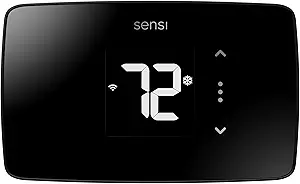 | Best for Flexible DIY Installation | Model: ST25 | Connectivity: Wi-Fi, 2.4 GHz | Voice assistants: Amazon Alexa and Google Assistant | VIEW ON AMAZON | See Our Full Breakdown |
| Honeywell Home RTH9585WF Wi-Fi Smart Color Thermostat |  | Best for Detailed On-Screen Control | Model: RTH9585WF | Connectivity: Wi-Fi | Display: Customizable color touchscreen | VIEW ON AMAZON | See Our Full Breakdown |
| Google Nest Thermostat – Smart Programmable Wi-Fi Thermostat (Snow) |  | Best for Automatic Away Adjustments | Connectivity: Wi-Fi | Color: Snow | App control: Google Home app for Android and iPhone | VIEW ON AMAZON | See Our Full Breakdown |
| Sensi Smart Wi-Fi Thermostat (ST55) |  | Best for DIY Installation | Model: ST55 | Connectivity: Wi-Fi | Voice assistant compatibility: Alexa | VIEW ON AMAZON | See Our Full Breakdown |
| Google Nest Smart Thermostat, Charcoal |  | Best for Google Home Scheduling | Color: Charcoal | Connectivity: Wi-Fi and Bluetooth Low Energy | Wi-Fi bands: 2.4 GHz and 5 GHz | VIEW ON AMAZON | See Our Full Breakdown |
| Meross Matter Smart Wi-Fi Thermostat for Home |  | Best for Matter Platform Flexibility | HVAC compatibility: 24V systems; most heat pumps, air conditioners, furnaces, boilers, dehumidifiers, and humidifiers | Not compatible with: Electric baseboard heaters, millivolt thermostats, and two-wire systems | Connectivity: Wi-Fi and Matter | VIEW ON AMAZON | See Our Full Breakdown |
| Vine Wi-Fi Smart Thermostat, 7-Day Programmable, Compatible with Alexa and Google Assistant |  | Best for Flexible Mobile-Office Scheduling | HVAC compatibility: Most 24V AC systems, including conventional, heat pump, heat-only, and cool-only | Wiring: C-wire required | Scheduling: 7-day programmable | VIEW ON AMAZON | See Our Full Breakdown |
| smart thermostat for mobile office | Connectivity | Certification | Smart-home compatibility | Display |
|---|---|---|---|---|
| Amazon Smart Thermostat | — | ENERGY STAR | Alexa and Ring | — |
| ecobee Smart Thermostat Essent | Wi-Fi | — | Apple HomeKit, Google Assistant, and Alexa | Color touchscreen |
| Emerson Sensi Touch Smart Ther | Wi-Fi | ENERGY STAR | — | Color touchscreen |
| Smart WiFi Thermostat | — | — | — | Backlit LCD |
| Sensi Lite Smart Wi-Fi Thermos | Wi-Fi, 2.4 GHz | ENERGY STAR | — | LCD |
| Honeywell Home RTH9585WF Wi-Fi | Wi-Fi | ENERGY STAR | Amazon Alexa and Google Home | Customizable color touchscreen |
| Google Nest Thermostat | Wi-Fi | ENERGY STAR | Google Assistant, Alexa, and Matter-certified voice assistants | — |
| Sensi Smart Wi-Fi Thermostat | Wi-Fi | ENERGY STAR | — | — |
| Google Nest Smart Thermostat | Wi-Fi and Bluetooth Low Energy | ENERGY STAR | Google Assistant and Matter-certified voice assistants | — |
| Meross Matter Smart Wi-Fi Ther | Wi-Fi and Matter | — | Apple Home, Amazon Alexa, Google Home, Home Assistant, and Samsung SmartThings | LED |
| Vine Wi-Fi Smart Thermostat | Wi-Fi | — | — | — |
More Details on Our Top Picks
Amazon Smart Thermostat
For a mobile office already built around Alexa, this is my strongest pick: remote app control, voice commands, and presence-based adjustments can help manage comfort without returning to the wall control. Its Honeywell Home technology and ENERGY STAR certification add a familiar HVAC foundation, while app-guided DIY installation is useful when setting up a workspace in a home with compatible wiring. Compared with the ecobee Smart Thermostat Essential, it is a more natural fit for Alexa and Ring households, but ecobee offers broader smart-home platform support. The tradeoff is practical: this Amazon model requires a C-wire, and some advanced Alexa routines may depend on extra devices or subscriptions. I would choose it for a fixed mobile-office setup with Alexa already in place, not for a wiring-uncertain or platform-neutral home.
Pros:- Alexa and Ring compatibility supports voice and automatic control.
- Presence detection through Alexa devices can adjust heating and cooling when the space is occupied.
- App-guided DIY installation helps users handle setup themselves.
- ENERGY STAR certification and programmable schedules support more deliberate energy use.
Cons:- A C-wire is required, limiting installation options in some offices and homes.
- Some advanced Alexa routines may require additional subscriptions or compatible devices.
- Its strongest smart-home fit is Alexa and Ring rather than a broad range of ecosystems.
Best for: Remote workers with an Alexa or Ring household, a compatible HVAC system, and a confirmed C-wire.
Not ideal for: Mobile-office owners who need Apple HomeKit or Google Assistant integration, lack a C-wire, or want advanced routines without added devices or subscriptions.
- Smart-home compatibility:Alexa and Ring
- Power requirement:C-wire required
- Thermostat technology:Honeywell Home Thermostat Technology
- Certification:ENERGY STAR
- Control methods:Voice, app, and automatic
- Installation:DIY with app guidance
Our verdict“Choose this when your mobile office already runs on Alexa and has a C-wire; choose ecobee if broader platform compatibility matters more.”
ecobee Smart Thermostat Essential Wi-Fi Thermostat
The ecobee Smart Thermostat Essential suits a mobile office where household devices span different ecosystems: it works with Apple HomeKit, Google Assistant, and Alexa, and offers both app and color touchscreen control. Its schedules, eco+ features, and time-of-use preheating and precooling can help prepare a workspace around a regular workday instead of heating or cooling it continuously. Indoor humidity detection adds context when temperature alone does not explain an uncomfortable room. Compared with the Amazon Smart Thermostat, ecobee is the more flexible choice for mixed-platform homes; Amazon is a more focused match for Alexa and Ring. The cost in convenience is setup: homes without a C-wire may need a separately sold Power Extender Kit, and SmartSensor support requires an additional purchase. I would pick it when ecosystem flexibility matters more than a simple, all-in-one installation.
Pros:- Compatible with Apple HomeKit, Google Assistant, and Alexa.
- Offers both color touchscreen and app control.
- Schedule assistant, eco+ features, and time-of-use preheating and precooling support planned office hours.
- Indoor humidity detection provides information beyond temperature.
Cons:- Homes without a C-wire may need a Power Extender Kit sold separately.
- SmartSensor is compatible but sold separately.
- The trim kit is also sold separately.
Best for: Remote workers using a mix of Apple, Google, and Alexa devices who want app and touchscreen controls plus scheduling features.
Not ideal for: Buyers seeking the simplest out-of-box setup, those without a C-wire who do not want a separate Power Extender Kit, or anyone expecting a SmartSensor to be included.
- Connectivity:Wi-Fi
- Display:Color touchscreen
- HVAC compatibility:Most 24 VAC systems, including gas, oil, electric, dual fuel, forced air, heat pumps, and boilers
- Smart-home compatibility:Apple HomeKit, Google Assistant, and Alexa
- C-wire support:Power Extender Kit sold separately for homes without a C-wire
- Additional features:Indoor humidity detection, schedule assistant, and time-of-use preheating and precooling
- SmartSensor:Compatible; sold separately
Our verdict“Pick ecobee for a mobile office in a mixed smart-home ecosystem, especially if flexible scheduling matters more than keeping setup costs and extras to a minimum.”
Emerson Sensi Touch Smart Thermostat with Color Touchscreen, Wi-Fi, and Alexa Compatibility, ST75, Black
The Sensi Touch ST75 is a good match for mobile-office owners who want a clear local control surface as well as remote access. Its color touchscreen, Sensi app, flexible scheduling, and usage reports make it easier to adjust comfort between work sessions and review HVAC patterns later. The built-in level and app instructions support DIY installation, while stated privacy protections may appeal to people cautious about connected devices. Compared with the Sensi Lite ST25, the ST75 adds a color touchscreen and lists broader controller compatibility, including Apple HomeKit, Google Assistant, SmartThings, and Vera. That advantage comes with a firm limitation: a C-wire is required, and HVAC compatibility can vary. It is also less attractive if you want the Sensi Lite’s listed battery option for many systems. I would favor the ST75 when an easy-to-read wall interface and usage reports matter more than wiring flexibility.
Pros:- Color touchscreen gives a clear on-wall control option alongside the app.
- Flexible scheduling and usage reports help manage office comfort and HVAC use.
- Built-in level and app instructions support DIY installation.
- Lists compatibility with Alexa, Apple HomeKit, Google Assistant, SmartThings, and Vera.
Cons:- Requires a C-wire for power.
- Compatibility may vary by HVAC system.
- Unlike the Sensi Lite ST25, the listed power requirement does not offer a battery option.
Best for: Remote workers with a compatible C-wire-equipped HVAC system who want a color touchscreen, usage reports, and DIY setup guidance.
Not ideal for: People with no C-wire, uncertain HVAC compatibility, or a preference for a battery-powered option such as the Sensi Lite ST25 offers for many systems.
- Model:ST75
- Color:Black
- Display:Color touchscreen
- Connectivity:Wi-Fi
- Controller compatibility:Amazon Alexa, Apple HomeKit, Google Assistant, SmartThings, and Vera
- Additional feature:Auto changeover
- Power requirement:C-wire required
- Certification:ENERGY STAR
Our verdict“Choose the Sensi Touch ST75 for a compatible wired setup where touchscreen control and usage reports matter more than battery flexibility.”
Smart WiFi Thermostat – Single‑Stage 1 Heat / 1 Cool, App Remote Control, 7‑Day Programming (C‑Wire Required)
This thermostat makes sense for a mobile office with a straightforward single-stage, 1-heat/1-cool HVAC system and a user who wants app control without a feature-heavy setup. Its 7-day programming can follow a repeating workweek, while the backlit LCD stays readable when the office is dim. The listed temperature regulation accuracy of ±2°F gives a clear expectation for control, though it is not a substitute for checking whether the HVAC system itself is compatible. Compared with the Amazon Smart Thermostat, this model is more narrowly specified and does not list Alexa or Ring integration; its value is focused scheduling for supported systems rather than ecosystem features. It also has strict limits: it needs a C-wire and 2.4 GHz Wi-Fi, and it does not support heat pumps, multi-stage systems, mini-splits, RV AC, or line voltage. I would skip it if the office system type is unknown.
Pros:- App remote control allows temperature adjustments away from the office.
- Seven-day programming can match a recurring work schedule.
- Backlit LCD is easier to read in low-light office spaces.
- Lists temperature regulation accuracy within ±2°F.
Cons:- Requires a 24 V C-wire and cannot operate on batteries.
- Supports only single-stage 1-heat/1-cool systems, excluding several common HVAC types.
- Wi-Fi is limited to 2.4 GHz.
Best for: Owners of a mobile office with a confirmed 24 V single-stage gas, oil, or electric 1-heat/1-cool system and 2.4 GHz Wi-Fi.
Not ideal for: Buyers with heat pumps, multi-stage HVAC, mini-splits, line-voltage systems, RV AC, no C-wire, or a Wi-Fi network limited to 5 GHz.
- Controller type:App
- Wi-Fi:2.4 GHz only
- Display:Backlit LCD
- Voltage:24 V AC
- Mounting:Wall mount
- Dimensions:0.98 in D × 4.72 in W × 3.86 in H
- Compatible systems:Single-stage 1-heat/1-cool gas, oil, or electric systems with C-wire
- Unsupported systems:Multi-stage, heat pumps, line voltage, mini-splits, and RV AC
Our verdict“Choose this for a confirmed single-stage office system and routine-based app control, but pick a broader-compatibility option if your HVAC setup is more complex.”
Sensi Lite Smart Wi-Fi Thermostat, Alexa Compatible, ENERGY STAR Certified, ST25
The Sensi Lite ST25 is the most flexible installation choice in this group for many mobile-office HVAC setups: it can run on batteries or a C-wire, with a C-wire required for heat-pump and heat/cool-only systems. App control, touch controls, Alexa and Google Assistant support, scheduling, and geofencing give a remote worker several ways to manage comfort when work hours change. Its DIY instructions and built-in level also help make setup more approachable. Compared with the Sensi Touch ST75, the ST25 gives up the color touchscreen but adds a listed battery option for many systems; the ST75 instead offers a color display and broader smart-controller compatibility. The ST25’s limits include 2.4 GHz Wi-Fi and system-specific wiring needs, so checking the HVAC type matters before choosing it. I would pick it for a practical, app-led office setup rather than for a prominent touchscreen.
Pros:- Battery or C-wire power gives more installation flexibility for many compatible systems.
- App, touch, and voice controls support different ways to adjust the office.
- Scheduling, geofencing, and usage reports help manage changing work routines.
- DIY setup includes a built-in level and step-by-step instructions.
Cons:- A C-wire is required for heat-pump and heat/cool-only systems.
- Wi-Fi must use the 2.4 GHz band.
- Its LCD does not provide the color touchscreen offered by the Sensi Touch ST75.
Best for: DIY-minded remote workers who want app, touch, or voice control and have a compatible system that can use battery power or a C-wire.
Not ideal for: Owners of heat-pump or heat/cool-only systems without a C-wire, users with only 5 GHz Wi-Fi, or buyers who want the ST75’s color touchscreen.
- Model:ST25
- Connectivity:Wi-Fi, 2.4 GHz
- Voice assistants:Amazon Alexa and Google Assistant
- Control methods:App, touch, and voice
- Power source:Battery or C-wire
- Display:LCD
- Compatible systems:Air conditioner, boiler, furnace, and heat pump
- Certification:ENERGY STAR
Our verdict“Choose the Sensi Lite ST25 for flexible DIY power options and app-led control, provided your HVAC type and 2.4 GHz network are compatible.”
Honeywell Home RTH9585WF Wi-Fi Smart Color Thermostat
The RTH9585WF suits a mobile office where someone on site may need to adjust comfort without opening an app. Its customizable color touchscreen puts controls directly on the wall, while remote access, flexible schedules, energy reports, and maintenance alerts help manage the space between visits. Compared with the Google Nest Thermostat, this Honeywell offers a richer built-in display and supports a broad range of forced-air, hot-water, steam, and heat-pump systems. That makes it a useful fit for offices with varied conventional HVAC, but it does not support electric baseboard heating. The main installation constraint is its required C-wire; the Nest and Sensi ST55 can work without one in many homes. Choose this model for visible local controls and system flexibility, not for wiring simplicity.
Pros:- Customizable color touchscreen makes local adjustments straightforward
- Remote control and flexible scheduling support between-visit management
- Energy reports and maintenance alerts help track HVAC use and upkeep
- Supports several common forced-air, hot-water, steam, and heat-pump systems
Cons:- Requires a C-wire for installation
- Does not support 120–240V electric baseboard heating
Best for: Mobile-office owners with compatible forced-air, hot-water, steam, or heat-pump HVAC who want clear wall controls and remote scheduling.
Not ideal for: Renters or office managers with electric baseboard heat, or sites without a C-wire and no practical way to add one.
- Model:RTH9585WF
- Connectivity:Wi-Fi
- Display:Customizable color touchscreen
- Scheduling:Flexible programmable schedules
- System compatibility:Forced-air gas, oil, or electric; hot water; steam; heat pumps with electric backup
- Smart-home compatibility:Amazon Alexa and Google Home
- Power requirement:C-wire required
- Certification:ENERGY STAR
- Fan modes:On, Automatic, and Circulate
Our verdict“Choose the Honeywell RTH9585WF if your mobile office has compatible HVAC and you value a detailed touchscreen more than a C-wire-free setup.”
Google Nest Thermostat – Smart Programmable Wi-Fi Thermostat (Snow)
The Google Nest Thermostat is a strong match for a mobile office that sits empty outside scheduled work hours. Its automatic temperature adjustments when you leave can reduce unnecessary heating or cooling, while the Google Home app lets an authorized user check and change settings remotely. Savings Finder suggestions and HVAC alerts add useful guidance without requiring constant schedule edits. Compared with the Honeywell RTH9585WF, the Nest leans more on app-based, automatic management than on a prominent customizable touchscreen. It also works with Google Assistant, Alexa, and Matter-certified voice assistants. The tradeoff is wiring uncertainty: some system types need a C-wire or power accessory, and this model has no temperature lock to prevent other occupants from changing settings. It fits a connected, mostly unattended office better than a shared space needing firm controls.
Pros:- Automatic temperature adjustments can reduce conditioning while the office is empty
- Google Home app supports remote control and scheduling
- Savings Finder and HVAC monitoring alerts provide energy and system guidance
- Works with Google Assistant, Alexa, and Matter-certified voice assistants
Cons:- Some HVAC configurations require a C-wire or power accessory
- No lock feature to restrict temperature changes by other occupants
Best for: Small-office operators who leave the workspace vacant between visits and want app control plus automatic away adjustments.
Not ideal for: Shared offices where staff should not change setpoints, or installations whose HVAC wiring needs a C-wire accessory that cannot be added.
- Connectivity:Wi-Fi
- Color:Snow
- App control:Google Home app for Android and iPhone
- Smart-home compatibility:Google Assistant, Alexa, and Matter-certified voice assistants
- Power requirement:Works without a C-wire in most homes; some systems require a C-wire
- Energy features:Savings Finder and Nest Renew
- Monitoring:HVAC monitoring alerts
- Certification:ENERGY STAR
Our verdict“Pick the Snow Nest Thermostat for an often-empty mobile office where automatic away control matters more than locking down shared settings.”
Sensi Smart Wi-Fi Thermostat (ST55)
For a mobile office where installation needs to stay manageable, the Sensi ST55 is the clearest DIY-oriented pick here. Built-in leveling and step-by-step app instructions help with mounting and setup, and a C-wire is not needed in most applications. That can make it a more practical choice than the Honeywell RTH9585WF, which requires one, especially when an office owner is handling the installation without an HVAC contractor. Remote access, schedules, energy reports, and maintenance alerts cover the basics of managing a workspace from elsewhere. Its ENERGY STAR certification and stated potential to help save HVAC energy add to its appeal. The compromises are a less showy control experience than Honeywell’s color touchscreen and Alexa-only voice compatibility in the supplied specs. Wiring still needs checking, since some setups require a C-wire.
Pros:- Built-in level and app instructions support DIY installation
- C-wire is not required in most applications
- Remote access, schedules, energy reports, and HVAC alerts support remote oversight
- Privacy policy states personal information is not sold to third parties
Cons:- Some installations still require a C-wire
- Supplied voice-assistant compatibility is limited to Alexa
Best for: Small-office owners who want app-guided DIY setup, remote scheduling, and a thermostat that often avoids C-wire work.
Not ideal for: Teams that need broad voice-assistant compatibility or buyers whose HVAC wiring requires a C-wire they cannot provide.
- Model:ST55
- Connectivity:Wi-Fi
- Voice assistant compatibility:Alexa
- Installation:DIY with built-in leveling and app instructions
- C-wire:Not required in most applications; may be required in some
- Certification:ENERGY STAR
- Controls and monitoring:Remote access, flexible scheduling, energy reports, HVAC alerts, and maintenance reminders
- Energy savings claim:Can help save about 23% on HVAC energy
Our verdict“Choose the Sensi ST55 when straightforward DIY installation and avoiding C-wire work in many setups matter more than a color touchscreen or broader voice support.”
Google Nest Smart Thermostat, Charcoal
The Charcoal Nest Thermostat makes sense for a mobile office already managed through Google Home. App-based schedules and remote temperature control let an owner adjust the workspace without being there, while energy-saving suggestions and HVAC monitoring can help flag inefficient use or potential equipment issues. Its Wi-Fi supports both 2.4 GHz and 5 GHz, with Bluetooth Low Energy also included. Compared with the Sensi ST55, this Nest has broader stated compatibility with Google Assistant and Matter-certified voice assistants, while Sensi emphasizes DIY setup and Alexa support. The Nest’s restrained feature set suits buyers who want routine app control rather than a more customizable wall interface like the Honeywell RTH9585WF. Some HVAC systems still need a C-wire or compatible power accessory, and voice control depends on having a compatible smart device.
Pros:- Google Home app supports remote temperature control and schedules
- Energy-saving suggestions help tune office settings
- HVAC monitoring can alert users to potential system issues
- Supports Google Assistant and Matter-certified voice assistants
Cons:- Some HVAC systems may require a C-wire or compatible power accessory
- Voice control requires a compatible smart device
Best for: Google Home users managing a mobile office who want remote scheduling, energy suggestions, and HVAC alerts in one app.
Not ideal for: Offices without a compatible voice-control device, or HVAC setups where adding a C-wire or power accessory is impractical.
- Color:Charcoal
- Connectivity:Wi-Fi and Bluetooth Low Energy
- Wi-Fi bands:2.4 GHz and 5 GHz
- Wi-Fi standards:802.11b/g/n (2.4 GHz); 802.11a/n (5 GHz)
- Smart-home compatibility:Google Assistant and Matter-certified voice assistants
- C-wire requirement:Not required in most homes; may be needed for some systems
- Certification:ENERGY STAR
- Monitoring:HVAC monitoring, alerts, and maintenance reminders
Our verdict“Choose the Charcoal Nest if your office already uses Google Home and you want straightforward remote scheduling with HVAC monitoring.”
Meross Matter Smart Wi-Fi Thermostat for Home
The Meross Matter Smart Wi-Fi Thermostat is the most platform-flexible pick in this group for a mobile office built around an existing smart-home system. Matter support connects it with Apple Home, Alexa, Google Home, Home Assistant, and SmartThings, so buyers have more options than with the Alexa-focused Sensi ST55 or Google-centered Nest models. App control, schedules, HVAC usage tracking, and filter-life and system alerts support day-to-day oversight from off site. Its lockable controls are also useful in a shared workspace where occupants should not casually change the temperature. That breadth comes with more compatibility checks: it is for 24V systems and excludes electric baseboard, millivolt, and two-wire setups. Some wiring configurations need a C-wire, which is not included. Pick Meross for ecosystem choice, not for a guaranteed simple installation.
Pros:- Matter support spans Apple Home, Alexa, Google Home, Home Assistant, and SmartThings
- App and voice control support remote adjustments
- Lockable controls can limit unwanted changes in a shared office
- Filter-life, system, and HVAC usage information aid maintenance planning
Cons:- Not compatible with electric baseboard, millivolt, or two-wire systems
- Some installations require a C-wire, which is not included
- Requires a compatible 24V HVAC system
Best for: Mobile-office owners using Apple Home, Home Assistant, SmartThings, or multiple smart-home platforms who want lockable controls and remote alerts.
Not ideal for: Offices with electric baseboard, millivolt, or two-wire thermostats, or installations that need a C-wire the owner cannot supply.
- HVAC compatibility:24V systems; most heat pumps, air conditioners, furnaces, boilers, dehumidifiers, and humidifiers
- Not compatible with:Electric baseboard heaters, millivolt thermostats, and two-wire systems
- Connectivity:Wi-Fi and Matter
- Smart-home compatibility:Apple Home, Amazon Alexa, Google Home, Home Assistant, and Samsung SmartThings
- Control:App and voice
- Display:LED
- Features:Programmable schedules, temperature display, lockable controls, HVAC usage tracking, and smart alerts
- Power and wiring:Corded electric; C-wire required for some configurations and not included
Our verdict“Choose Meross when broad Matter platform support and lockable controls outweigh the need for simple, wiring-agnostic installation.”
Vine Wi-Fi Smart Thermostat, 7-Day Programmable, Compatible with Alexa and Google Assistant
For a mobile office where working hours and location can shift from day to day, I’d choose the Vine for its 7-day schedule plus automatic home/away adjustments. Remote app control gives you a way to change settings when plans change, while temperature alerts and vacation mode help keep tabs on a space when it’s empty. Compared with the Amazon Smart Thermostat, the Vine’s listed feature set puts more emphasis on scheduling and reminders, including filter notices and a child lock. Its support for several types of 24V HVAC systems may also suit more setups, though compatibility still needs checking. The tradeoff is installation: it requires a C-wire, so it is a poor fit for offices without one or buyers seeking a simple, wiring-free setup.
Pros:- 7-day programming can match changing weekday and weekend work routines.
- App and voice control allow remote adjustments through Vine Thermostat or Smart Life, Alexa, and Google Assistant.
- Auto-away mode, geofencing, and vacation mode support use when the office is unoccupied.
- Temperature alerts, filter reminders, and child lock add practical monitoring and control.
Cons:- A C-wire is required, which can rule out offices with incompatible wiring.
- HVAC compatibility should be verified before purchase rather than assumed from the broad 24V support.
- The listed information does not specify a touchscreen or other display beyond an LCD.
Best for: Mobile-office workers with a compatible 24V HVAC system and C-wire who want different schedules for each day and remote control when away.
Not ideal for: Renters or small-office owners without a C-wire, and anyone unwilling to check HVAC compatibility before buying.
- HVAC compatibility:Most 24V AC systems, including conventional, heat pump, heat-only, and cool-only
- Wiring:C-wire required
- Scheduling:7-day programmable
- Connectivity:Wi-Fi
- Voice assistants:Amazon Alexa and Google Assistant
- Control:App, voice, and touch
- Display and mounting:LCD; wall mount
- Functions:Auto-away mode, geofencing, vacation mode, temperature alerts, filter reminders, and child lock
Our verdict“Choose the Vine if your mobile office has a C-wire and you want flexible weekly scheduling with remote controls and away-mode features.”

How We Picked
I ranked these thermostats around the practical needs of a mobile office: dependable remote adjustments, scheduling that can accommodate changing work hours, clear controls, and a realistic installation path. I also weighed compatibility clues in each product’s description, including stated C-wire requirements, Wi-Fi access, smart-assistant support, and Matter compatibility. Those details matter because the most capable app cannot help if a thermostat does not work with the office’s HVAC equipment.
The ranking favors options with a useful balance of remote control, day-to-day usability, and fit for common office setups; it does not assume every mobile office has the same wiring or smart-home platform. Models with a clear distinguishing benefit, such as a touchscreen or Matter support, earn a place for buyers who need that feature, but a narrower compatibility profile limits their position. Since the products are reviewed separately, I do not treat advertised smart features as proof of performance in every installation; I recommend checking the manufacturer’s compatibility information and the site’s actual HVAC configuration before buying.
| smart thermostat for mobile office | Smart-home compatibility | Connectivity | Display |
|---|---|---|---|
| Amazon Smart Thermostat | Alexa and Ring | — | — |
| ecobee Smart Thermostat Essent | Apple HomeKit, Google Assistant, and Alexa | Wi-Fi | Color touchscreen |
| Emerson Sensi Touch Smart Ther | — | Wi-Fi | Color touchscreen |
| Smart WiFi Thermostat | — | — | Backlit LCD |
| Sensi Lite Smart Wi-Fi Thermos | — | Wi-Fi, 2.4 GHz | LCD |
| Honeywell Home RTH9585WF Wi-Fi | Amazon Alexa and Google Home | Wi-Fi | Customizable color touchscreen |
| Google Nest Thermostat | Google Assistant, Alexa, and Matter-certified voice assistants | Wi-Fi | — |
| Sensi Smart Wi-Fi Thermostat | — | Wi-Fi | — |
| Google Nest Smart Thermostat | Google Assistant and Matter-certified voice assistants | Wi-Fi and Bluetooth Low Energy | — |
| Meross Matter Smart Wi-Fi Ther | Apple Home, Amazon Alexa, Google Home, Home Assistant, and Samsung SmartThings | Wi-Fi and Matter | LED |
| Vine Wi-Fi Smart Thermostat | — | Wi-Fi | — |
Factors to Consider When Choosing Smart Thermostat For Mobile Offices
A thermostat for a mobile office is only as useful as the system it controls. Before prioritizing voice commands or app design, I’d confirm where the thermostat will be installed, what equipment it must control, and whether the office has stable Wi-Fi. These checks can prevent a smart-home feature from distracting from a basic installation mismatch.
Confirm What “Mobile Office” Means for Your Setup
A thermostat generally controls the heating and cooling equipment it is wired to; it does not automatically travel with a mobile office or regulate a separate space. If your office is in a trailer, converted vehicle, or detached building, check whether its HVAC system is compatible with a residential thermostat at all. Some mobile workspaces rely on separate heaters, portable air conditioners, or integrated controls that may not accept a standard wall thermostat. A common mistake is buying for remote access before confirming there is a thermostat-controlled system at the site. If you move between buildings, you may need a thermostat at each location rather than one device that follows you. Choose based on the actual equipment and installation point, not just the name of the workspace.
Check Wiring and HVAC Compatibility Before Comparing Apps
Thermostats can differ in the heating stages, cooling stages, and wiring they support, so identify your equipment and existing thermostat connections first. A C-wire may provide continuous power for Wi-Fi features, and one model in this lineup explicitly requires it. Do not assume that a missing visible wire means no compatible option exists: some systems have unused conductors or manufacturer-approved power alternatives, but the remedy depends on the equipment. Photograph the existing wiring and compare it with the thermostat maker’s compatibility guidance. Heat pumps, multi-stage systems, and unusual commercial setups call for extra checking rather than guesswork. If the system is leased or building-managed, get approval before altering wiring.
Plan for Wi-Fi, Phone Access, and Account Ownership
Remote control depends on a working connection at the thermostat’s location, not simply on having a phone with internet access. A weak signal in a detached office can make app adjustments unreliable even when the main building’s Wi-Fi works well. Check whether the thermostat needs a particular Wi-Fi band or account setup, and confirm that you can manage the account if the office changes owners or users. For shared workspaces, decide who gets administrator access and how temporary staff will use the controls. Matter compatibility may help a thermostat fit into supported smart-home platforms, but it does not remove the need for compatible network equipment and setup. Treat connectivity as part of the installation plan rather than a feature to check after mounting.
Match Scheduling to Irregular Work Hours
A fixed weekday schedule works well for a predictable office routine but can waste energy when workdays shift or the room is used intermittently. Think through whether you want to adjust settings manually from an app, rely on recurring schedules, or use a mix of both. If other people share the space, a schedule that makes sense for one person may leave the room uncomfortable for everyone else. Avoid setting frequent schedule changes before you know how the HVAC system responds; large swings may not make a room comfortable faster. A simpler schedule with quick remote overrides can be more practical than complex automation that nobody maintains. The best fit is the one that matches how often you actually use the office.
Choose Controls That Work for Everyone Using the Office
App-first control is convenient when the person managing the office always has a phone at hand, but it can frustrate guests or coworkers who need a quick adjustment. A touchscreen, physical controls, or a familiar wall interface can make shared use easier. Voice-assistant support can help when hands are occupied, yet it may be irrelevant if the office has no compatible speaker or if voice control is not appropriate for a shared environment. Consider whether users need to see the current setting at a glance or make changes without installing an app. The models in this roundup vary from touchscreen-led controls to more streamlined smart-home operation. Pick the interaction style that suits the least tech-comfortable regular user, not only the person who installs it.
Know When a More Connected Model Is Worth It
Paying for a broader smart-home feature set makes sense when it connects to devices and routines you already use. If you only need to change the temperature remotely and set a weekly schedule, an elaborate ecosystem may add setup work without changing your day. Matter support can be useful when you want compatibility across supported platforms, while a touchscreen matters more to people who adjust settings at the wall. Compare the added functions against the network, account, and maintenance burden they bring. Also check whether the thermostat’s software and app support meet your needs, since connected devices depend on ongoing service. Favor a feature only when it solves a real problem in your office.
Frequently Asked Questions
Can a smart thermostat control a mobile office in a trailer or converted vehicle?
Possibly, but the label “smart thermostat” does not confirm compatibility with vehicle or trailer HVAC equipment. Many residential models are designed for particular low-voltage heating and cooling systems, while mobile units may use integrated controls or different electrical arrangements. Identify the HVAC system’s control wiring and check the thermostat maker’s compatibility list before purchase. If the space uses portable heating or cooling appliances, a wall thermostat may not control them at all. For a nonstandard setup, ask the HVAC or vehicle-system installer to confirm compatibility rather than adapting wiring by trial and error.
Should I choose a thermostat that requires a C-wire?
Choose a C-wire-required model only if the office’s HVAC wiring can provide that connection or an approved installation method is available. A C-wire can supply steady power for connected features, but not every existing system has one in use. Check the current thermostat wiring and the manufacturer’s compatibility tool before ordering; wire color alone is not a reliable guide to function. Some installations may support an approved adapter or another solution, but that depends on the system and should be verified. If you cannot confirm a safe power path, prioritize a model and installation plan explicitly compatible with your setup.
Is app control useful if my mobile office has unreliable Wi-Fi?
App control is most useful when the thermostat can stay connected to the internet at the office location. If Wi-Fi drops regularly, remote commands and connected features may be unavailable even though the thermostat’s local controls still work. Check signal strength where the thermostat will be mounted, not just near the building’s router. A network extender or access point may help, but confirm it can reach the workspace reliably before relying on remote access. For a space with intermittent connectivity, prioritize a usable wall interface and schedule that can run without constant phone control.
Do I need Matter support if my office already uses Alexa or Google Assistant?
Not necessarily: a thermostat that already supports the assistant or platform you use may cover your everyday control needs. Matter is more relevant if you want to connect supported devices across different smart-home platforms or keep flexibility as your setup changes. Compatibility still depends on the specific thermostat, controller, and network, so check the supported functions rather than assuming every feature carries over. In a small office with one established ecosystem, Matter may not justify extra setup attention. Choose it for a planned cross-platform benefit, not simply because the label is present.
What should I prioritize if coworkers or visitors also adjust the office temperature?
Prioritize controls that are understandable at the wall and decide in advance who can change schedules or account settings. An app-only routine can leave occasional users unsure how to make a temporary adjustment, while a clear on-device interface can reduce that friction. Set expectations about acceptable temperature changes so one user’s adjustment does not become another person’s ongoing schedule. If you use assistant controls, consider whether shared voice commands are suitable for the space. For a shared office, simple access and predictable settings can matter more than adding another layer of automation.
Conclusion
For most buyers with compatible residential HVAC, I’d start with the ecobee Smart Thermostat Essential as the best overall balance for a connected office. The Amazon Smart Thermostat is my best value-style pick for buyers already using Alexa who want remote control and scheduling without prioritizing a touchscreen. For best premium-style controls, the Sensi Touch ST75 is the clearest fit if an on-device color display matters; it is not the right choice if you want the simplest interface. Beginners should compare the Sensi Lite ST25 for a more straightforward route, while Google Nest buyers should pick between its models based on the interface and smart-home fit they prefer. If cross-platform flexibility is your main need, look at the Meross Matter thermostat; if your wiring or HVAC is unusual, confirm compatibility before choosing any model. The right pick is the one that fits the office’s actual system, network, and users—not just the one with the longest feature list.