For a smart thermostat, the real choice is whether you want a hub for connected home routines or a thermostat that learns your schedule with less manual setup. The ecobee Smart Thermostat Premium pairs heating and cooling control with room sensors, voice control, and additional home monitoring features. The Google Nest Learning Thermostat (4th gen) emphasizes automatic scheduling, energy-saving adjustments, and Google Home integration. Ecobee is the stronger fit for households building automation across devices or balancing temperatures between rooms; Nest is more appealing if you want the thermostat to learn your habits and already use Google services. HVAC compatibility and the smart-home platform you rely on can outweigh either product’s headline features.

Get home appliances delivered free — and shop member deals
- Fast, free delivery on millions of items
- Access to Prime Big Deal Days deals on October 6–7
- Prime Video, Amazon Music and more included
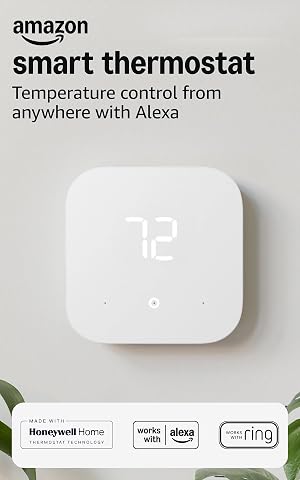
Amazon Smart Thermostat with Alexa and Ring Compatibility
- ✔ Compatibility: Alexa and Ring
- ✔ Wiring: C-wire required
- ✔ Control: Alexa app, voice routines, schedules, and compatible Alexa devices

Honeywell Home T5 Smart Wi-Fi Thermostat
- ✔ Connectivity: Wi-Fi
- ✔ Scheduling: Flexible seven-day scheduling
- ✔ Location control: Geofencing with automatic home and away modes

Honeywell Home RTH9600WF Smart Color Wi-Fi Thermostat
- ✔ Model: RTH9600WF
- ✔ Connectivity: Wi-Fi
- ✔ Display: Customizable color touchscreen
At a Glance
| Criteria | ecobee Smart Thermostat Premium | Google Nest Learning Thermostat (4th gen) | Winner |
|---|---|---|---|
| Home automation and platform fit | Works with Apple Home, Google Home, Alexa, and SmartThings; includes built-in voice assistant options. | Designed around Google Home, with Matter support for compatible smart-home setups. | A |
| Temperature learning and scheduling | Supports schedules and automated routines, with more control in the ecobee app. | Learns routines and can adjust heating and cooling automatically; settings can also be scheduled manually. | B |
| Room comfort | Includes a remote SmartSensor; additional sensors can help address room-to-room temperature differences. | Room temperature sensing can be extended with compatible Nest Temperature Sensors, sold separately. | A |
| HVAC compatibility | Supports many conventional heating and cooling systems, but wiring and equipment requirements need checking. | Supports many common systems, but compatibility depends on system type, wiring, and any required accessories. | Depends |
| Sensors and voice control | Includes occupancy and temperature sensing, voice control, and air-quality monitoring features. | Includes temperature and presence sensing; Google Assistant can be used through compatible devices. | A |
| Privacy and extra features | Offers optional security and monitoring functions; some services require a subscription. | Provides energy-saving and presence features; Google account and connected services shape the experience. | Depends |
| Value | Higher upfront cost; worthwhile when sensors and automation replace separate devices or solve specific comfort needs. | Often the less expensive route; strong value for Google Home users who need basic smart control and learning. | Depends |
Amazon Smart Thermostat with Alexa and Ring Compatibility
The Amazon Smart Thermostat takes the top spot for a specific reason: it connects temperature control to the Alexa app, voice routines, and compatible Alexa devices. For a household already using Alexa, that means the thermostat can sit within familiar controls instead of becoming a separate smart home island. Schedules cover predictable routines, while compatible devices can adjust temperature based on readings or presence.That device dependency is also its main limitation. Buyers should not assume every automatic adjustment works from the thermostat alone; the product description ties those features to compatible Alexa devices. Compared with the Honeywell T5, the Amazon model is more centered on Alexa integration than geofencing. Compared with the RTH9600WF, it offers less emphasis on detailed information displayed at the thermostat itself. Its straightforward role makes sense for Alexa-first homes, but less so for a mixed-platform household seeking broader assistant options.Installation is designed for do-it-yourself setup with app guidance, and the thermostat uses Honeywell Home technology. Still, the C-wire is required, so the guidance does not remove the need to verify wiring first. We would choose it when Alexa is already the household’s automation hub and skip it when the home lacks compatible Alexa devices or the wiring does not meet the requirement.
Pros:
- Connects temperature control with Alexa app features and voice routines.
- Compatible Alexa devices can support adjustments based on readings or presence.
- App-guided do-it-yourself installation can help users follow setup steps.
- ENERGY STAR certified and supports scheduled control.
Cons:
- A C-wire is required.
- Some automatic adjustment features depend on compatible Alexa devices.
Best for: Households already using Alexa or Ring that want thermostat schedules and voice-routine control in the same smart home setup.
Not ideal for: Buyers who need a thermostat that works without a C-wire, want location-based automation specifically, or do not use compatible Alexa devices.
Bottom line: For Alexa-centered homes, this is the most cohesive automation pick, provided the wiring and compatible-device requirements fit.
“For Alexa-centered homes, this is the most cohesive automation pick, provided the wiring and compatible-device requirements fit.”
Honeywell Home T5 Smart Wi-Fi Thermostat
Where the Amazon thermostat leans on Alexa, the Honeywell Home T5 gives home automation a different trigger: geofencing that switches between home and away modes. That can suit people whose schedules vary enough that a fixed weekly program needs backup. It also supports a flexible seven-day schedule, so buyers can combine predictable temperature changes with location-based control.Compared with the RTH9600WF, the T5’s standout is this location feature rather than a customizable color screen and broader on-device comfort information. Compared with the Amazon model, it offers a clearly described home-and-away automation path without making compatible Alexa devices the center of that feature set. The product details emphasize smartphone or tablet control, energy reports, and personalized tips; they do not specify the same Alexa and Ring role as the Amazon pick, so buyers should confirm assistant compatibility if that matters to their setup.Its system caveats deserve a close read. A C-wire or power adapter may be required, and heating-only oil furnace systems require a C-wire. We would shortlist the T5 when a schedule plus location control is more useful than a rich thermostat display. Buyers with a heating-only oil furnace and no C-wire should look elsewhere or resolve the wiring question first.
Pros:
- Pairs flexible seven-day scheduling with geofencing.
- Supports smartphone or tablet control over Wi-Fi.
- Provides monthly energy reports and personalized energy-saving tips.
- ENERGY STAR certified.
Cons:
- A C-wire or C-wire power adapter may be required.
- Heating-only oil furnace systems require a C-wire.
Best for: People who want scheduled heating and cooling with automatic home and away changes based on location.
Not ideal for: Owners of heating-only oil furnace systems without a C-wire, or buyers who prioritize a color touchscreen and weather details on the device.
Bottom line: Choose the T5 when location-based home and away control matters more than Alexa-specific routines or a feature-rich display.
“Choose the T5 when location-based home and away control matters more than Alexa-specific routines or a feature-rich display.”
Honeywell Home RTH9600WF Smart Color Wi-Fi Thermostat
The RTH9600WF earns its place through information you can see at the thermostat. Its customizable color touchscreen can present indoor and outdoor comfort information, weather forecasts, and smart alerts, while the app and compatible assistants provide remote control. That makes it a better fit than the T5 for buyers who like checking conditions at the wall, and a more display-oriented choice than the Amazon thermostat’s Alexa-centered approach.For automation, it supports flexible scheduling and works with Amazon Alexa, Google Assistant, and Microsoft Cortana. Those options give it a broader stated assistant mix than the Amazon model, although its product details do not describe geofencing as the T5 does. The RTH9600WF can also provide energy use insights, making it useful for people who want more context about comfort and operation without relying entirely on a phone app.Compatibility is the deciding tradeoff. It supports several forced-air, hot water, steam, and heat pump setups, but does not work with electric baseboard heat. Power also needs planning: a C-wire or compatible adapter is required. Compared with the T5, the RTH9600WF trades the T5’s explicit location-based automation for a more informative screen. It is our pick for display-first buyers, but those with baseboard heating or a preference for automatic away detection should consider another model.
Pros:
- Customizable color touchscreen displays comfort information and weather forecasts.
- Supports remote control through the app and compatible smart home assistants.
- Combines flexible scheduling with energy use insights and smart alerts.
- ENERGY STAR certified.
Cons:
- Does not work with electric baseboard heat.
- Requires a C-wire or compatible power adapter.
Best for: Buyers who want scheduling, assistant control, and comfort or weather details visible on a customizable thermostat screen.
Not ideal for: Homes with electric baseboard heat, or buyers whose priority is geofencing-based home and away automation.
Bottom line: The RTH9600WF is the display-focused choice for compatible systems, especially when at-a-glance comfort information is a priority.
“The RTH9600WF is the display-focused choice for compatible systems, especially when at-a-glance comfort information is a priority.”
As an Amazon Associate we earn from qualifying purchases.
Key Differences
Ecobee’s advantage is breadth. It can connect to several major smart-home platforms and comes with a remote room sensor, making it a better starting point for households that want thermostat changes to work alongside lights, routines, or other connected devices. Its premium model also includes voice and air-quality features. Those extras add value when people will use them, but they can make the thermostat more complex and raise the initial cost.
Nest’s advantage is a more focused experience. Its learning features can build a schedule from household patterns, which may reduce setup for people with regular routines. It is a natural fit for Google Home users, while households tied to Apple Home, Alexa, or SmartThings should check which controls and automations they can use before choosing it. Nest can use separate temperature sensors, but buying them adds to the overall cost if room-by-room comfort is a priority.
Neither thermostat is automatically the better buy for every HVAC system. Check the manufacturer compatibility information for your exact equipment and wiring before purchasing, especially for heat pumps, multi-stage systems, or installations without a common wire. The best value comes from matching platform, comfort needs, and system support—not from paying for features that will sit unused.
Detailed Comparison
Ecobee wins by a moderate margin for homes using more than one smart-home ecosystem. It supports Apple Home, Google Home, Alexa, and SmartThings, so it can fit a mixed-device household more easily. Nest is most straightforward for Google Home users; Matter support can help with compatible devices, but buyers should verify the specific controls their platform offers. In practice, pick the system that can trigger the routines you actually use.
Temperature learning and scheduling (Google Nest Learning Thermostat (4th gen) wins — moderate)
Nest wins by a moderate margin if you want automatic schedule building. It is designed to learn household patterns and make adjustments, while ecobee gives users schedules and automation controls without centering the experience on learning. Either can be adjusted manually. Nest is more convenient for a household with repeatable routines; ecobee can suit people who prefer to set rules themselves or combine thermostat settings with broader automations.
Ecobee wins by a moderate margin for out-of-the-box room balancing because a SmartSensor is included with the Premium thermostat. It can help the system account for temperatures in another part of the home, though a sensor cannot make every room identical or replace zoning. Nest supports remote temperature sensors too, but they are a separate purchase. For bedrooms or rooms that run notably warmer or cooler, include sensor cost in the comparison.
HVAC compatibility (major difference)
This is a tie until you check your equipment. Both thermostats support many common systems, but model-specific limits, wiring, and accessory needs can determine which one works. A thermostat that is incompatible with a heat pump or needs wiring work is poor value regardless of its app. Confirm the exact HVAC model, number of stages, and wiring against each maker’s compatibility checker or with an installer before ordering.
Ecobee wins by a moderate margin on built-in extras. Premium includes a room sensor, voice-control capability, and air-quality monitoring. Nest has temperature and presence sensing, and can work with Google Assistant through compatible devices, but the overall voice experience may depend on the rest of the Google Home setup. Choose Ecobee if those functions will replace separate devices; otherwise they may not justify its higher price.
Privacy and extra features (minor difference)
Neither is a clear winner. Both connect thermostat use to an account and offer features shaped by their respective ecosystems. Ecobee’s additional monitoring and optional security services may appeal to people consolidating devices, though some services require a subscription. Nest’s appeal is simpler for people already comfortable with Google Home. Review account settings, data controls, and ongoing service costs based on the features you plan to enable.
Value (major difference)
The winner depends on which features earn their keep. Nest is usually the better value for a Google-centered home that wants learning and remote control without extra sensors or monitoring. Ecobee can justify its higher upfront price when its included sensor, broader platform reach, or voice and air-quality functions solve real needs. Compare the thermostat plus any sensors, adapters, or subscriptions needed for your setup.
Pros:
- Broad compatibility with major smart-home platforms.
- A remote room sensor is included with the Premium model.
- Combines thermostat control with voice and air-quality features.
- Useful automation controls for households with varied routines.
Cons:
- Costs more upfront than simpler smart thermostats.
- Extra monitoring and voice features may go unused.
- Some security features or services may require a subscription.
- Compatibility still depends on HVAC equipment and wiring.
Google Nest Learning Thermostat (4th gen): Pros and Cons
Pros:
- Learns household patterns to build automatic temperature adjustments.
- Strong fit for households already using Google Home.
- Can provide smart scheduling without requiring a separate sensor for every room.
- Often costs less than a feature-rich Ecobee package.
Cons:
- Less compelling for homes organized around Apple Home, Alexa, or SmartThings.
- Remote temperature sensors add to the cost.
- Learning may be less useful for irregular schedules or frequent manual changes.
- Compatibility and wiring requirements still need checking.
Who Should Choose What
Choose ecobee Smart Thermostat Premium if:
- You use multiple smart-home platforms and want the thermostat to join wider routines.
- A bedroom or other room needs separate temperature sensing, and you want a sensor included.
- You will use the built-in voice, air-quality, or optional home-monitoring functions.
Choose Google Nest Learning Thermostat (4th gen) if:
- Your home already runs on Google Home and you want a thermostat that can learn a regular schedule.
- You prefer automatic adjustments over building detailed routines yourself.
- You want to keep the initial purchase focused and do not need a bundled room sensor or extra monitoring.
Skip both if: Your HVAC system is unsupported, you cannot confirm wiring compatibility, or a basic programmable thermostat already meets your needs.
Value for Money
Ecobee’s higher price is worth paying when its included sensor and broader automation support would otherwise require separate purchases or workarounds. Its extra features make little financial sense if you only want to adjust the temperature from a phone. Nest is the stronger value for a Google Home household with predictable routines and no pressing need for remote room sensing. If you need extra sensors for either system, compare the full setup cost rather than the thermostat price alone, and count any subscription only if you plan to use the service.
Final Verdict
Choose the ecobee Smart Thermostat Premium if your home mixes smart-home platforms, has uneven room temperatures, or will use its bundled sensor and additional controls. Choose the Google Nest Learning Thermostat (4th gen) if you are invested in Google Home and want adaptive scheduling with a more focused feature set. For most buyers, the deciding factor is platform and room-sensor need: Ecobee is the more capable automation hub, while Nest is the better fit for learning-centered temperature control. Check HVAC compatibility before buying either one.
Frequently Asked Questions
Which is better for a Google Home household?
Nest is the more direct fit for a home already using Google Home, particularly if you want its learning features. Ecobee also supports Google Home, so it remains a good option when you need its room sensor or broader platform compatibility.
Does Ecobee include a room sensor while Nest does not?
The ecobee Smart Thermostat Premium includes a SmartSensor. Nest supports separate Temperature Sensors, but they are generally an additional purchase. Check the package contents and current sensor compatibility before ordering.
Which thermostat is better for a home with uneven temperatures?
Ecobee has the advantage if its included sensor can address the room that runs too warm or cool. A remote sensor can inform temperature control, but it cannot correct every cause of uneven heating or cooling, such as poor insulation or a system that needs balancing.
Is the more expensive Ecobee worth it?
It can be if you will use the included sensor, cross-platform automation, or extra monitoring features. If you mainly want remote control and automatic scheduling in a Google Home household, Nest is likely the better value.
Should I check HVAC compatibility before choosing?
Yes. Compare your exact heating and cooling system, wiring, and any accessory requirements with each manufacturer’s compatibility guidance. Compatibility can decide the purchase before smart-home features do.
Halloween Picks
halloween
As an affiliate, we earn on qualifying purchases.