TL;DR

Get home appliances delivered free with Prime
- Fast, free delivery on millions of items
- Prime Video, Amazon Music and more included
- Member-only deals all year
A smart thermostat connects to a home’s heating and cooling system, letting you manage temperature at the device or through features such as schedules and an app. Before buying, check your HVAC type and wiring, compare the features and ongoing costs you will actually use, and remember that energy savings depend on your home, climate, equipment, and settings.
Your bedroom can feel like a chilly cave while the thermostat insists the rest of the house is comfortable. A smart thermostat may help you manage that mismatch, but it cannot fix every draft, wiring problem, or uneven heating system by itself.
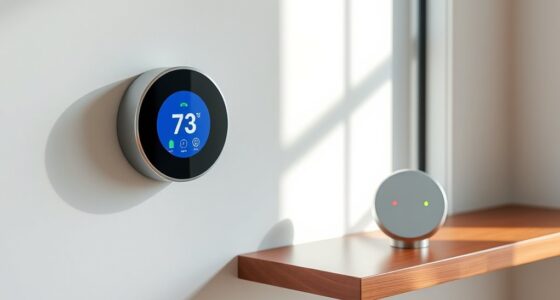
A smart thermostat for home connects to a home’s heating and cooling system and adds controls such as schedules, app access, or occupancy features. This guide explains what those features actually do, how to check compatibility before you buy, and when sensors, professional installation, or a utility program make sense.
You’ll also see why a lower bill is possible but never automatic. Think of the thermostat like a kitchen timer: it can help you manage when something runs, but the result still depends on what you set and what is happening around it. A few careful checks can save you from buying a device that cannot control your system.
Match the thermostat to your exact HVAC type and wiring, including any C-wire requirement.
Treat energy savings as dependent on your schedule, climate, insulation, equipment, and energy rates.
Use room sensors to respond to temperature differences, while remembering that they may not control rooms independently.
Compare the full cost, including adapters, sensors, installation, subscriptions, and any rebate conditions.
Review privacy controls and offline behavior, and get qualified help when wiring or system connections are unclear.
What a Smart Thermostat Can Actually Do for Your Home
A smart thermostat for home connects to your heating and cooling system so you can change temperatures at the thermostat and, on many models, through an app or voice assistant. Some add schedules, occupancy sensing, geofencing, or learning features that adjust the temperature around your routines. The exact controls vary by model and HVAC equipment.
Imagine leaving for work on a cold Tuesday. A schedule can lower the heat while the house is empty and bring it back up before you return. With app control, you can also change the setting if your plans shift. That is useful convenience, but it is not the same as the thermostat knowing every room is comfortable.
Many smart thermostats can connect to a home Wi-Fi network and share data with an app. Some features may need location access, extra sensors, an account, or a paid subscription. A model that works with one voice assistant or smart-home platform may not support every feature on another; check the manufacturer’s current compatibility details before purchase.
When comparing smart thermostats for, say, a small flat and a two-story house, the same feature can have different value. Remote control may matter most when you travel, while room sensors may help when upstairs bedrooms run warmer than the living room. If your current schedule already matches your routine, a simpler thermostat may do the job.
Products Worth Considering

Levoit Core 600S-P Smart Air Purifier for Large Rooms

Samsung 43-Inch M70H Series 4K Mini LED Smart TV (2026)

Hisense E6SR Series 55-Inch 4K UHD Hi-QLED Roku Smart TV
As an affiliate, we earn on qualifying purchases.
Check Your HVAC System Before You Choose a Model
A thermostat must match the heating and cooling system it will control, as well as the wiring at the wall. Check whether your home uses a furnace and air conditioner, heat pump, boiler, electric baseboard heat, or another setup, then compare that information with the model’s compatibility guide. A thermostat designed for one system may not support another.
Here is a common surprise: a homeowner sees familiar wire labels, buys a popular model, and discovers that the system uses a heat pump or multiple heating stages the device does not support. A C-wire, which can provide continuous power, is required by some thermostats. Other models work without one or support a compatible adapter. Read the requirements for the exact thermostat and system, not just a general product description.
Before you order, write down your system type, thermostat model, and visible wire labels. Compare all three against the manufacturer’s compatibility checker. A smart thermostat connects to a home’s control wiring, so a mismatch can prevent basic operation or leave certain functions unavailable.
If labels are unclear or the setup involves a heat pump, boiler, line-voltage heating, or multiple zones, ask an HVAC professional to identify the system and wiring. For straightforward compatible systems, many people can follow the manufacturer’s installation guide themselves. If you do, follow its safety steps, including switching off power to the HVAC equipment before handling wires. Stop and get qualified help if you cannot identify a connection with confidence.
What Smart Thermostats Can—and Can’t—Save on Energy
A smart thermostat can reduce heating or cooling demand when its schedule or temperature setbacks reduce how long the system runs. It cannot promise a particular bill reduction: the result depends on climate, insulation, energy prices, equipment, and settings. Treat savings claims as a reason to investigate, not a guaranteed return on the device.
For example, someone who heats an empty home to the same temperature all day may be able to lower demand by using a setback while at work. Someone already using a careful schedule may have less room to change. A drafty house can also lose heat quickly, which affects comfort and energy use regardless of how smart the thermostat is.
Think of a setback like turning down a tap when you leave the sink: it can reduce what you use while you are away, but the result depends on how much was flowing in the first place and how long you leave it down. The right setting depends on your equipment and comfort. A heat pump, for instance, may behave differently from a conventional furnace when recovering from a large temperature change, so follow the equipment and thermostat guidance rather than assuming one schedule fits every home.
Energy reports can help you notice patterns, but they do not prove that the thermostat caused a bill change. Compare similar billing periods where possible, and account for weather and energy rates. Start with a modest schedule change, then see whether your home stays comfortable and the system responds as expected.
Use Room Sensors to Tackle Hot and Cold Spots
A thermostat reads conditions near its installation point, so it may not reflect how a distant bedroom feels. Optional room sensors can give some models temperature or occupancy readings from other parts of the home, helping prioritize a room at certain times. They can improve comfort in some layouts, but they do not necessarily control each room independently.
Say the thermostat sits in a sunny hallway and the nursery at the back of the house stays cool. A compatible sensor in the nursery might let the system use that room’s temperature when deciding whether to run heating at bedtime. That could make the nursery more comfortable, while the hallway gets warmer than before. The tradeoff depends on how the system distributes heat and which rooms matter most to you.
Before spending more, note when and where temperatures feel wrong. If the living room is pleasant all day but bedrooms are uncomfortable only at night, a sensor schedule may help. If one room is always much colder, a closed vent, draft, insulation issue, or system-balancing problem may be involved; a sensor may show the difference without correcting its cause.
Sensor cost, battery changes, model support, and subscription terms vary. Check whether the thermostat includes sensors, how many it supports, and whether the app lets you prioritize rooms by time. For a household that rarely uses its upstairs guest room, buying several sensors may add expense without much benefit.
Choose Features You’ll Use and Protect Your Data
The best thermostat is the one whose features fit your routines, platform, and comfort needs. Compare app control, schedules, occupancy sensing, geofencing, voice support, room sensors, and subscriptions with the way you actually live. More automation can help, but every connected feature can add setup steps or data-sharing choices.
A household with regular work hours may get plenty of value from a weekly schedule. A person with changing shifts might prefer simple app control over an automatic learning routine that keeps guessing wrong. If you already use a voice assistant, check the exact thermostat model’s current support list; broad platform compatibility does not always mean every function works the same way.
Smart-home standards such as Matter may improve interoperability for some products, but they do not guarantee that every feature is available across every app or platform. Check which functions you want and whether they require an extra account, hub, location access, or subscription. Product features and platform support change, so verify current details with the manufacturer before buying.
Connected thermostats may collect temperature, schedule, occupancy, or location data. Review privacy settings and data-sharing policies, use a strong account password, turn on multifactor authentication if offered, and install software updates. If you rent, ask your landlord before replacing the thermostat and keep the original so you can restore it when you move.
Install It Safely and Check the Real Cost
Installing a compatible thermostat may be a manageable DIY task when the wiring is clear and the manufacturer’s instructions match your HVAC system. The total cost can include the device, an adapter or sensors, professional installation, and any subscription fees. A utility rebate may help, but availability and requirements depend on your location and can change.
For example, if you find a model on sale but it needs a separate room sensor and paid service for a feature you want, its real cost may differ from the listing price. Check the full equipment list and terms before ordering. Ask your local utility whether a rebate is available, which models qualify, and whether joining a demand-response program allows the provider to adjust your temperature during peak demand.
If you install the thermostat yourself, read the exact wiring guide first and switch off power to the HVAC equipment before handling wires. Take a clear photo of the existing connections and follow the manufacturer’s labeling instructions. Do not guess when a wire is unlabeled, the system does not match the diagram, or the equipment type is uncertain. A licensed or qualified HVAC professional can confirm the setup and install the thermostat safely.
Most connected models continue to operate at the device if internet access drops, but remote app control, cloud-based features, or updates may stop until service returns. Check the model’s offline behavior before buying, especially if you rely on remote access. A basic local control you can use without Wi-Fi may matter more than a feature-rich app in a home with unreliable internet.
Frequently Asked Questions
Will a smart thermostat work with my heating and cooling system?
It depends on your system type and wiring. Check the manufacturer’s compatibility guide for your furnace and air conditioner, heat pump, boiler, baseboard heat, or other setup, and confirm any wire requirements before buying.
Do I need a C-wire?
Some thermostats need a C-wire for continuous power; others work without one or support a compatible adapter. Check the requirements for the exact thermostat and HVAC system rather than relying on a general rule.
Will a smart thermostat lower my energy bill?
It may help if schedules or temperature setbacks reduce heating or cooling when the home is empty or people are asleep. There is no universal savings figure: results depend on climate, insulation, energy rates, equipment, and how you use the settings.
Can I install a smart thermostat myself?
Often, if the model is compatible and the wiring is straightforward. Follow the manufacturer’s instructions and switch off power to the HVAC equipment before handling wires; get qualified help if the wiring or system connections are unclear.
Does a smart thermostat work without Wi-Fi?
Many models still allow temperature control at the thermostat when the internet is down. App access, remote control, updates, and some cloud-based features may stop, so check the model’s offline behavior before buying.
Are room sensors worth the extra cost?
They can help a thermostat respond to temperatures or occupancy in rooms beyond its own location, such as a bedroom that runs cold at night. They add cost and may prioritize a room without providing separate heating or cooling control for it.
Conclusion
Before you buy, identify your HVAC system and wiring, then choose features that solve a real problem in your home. A thermostat can make schedules and temperature changes easier, but comfort and savings still depend on the equipment, the building, and the settings you choose.
Start with compatibility, keep installation safe, and make one small schedule change at a time. The best upgrade is the one that leaves your home comfortable without making you guess what is happening behind the wall.