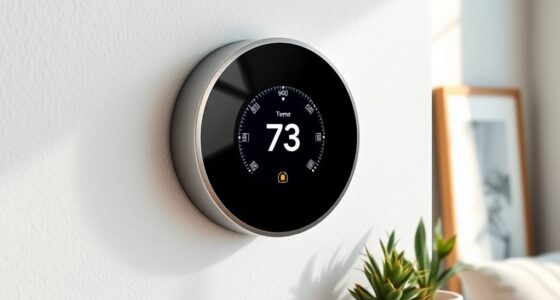
Choosing a smart thermostat is less about putting your heating on an app and more about deciding how much control you want over comfort across your home. The ecobee Smart Thermostat Premium and Google Nest Learning Thermostat (4th gen) both let you adjust temperatures remotely, build schedules, and connect heating and cooling to a smart home. Their central difference is how they handle everyday comfort: Ecobee supports separate room sensors and more hands-on scheduling, while Nest learns routines and adjusts its schedule automatically.

Get home appliances delivered free with Prime
- Fast, free delivery on millions of items
- Prime Video, Amazon Music and more included
- Member-only deals all year

Sensi ST55 Smart Wi-Fi Thermostat
- ✔ Model: ST55
- ✔ Compatible systems: Air conditioner, boiler, furnace, and heat pump
- ✔ Smart home compatibility: Amazon Alexa, Apple HomeKit, Google Assistant, SmartThings, and Vera
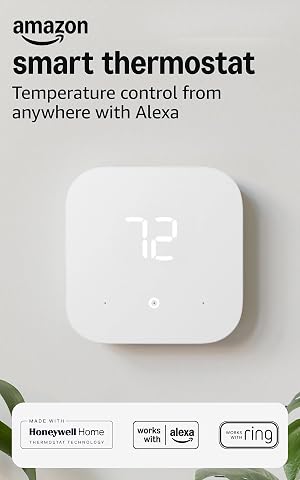
Amazon Smart Thermostat with Alexa and Ring Compatibility
- ✔ Model: S6ED3R
- ✔ HVAC compatibility: Most 24V conventional forced-air, heat pump, and radiant boiler systems
- ✔ Power requirement: C-wire or separately sold power adapter kit

Honeywell Home RTH9585WF1004 Wi-Fi Smart Color Thermostat
- ✔ Model: RTH9585WF1004
- ✔ Compatible systems: Forced-air gas, oil, or electric; hot water; steam; and heat pumps with electric backup
- ✔ Wiring: C-wire required
That difference matters in homes where temperatures vary from room to room, or where people want the thermostat to adapt with little upkeep. Ecobee is the stronger fit for households that want sensor-based comfort and broad system controls. Nest suits people who prefer automatic scheduling and already use Google Home. Compatibility with your heating and cooling equipment should come first: neither thermostat is a safe buy until you confirm it supports your system.
At a Glance
| Criteria | ecobee Smart Thermostat Premium | Google Nest Learning Thermostat (4th gen) | Winner |
|---|---|---|---|
| Room comfort and sensors | Remote room sensors included; can prioritize occupied rooms | Room sensing through compatible Nest Temperature Sensors, generally sold separately | A |
| Scheduling and automation | Custom schedules, occupancy routines, and sensor-based adjustments | Learns routines over time and can adjust its schedule automatically | B |
| Smart home integration | Works with major platforms, including Apple Home, Google Home, and Alexa | Strong Google Home integration; works with Alexa, with platform support varying by feature | Depends |
| Heating system compatibility | Supports many common systems; some installations need a Power Extender Kit | Supports many common systems; check wiring and system type before purchase | Depends |
| On-device controls | Touchscreen with temperature, settings, and air-quality information | Large touchscreen with a proximity-aware display and intuitive controls | Tie |
| Extra features | Built-in air-quality monitor, occupancy sensing, and Alexa voice features | Built-in presence and temperature sensing; no air-quality monitor | A |
Sensi ST55 Smart Wi-Fi Thermostat
The Sensi ST55 is our best overall choice because it combines a familiar wall thermostat format with unusually broad smart home support. Alongside Alexa, it works with Apple HomeKit, Google Assistant, SmartThings, and Vera. That breadth matters in a household where phones, speakers, or routines do not all live in one ecosystem; the Amazon model is more focused on Alexa and Ring, while Honeywell lists Alexa and Google compatibility.Setup is another point in Sensi’s favor. Its app-guided installation includes a built-in level, and the company says a common wire is not required for most installations. That can make it a more approachable option than the Amazon or Honeywell models, both of which specify a C-wire or separate adapter requirement. Still, “most” is not “all”: some homes will need a common wire, and the available details do not promise compatibility with every HVAC configuration.Once installed, scheduling, remote access, usage reports, alerts, and maintenance reminders cover the practical needs of a connected thermostat without making an elaborate touchscreen the centerpiece. The tradeoff is a more traditional LED screen and button-oriented design. Buyers who want a large, customizable display should look at the Honeywell; people who want Alexa routine-driven temperature changes may prefer Amazon. For mixed-platform households seeking flexible control and a potentially simpler wiring path, Sensi is the most balanced recommendation.
Pros:
- Works with Alexa, Apple HomeKit, Google Assistant, SmartThings, and Vera.
- App-guided DIY installation includes a built-in level.
- A common wire is not required in most installations.
- Scheduling, remote access, usage reports, alerts, and maintenance reminders support everyday home management.
Cons:
- Some installations still require a common wire.
- Compatibility is not specified for every HVAC system.
- Its LED display is less visually customizable than Honeywell’s color touchscreen.
Best for: Households that use more than one major smart home platform and want guided DIY installation with a traditional thermostat layout.
Not ideal for: Buyers who want a large color touchscreen, or anyone whose HVAC wiring and system type have not been confirmed as compatible.
Bottom line: Choose the Sensi ST55 for the strongest combination of broad smart home support, guided setup, and useful day-to-day controls.
“Choose the Sensi ST55 for the strongest combination of broad smart home support, guided setup, and useful day-to-day controls.”
Amazon Smart Thermostat with Alexa and Ring Compatibility
For a home already organized around Alexa, Amazon’s Smart Thermostat puts automation at the center of the experience. It can adjust temperatures in response to routines or presence, alongside conventional schedules, vacation mode, and emergency heat mode. Those options make it more automation-oriented than the Sensi ST55, whose listed strengths emphasize cross-platform access, reports, and alerts. Ring app compatibility also gives this model a closer connection to Amazon’s home ecosystem.Control is not limited to voice. The thermostat has three touch buttons, and owners can use the Alexa app; voice commands require a separate Alexa-enabled device. That distinction matters if the thermostat is the only smart device in the room. Its humidity sensing and energy dashboard add useful context for managing a home, while the Honeywell model offers a more prominent visual interface with a color touchscreen, weather forecasts, and equipment alerts.The main practical hurdle is installation: Amazon requires a C-wire or a separately sold power adapter kit. Its Wi-Fi works on 2.4 GHz only, so homes relying on 5 GHz connectivity should account for that before buying. Like the other two picks, it is not intended for 110–240V electric baseboard systems. This is the right choice when Alexa routines and presence-based control are the priority, but Sensi is a better fit for broad platform flexibility and a potentially less demanding wiring setup.
Pros:
- Can adjust temperatures based on routines or presence.
- Offers schedules, vacation mode, emergency heat mode, and indoor humidity sensing.
- Provides app, touch-button, and compatible Alexa voice control.
- Compatible with the Alexa app and Ring app.
Cons:
- Requires a C-wire or separately sold power adapter kit.
- Voice control requires a separate Alexa-enabled device.
- Supports 2.4 GHz Wi-Fi only and does not work with 110–240V baseboard systems.
Best for: Alexa households that want schedules, routines, and presence-based temperature adjustments in one connected thermostat.
Not ideal for: Homes without a C-wire or willingness to buy the adapter, people who need 5 GHz-only Wi-Fi, or electric baseboard users.
Bottom line: Pick Amazon’s thermostat when Alexa automation is central to your home and your wiring and Wi-Fi meet its requirements.
“Pick Amazon’s thermostat when Alexa automation is central to your home and your wiring and Wi-Fi meet its requirements.”
Honeywell Home RTH9585WF1004 Wi-Fi Smart Color Thermostat
The Honeywell Home RTH9585WF1004 is the visual-control pick in this group. Its customizable color touchscreen makes settings and schedules more visible at the wall than on the Sensi ST55’s LED display or Amazon’s three touch buttons. For households that regularly make adjustments in person, that larger interface can make the thermostat feel like a usable control panel rather than a device managed mostly by phone.It also brings information into that screen-based experience: flexible scheduling, energy reports, weather forecasts, and maintenance alerts. Remote control is available through a mobile app, Alexa, and Google Home. Compared with Amazon, Honeywell includes Google Home compatibility and more explicit on-device display features; compared with Sensi, it offers the richer screen but supports fewer listed smart home platforms.That interface comes with a firm installation condition: a C-wire is required, and heating-only oil furnace systems also need one. The model supports compatible forced-air, hot water, steam, and heat-pump systems with electric backup, but it does not work with electric baseboard heat. Those constraints make it less forgiving than Sensi for uncertain wiring situations. Choose it when at-a-glance touchscreen control and built-in household information matter more than broad ecosystem support or a potentially easier wiring path.
Pros:
- Customizable color touchscreen provides a clear on-wall control surface.
- Supports flexible schedules plus temporary, permanent, and vacation holds.
- Offers energy reports, weather forecasts, and equipment maintenance alerts.
- Works with a mobile app, Amazon Alexa, and Google Home.
Cons:
- Requires a C-wire; heating-only oil furnace systems also require one.
- Not compatible with 120–240V electric baseboard heat.
- Its listed smart home support is narrower than Sensi’s.
Best for: People who prefer making adjustments at the wall and want a customizable touchscreen with energy, weather, and maintenance information.
Not ideal for: Homes without a C-wire, electric baseboard systems, or buyers who prioritize broad smart home platform compatibility.
Bottom line: Choose Honeywell Home when its color touchscreen and on-device information justify the C-wire requirement and narrower system fit.
“Choose Honeywell Home when its color touchscreen and on-device information justify the C-wire requirement and narrower system fit.”
As an Amazon Associate we earn from qualifying purchases.
Key Differences
The most practical distinction is room-level comfort. Ecobee Premium includes remote sensors, so the thermostat can account for temperatures and occupancy in other parts of the home. That helps when a bedroom runs cold or a sunny room heats up faster than the hallway where the thermostat sits. Nest can also use remote temperature sensors, but buying them separately adds cost. Neither setup independently controls separate heating zones unless the home has compatible zoning equipment.
Nest has the clearer advantage for people who want a thermostat to learn from their routine and build its own schedule. Ecobee gives users more direct control over schedules, comfort settings, and sensor participation. Smart home preference can also settle the choice: Ecobee supports a wider mix of ecosystems, while Nest is the more natural match for Google Home households. Installation and equipment compatibility remain model- and home-specific, so check those details before weighing the convenience features.
Detailed Comparison
Ecobee wins by a moderate margin for buyers who want room sensing right away: a remote sensor is included, and schedules can use sensor readings to favor occupied spaces. That can reduce the familiar problem of a thermostat making the whole house follow the temperature in one hallway. Nest supports additional temperature sensors, but they are typically an extra purchase. For a small, even-temperature home, the difference may be minor; for a home with uneven rooms, Ecobee’s included sensor has more immediate value.
Scheduling and automation (Google Nest Learning Thermostat (4th gen) wins — moderate)
Nest wins for low-effort scheduling. It can learn from adjustments and create a routine, which is useful for households with consistent habits and owners who would rather not build a detailed weekly schedule. Ecobee offers flexible schedules and occupancy-based comfort adjustments, but it rewards more setup and deliberate configuration. The gap is moderate: Nest saves some routine maintenance, while Ecobee gives users more control over exactly how comfort settings behave.
Ecobee wins for households spread across platforms, with support for Apple Home, Google Home, and Alexa. Nest is especially convenient within Google Home and also works with Alexa, though the available controls can differ by platform. If the rest of the home already runs on Google devices, Nest’s ecosystem fit may matter more than Ecobee’s broader reach. For a mixed-platform household, Ecobee is the more flexible pick; the overall gap is moderate.
Heating system compatibility (major difference)
There is no universal winner. Both thermostats support many common heating and cooling setups, but compatibility depends on wiring, voltage, and equipment type. Some Ecobee installations need its Power Extender Kit when a C wire is absent; Nest also has wiring and system requirements that must be checked for the specific installation. The practical consequence is significant: verify the manufacturer’s compatibility guidance for your exact equipment before buying, and factor in professional installation if the wiring or system is unfamiliar.
On-device controls (minor difference)
This is close to a tie. Both provide a color touchscreen for changing settings at the thermostat as well as app-based control. Nest’s large, proximity-aware display makes basic adjustments feel straightforward. Ecobee shows useful information, including air-quality readings, on its screen. Most owners will use the app or automation more often than the display, so the difference is minor and comes down to which interface feels clearer to you.
Ecobee wins on built-in extras. Premium includes an air-quality monitor and Alexa voice features, alongside occupancy sensing. Nest has presence sensing and a display designed to respond as someone approaches, but it does not include an air-quality monitor. These extras are a moderate advantage only if you will use them: buyers who already own a separate speaker or air monitor may gain little from Ecobee’s additions.
Pros:
- Remote room sensor included for more representative comfort
- Flexible scheduling and occupancy-based settings
- Broad compatibility with Apple Home, Google Home, and Alexa
- Air-quality monitoring and built-in Alexa features
Cons:
- More options can mean more setup and adjustment
- Some homes without a C wire may need the included Power Extender Kit
- Extra features add limited value if you will not use them
Google Nest Learning Thermostat (4th gen): Pros and Cons
Pros:
- Learns routines to build an automatic schedule
- Natural fit for Google Home households
- Clear on-device controls and presence-aware display
- Can use additional temperature sensors
Cons:
- Remote sensors generally cost extra
- Less compelling for homes built around Apple Home
- No built-in air-quality monitor
Who Should Choose What
Choose ecobee Smart Thermostat Premium if:
- You want room-level temperature readings without buying a sensor separately.
- Your home uses a mix of Apple Home, Google Home, or Alexa devices.
- You want air-quality information or built-in Alexa features alongside temperature control.
- You prefer to set and adjust schedules yourself.
Choose Google Nest Learning Thermostat (4th gen) if:
- You want the thermostat to learn routines and reduce schedule setup.
- Your household already relies on Google Home.
- You value simple automatic behavior more than included room sensors or air-quality features.
- Your temperature stays reasonably consistent across the rooms you use.
Skip both if: Skip both until you confirm compatibility if your home has line-voltage heating, unusual equipment, or wiring that does not match the manufacturers’ requirements. A compatible thermostat designed for that system may be a better fit.
Value for Money
Ecobee Premium’s higher feature count is worth paying for when its included room sensor, wider smart home support, or air-quality features replace purchases or solve a real comfort problem. If you would otherwise buy a Nest Temperature Sensor, include that cost in the comparison; Ecobee may offer better value for multi-room use. Nest is the better value for a Google-centered household that wants learned scheduling and does not need the extra sensor or air monitor. Paying for either model’s premium features makes little sense if a simpler compatible thermostat already covers your needs.
Final Verdict
For most households that have uneven room temperatures or want flexibility across smart home platforms, choose the ecobee Smart Thermostat Premium. Its included remote sensor and broader integrations make the price easier to justify when those features will be used. Choose the Google Nest Learning Thermostat (4th gen) if automatic schedule learning is your priority and Google Home is already central to your home. The biggest deciding factor is whether you value hands-off schedule learning or included room-level control. Check equipment compatibility first; it can outweigh every feature comparison.
Frequently Asked Questions
Which smart thermostat is better for a home with rooms at different temperatures?
Ecobee Premium is the stronger starting point because it includes a remote room sensor and can use sensor readings in comfort settings. Nest can also support remote temperature sensors, but those generally cost extra. If the rooms are on separate heating zones, confirm the thermostat and zone controls are compatible; a sensor alone does not create separate zones.
Does the Nest Learning Thermostat need a room sensor?
No. It can control the system from its own built-in temperature and presence sensing. A compatible remote sensor can help when the thermostat’s location does not reflect the temperature in rooms that matter, but it adds to the total cost.
Is Ecobee worth paying more for?
It can be, if you will use the included room sensor, broader smart home support, or air-quality features. If your home is comfortable with one thermostat reading and you mainly want a learned schedule, Nest may deliver better value.
Can either thermostat work without a C wire?
Possibly, depending on the heating and cooling equipment and wiring. Ecobee includes a Power Extender Kit for some installations without a C wire, while Nest compatibility also depends on the system. Check each manufacturer’s compatibility guidance for your exact setup before purchase.