To manage multiple users on your smart thermostat, create individual accounts and set permission levels for each person, limiting access to sensitive settings if needed. Regularly update and review accounts to remove outdated users and grant temporary access to guests. Educate household members about system functions and privacy options to keep everyone comfortable and secure. If you want to understand how to optimize user management further, there’s more to discover below.
Key Takeaways
- Create separate user profiles with tailored permissions for each household member.
- Regularly review and update user accounts to reflect household changes.
- Assign specific access levels, such as full control or limited permissions, to manage privacy.
- Use temporary or guest access features for visitors or service technicians.
- Remove inactive or unnecessary accounts promptly to maintain security.

Managing multiple user accounts on a smart thermostat can seem intimidating at first, but it’s essential for households with several members. When you have different people living together, each person may want personalized control over the temperature and settings. To make this work smoothly, you’ll need to understand how to manage privacy settings and user access effectively. These features help guarantee everyone can enjoy comfort without compromising security or making unintentional changes.
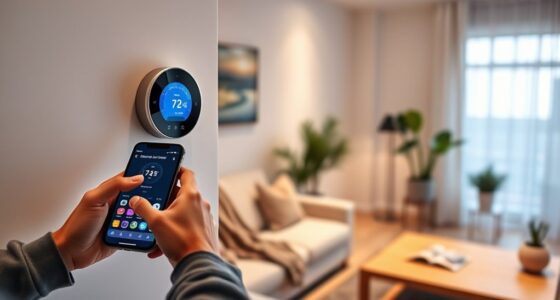
Start by familiarizing yourself with the user management options available on your thermostat. Most models allow you to create separate user accounts, each with specific permissions. You can assign access levels, such as full control or limited permissions, depending on what each household member needs. For example, children or guests might have restricted access, preventing them from changing critical settings. This way, you maintain control over the overall system while letting others adjust their preferred temperature within set boundaries.
Create user accounts with tailored permissions to balance control and personalization.
Next, focus on privacy settings. These are essential to guarantee personal preferences remain private, especially if your thermostat offers features like scheduling, energy reports, or custom modes. You can typically set privacy options that limit what information each user can see or modify. For example, you might restrict access to energy consumption data or prevent certain users from changing advanced settings. Adjusting these privacy settings helps you protect sensitive information and maintain a comfortable environment tailored to each user’s needs. Implementing privacy controls can further enhance user trust and security.
Regularly review and update user access privileges. As your household dynamics change—say, a new roommate moves in or someone moves out—you should modify user accounts accordingly. Removing outdated accounts prevents unauthorized access, while granting new users appropriate permissions keeps everyone comfortable and secure. Many smart thermostats also allow temporary access, which is useful when hosting guests or service technicians. You can set time-limited user access, ensuring they have control only for a specific period. Additionally, consider enabling multi-user authentication if your device supports it, to add an extra layer of security.
Another essential aspect is to educate everyone on how the system works. Make sure all users understand their access levels and the importance of respecting privacy settings. Clear communication reduces conflicts and helps everyone enjoy the benefits of a smart thermostat without issues. Also, regularly update your device’s firmware and security settings to protect against vulnerabilities. Keeping your system current guarantees that privacy and user access controls remain robust against potential threats. Additionally, understanding the contrast ratio of your thermostat’s display can improve visibility and ease of use, especially in varying lighting conditions.
Frequently Asked Questions
Can Users Have Different Temperature Preferences?
You might wonder if users can have different temperature preferences. The answer is yes; most smart thermostats allow individual temperature customization, giving each user control over their preferred settings. This feature helps maintain user privacy by keeping personal preferences separate. With multiple accounts, everyone can enjoy a comfortable environment tailored to their needs without affecting others, making your smart thermostat more convenient and respectful of individual preferences.
How Do I Delete a User Account?
Did you know that 65% of smart device users find managing accounts challenging? To delete a user account, access your thermostat’s settings, find the user list, and select the account you want to remove. You’ll see options for user account permissions and account recovery options. Confirm the deletion, and the account’s data is erased. This keeps your device secure and personalized to your preferences.
Is There a Way to Limit User Access?
You can implement user restriction and access control features on your smart thermostat to limit user access. Check the device settings for options to set PIN codes, passwords, or specific permissions for each user. This way, you regulate who can change temperature settings or access advanced features. By customizing user access, you ensure only authorized users make adjustments, enhancing security and maintaining desired comfort levels in your home.
Can Multiple Users Access the Thermostat Remotely?
Think of your smart thermostat as a shared garden; anyone with the right key can tend to it. Yes, multiple users can access it remotely, especially if you set up guest access or enable remote management features. This allows friends or family to adjust the temperature from anywhere, like tending to your garden from afar. Just make certain you enable secure login options to keep everything safe and under your control.
How Are User Activities and Changes Logged?
You can track user activities and changes through activity tracking and change history features. When someone adjusts the temperature or modifies settings, the thermostat records these actions, showing who made each change and when. This helps you monitor usage and troubleshoot issues. Typically, you access this information via the app or thermostat interface, giving you clear insight into all user activities and ensuring accountability across multiple users.
Conclusion
Managing multiple user accounts on your smart thermostat simplifies your household’s comfort, enhances energy efficiency, and guarantees personalized settings. It allows everyone to enjoy their preferred temperatures, access their schedules, and maintain control. By customizing profiles, you create a seamless experience, promote harmony, and save energy. Ultimately, managing multiple accounts empowers you to balance convenience, personalization, and efficiency—making your smart thermostat a true reflection of your household’s needs, now and in the future.