
TL;DR
Building your own AI workstation used to be cheaper, but recent component shortages and price hikes now make prebuilt systems equally or more cost-effective. Your choice depends on how much time, control, and risk you’re willing to take.
Building your own AI workstation used to be the default for saving money and gaining control. Now, with chip shortages and skyrocketing component prices, that’s no longer the obvious choice to build yourself. The decision is shifting from cost alone to speed, risk, and customization.
If you’re eyeing a powerful rig for local AI work—whether training models or running inference—your options are clearer than ever. Should you pull the levers yourself, or trust a vendor to do it for you? Let’s break down what really matters in 2026.
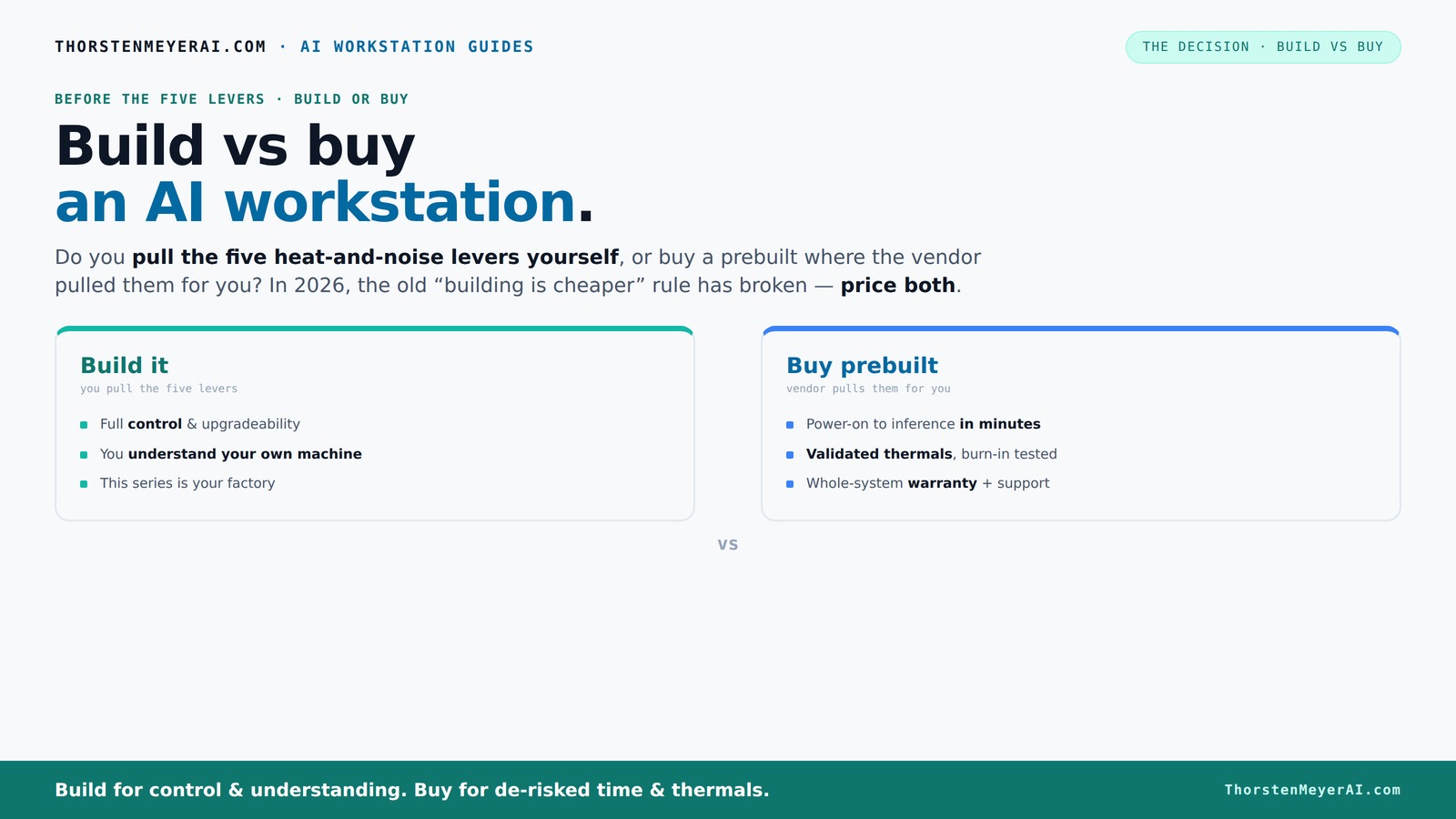
Build vs buy
an AI workstation.
The real question behind this whole series: do you pull the five heat-and-noise levers yourself, or buy a prebuilt where the vendor pulled them for you? And in 2026, the old “building is cheaper” rule has broken. Match your situation in Part 3.
Key Takeaways
- In 2026, component shortages and bulk buying often make prebuilt AI workstations as affordable or cheaper than DIY builds.
- Prebuilts save time, reduce risk, and come with validated thermals and warranties—ideal for quick deployment and reliability.
- Building your own system offers total control over components, cooling, and upgrades, but demands time, expertise, and effort.
- Hybrid strategies—buy the base system, upgrade key parts—offer a flexible middle ground.
- Always price out your configuration both ways before deciding—don’t assume DIY is cheaper anymore.
high performance AI workstation prebuilt
As an affiliate, we earn on qualifying purchases.
As an affiliate, we earn on qualifying purchases.
Why Building Your Own AI Workstation Is No Longer Cheaper in 2026
Building your own system used to save you thousands. Now, component shortages and price spikes mean that a DIY rig often costs as much as, or more than, prebuilt options.
For example, a DIY build with a high-end GPU and DDR5 RAM that used to cost around $1,200 now easily hits $1,500–$1,700. Meanwhile, prebuilt vendors have locked in bulk discounts, offering systems at similar or even lower prices.
According to recent reports, the cost of GPUs alone has doubled since 2022, making it harder for DIY builders to beat prebuilt prices. This shift means that the traditional advantage of building—cost savings—is diminishing. To explore whether a prebuilt might be better for you, check out build vs buy options. Instead, it emphasizes the importance of considering time, risk, and the ability to troubleshoot. You might spend extra hours sourcing, testing, and assembling parts, which could outweigh the initial savings. Learn more about the build vs buy decision. The tradeoff is whether you value control and learning more than convenience and reliability. Ultimately, this economic change pushes many toward prebuilt options, especially when factoring in the hidden costs of delays or incorrect parts.

CORSAIR Frame 4000D Vault Series Modular Mid-Tower ATX PC Case – High Airflow, InfiniRail Fan Mounting System, Modular Customization, Spacious Interior, GPU Anti-Sag – Galaxy
Limited Edition Vault Series - The FRAME 4000D enters the Vault. This inaugural release showcases the stunning Galaxy...
As an affiliate, we earn on qualifying purchases.
As an affiliate, we earn on qualifying purchases.
The Five Levers of Heat and Noise Control—And Who Pulls Them
Managing heat and noise is critical for AI workstations—especially with multi-GPU rigs. The five levers are undervolting GPUs, matching coolers, optimizing airflow, tuning fans, and strategic placement. When you buy a prebuilt, the vendor pulls these levers for you—testing, tuning, and validating thermal performance before shipping.
When you buy a prebuilt, the vendor pulls these levers for you—testing, tuning, and validating thermal performance before shipping. Many systems now come with water-cooling and custom fan curves that cut noise by up to 30%.
Building your own means you’re responsible for every adjustment. You choose a quiet GPU, like the quiet GPU options, and set up airflow and cooling yourself. This process requires a good understanding of thermal dynamics—knowing how to balance airflow, fan speeds, and cooling solutions to prevent overheating while minimizing noise. For more tips, see how to reduce heat and noise in your system. The tradeoff here is between the effort involved and the potential for a quieter, more efficient system. Properly tuned, DIY cooling can outperform stock prebuilt thermal solutions, but it demands patience, testing, and technical skill. Conversely, prebuilt systems that come with optimized cooling solutions save you the guesswork and ensure consistent thermal performance, which is crucial for maintaining GPU longevity and stable operation during intensive workloads.

GMKtec EVO-X2 AI Mini PC Ryzen Al Max+ 395 (up to 5.1GHz) Mini Gaming Computers, 128GB LPDDR5X 8000MHz (16GB*8) 2TB PCIe 4.0 SSD, Quad Screen 8K Display, WiFi 7 & USB4, SD Card Reader 4.0
EVOLUTION RYZEN AI MAX+ 395 MINI PC - GMKtec EVO-X2 is the next evolution in AI mini PC...
As an affiliate, we earn on qualifying purchases.
As an affiliate, we earn on qualifying purchases.
Comparison Table: Build vs Buy a Prebuilt AI Workstation
| Feature | Build Your Own | Buy a Prebuilt |
|---|---|---|
| Cost | Often higher due to shortages; you source all parts, and uncertainties can lead to unexpected expenses | Usually comparable or lower, thanks to bulk discounts and vendor negotiations, which can buffer against component shortages |
| Time to Deploy | Weeks to months, depending on sourcing, assembly, and testing—delays can be unpredictable | Typically a few weeks or less, with ready-to-run systems that minimize waiting time |
| Control & Customization | Full control over every component, cooling, and layout—ideal for tailored performance and learning experience | Limited to vendor options, but these are often validated for thermals and reliability, offering a balance between control and convenience |
| Support & Warranty | No support; you troubleshoot and repair—this can be empowering but also time-consuming and frustrating | Includes warranty, support, and burn-in testing, reducing downtime and providing peace of mind |
| Performance Tuning | Requires effort; you tune for your workload, which can optimize performance but involves trial and error | Pre-optimized and validated, offering reliable performance out of the box |
| Upgrade Path | Easy to upgrade individual components—good for future-proofing and adapting to evolving workloads | Limited by the design—upgrades depend on vendor support and compatibility |

GMKtec K17 AI Mini PC, Intel Core Ultra 5 226V (Up to 4.5GHz), 16GB LPDDR5X 8533MT/s, 1TB PCIe 4.0 SSD, 97 Tops AI, Intel Arc 130V, Dual M.2 (Gen5+Gen4) Up to 16TB, USB4, 8K Triple Display, WiFi 6E
97 TOPS AI SUPERCHARGED PERFORMANCE – BUILT FOR THE AI ERA --- Powered by the next-gen Intel Core...
As an affiliate, we earn on qualifying purchases.
As an affiliate, we earn on qualifying purchases.
When Building Your Own System Makes Sense
If you’re a hobbyist, student, or tech enthusiast, building your own system offers unmatched control. You get to pick every component—down to the case fans—and learn how everything works. This process can deepen your understanding of hardware performance, thermal management, and system optimization, which can be valuable for future upgrades or troubleshooting.
For example, if you enjoy tuning GPUs or customizing airflow, building can be a rewarding project that enhances your technical skills. Plus, you can tailor your machine precisely for your workload, whether it’s inference or training, optimizing for power efficiency, noise levels, or specific performance metrics. The tradeoff is the time and effort involved, which might be significant if you’re new to hardware assembly. However, the knowledge gained and the satisfaction of creating a bespoke system often outweigh the initial investment. For those willing to learn and invest time, building can also be more cost-effective if you source parts carefully, avoiding unnecessary expenses. Check out the detailed guides on reducing heat and noise to get started and understand the nuances of thermal management and component selection.
Why Buying a Prebuilt AI Workstation Is the Smart Play for Many
If speed, support, and reliability matter more than total control, a prebuilt is your best option. Vendors like Lambda and Puget validate their systems thoroughly, ensuring they won’t throttle during long runs. This validation process minimizes the risk of hardware incompatibility or thermal issues that could compromise your workload or damage components.
Imagine launching a deep learning model and knowing everything’s tested—no surprises. Many systems now come with quiet GPUs and optimized cooling, which are designed to handle sustained workloads without overheating or excessive noise. This reliability means you can focus on your AI tasks rather than troubleshooting hardware issues or thermal throttling, which can be costly in terms of time and productivity. For enterprise users or those handling sensitive data, the added support and warranty reduce risks, making prebuilt systems a safer and more predictable choice. The ability to deploy quickly and depend on manufacturer validation is especially valuable in professional environments where downtime or hardware failure can be costly.
The Hybrid Approach: Buy the Base, Build the Differentiator
Many organizations now opt for a hybrid strategy: buy a solid base system and upgrade key components for their specific needs. This strikes a balance—fast deployment plus tailored performance. This approach is appealing because it reduces the time and effort required to assemble a fully customized system while still allowing for meaningful upgrades that improve performance or thermal management.
For example, you might buy a prebuilt with a good CPU and GPU, then swap in a more advanced cooler or faster SSD. This method lets you customize thermal solutions, storage speed, or even aesthetic elements without starting from scratch. It’s particularly useful when certain components are hard to find or expensive, and upgrading a few parts is more feasible than building an entirely new system. The flexibility to adapt as your workload evolves means you can incrementally improve your workstation without significant downtime or investment, making it a practical middle ground. Check out GPU undervolting tips for better thermal management and performance tuning in hybrid setups.
Final Decision: Speed, Cost, Control—What Matters Most?
Your choice hinges on what you value most. Need quick deployment, support, and proven reliability? Prebuilt wins because it minimizes setup time and provides peace of mind. Want maximum control, customization, or an engaging project? Building might be better, especially if you enjoy hardware tinkering and learning.
Remember, in 2026, the cost gap has narrowed—and sometimes flipped—so always compare prices for your specific configuration. The decision should also consider your long-term goals: whether you prioritize immediate productivity or gaining in-depth hardware knowledge. The tradeoffs involve time, effort, and potential risks versus convenience and guaranteed performance. The best system aligns with your workload, skills, and timeline, ensuring you get your AI projects off the ground with minimal hassle or maximum control.
Frequently Asked Questions
Is it really cheaper to build my own AI workstation in 2026?
Not always. Thanks to component shortages and bulk discounts, prebuilt systems often match or beat DIY prices for high-end configs. Always compare specific components and total costs before buying or building.
How much performance do I lose with a prebuilt versus a custom build?
Most prebuilt systems are thoroughly tested and optimized, so performance loss is minimal—often less than 5%. The main difference is in thermal tuning and cooling, which affects sustained workload stability.
Can I upgrade a prebuilt system later?
It depends on the design. Some prebuilt workstations support easy upgrades—adding RAM, swapping GPUs—while others are more locked in. Check the vendor’s upgrade policy before purchasing.
Is a prebuilt workstation worth it for a small team or solo creator?
Absolutely. It saves time, reduces setup hassle, and comes with support. For solo projects or small teams, the quick deployment and support often outweigh the cost savings of building yourself.
What hidden costs should I watch for with DIY builds?
Expect to spend extra on troubleshooting, thermal management, and potential future upgrades. Plus, your time and effort are costs you might not initially consider.
Conclusion
In the end, your decision boils down to what you value most: speed and support or control and customization. With 2026’s market dynamics, most users find that a prebuilt AI workstation provides a smarter, faster route to productivity.
Think of it as choosing between a ready-to-go race car and building your own from scratch. Both have their charm, but in today’s landscape, the ready option often wins for sheer convenience—and peace of mind.